simple-ats-resume-template — Traditional ATS Resume Jo Har Parser Pass Kare
Harsh truth: design-heavy resume ATS me fail ho jata hai. Yahan aapko milega ek proven simple-ats-resume-template approach jo Taleo, Workday, Greenhouse aur Lever sab me clean parse hota hai — bina table, bina text box, sirf single-column clarity.

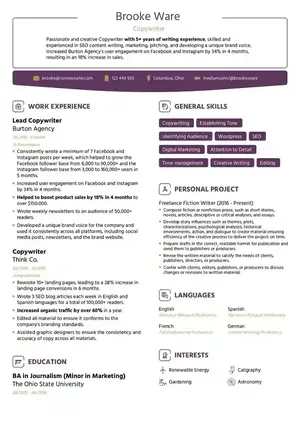
100 Words Me Jawab — simple-ats-resume-template kya hai?
simple-ats-resume-template ek single-column, plain-formatting resume hai jo ATS ko bina confuse kiye aapka data extract karne deta hai — no tables, no text boxes, no header/footer contact, no graphics. Traditional ATS version me standard headings, linear dates (MMM YYYY), bullet points aur searchable keywords hote hain. ResumeEra.xyz par aap is simple-ats-resume-template ko 2 minute me bana sakte hain, AI keyword suggestions ke saath, aur free ATS score check kar sakte hain. Agar aap India me fresher ho ya experienced, naukri portal ya company ATS — yahi simplest format sabse zyada shortlist dilata hai.
ResumeEra Advantage — No login, no paywall
ResumeEra.xyz India ka free resume builder hai. Aap simple-ats-resume-template ko browser me hi edit kar sakte hain, AI se details extract kar sakte hain (PDF/DOCX/image upload), 100+ ATS-safe single-column templates me se pick kar sakte hain, aur PDF/DOCX me bina watermark ke download kar sakte hain. Mobile-friendly, Hinglish supported.
H2 • Foundation
What Is an ATS-Friendly Resume (And What It’s Not)
ATS-friendly ka matlab boring ya text-only nahi hai. Iska matlab hai machine-readable. ATS (Applicant Tracking System) aapke resume ko pehle ek parser se nikalta hai — fir recruiter ke liye fields me todta hai: Name, Email, Phone, Experience, Education, Skills, Dates.
simple-ats-resume-template isi parsing ko dhyaan me rakh kar bana hai. Ye ek traditional, clean layout hai: single column, standard fonts (Calibri, Garamond, Arial, Georgia), 11–12 pt body, clear headings, aur linear sections. Koi multi-column table, koi floating text box nahi. Har line left-aligned, har heading hierarchy me.
Log samajhte hain ATS ko design pasand nahi, isliye full blank resume banana chahiye — ye half-truth hai. Thoda visual hierarchy (bold headings, thin dividers, bullet points) chalega, par jab aap columns se text ko cut karte ho, icons ke andar skills chipka dete ho, ya contact ko header me daal dete ho, to parser data miss kar deta hai. Tab aapka perfect experience bhi searchable nahi rehta.
What it’s NOT — 3 Myths Busted
- Myth 1: Two-column = modern isliye ATS fail. Do column kabhi-kabhi parse ho jata hai, par order bigad jata hai. Left column ka text right column ke beech me ghus jata hai. simple-ats-resume-template purposely single-column rakhta hai taaki reading order 100% linear rahe.
- Myth 2: Color ya shade use karoge to ATS reject karega. Halka accent (jaise heading teal) chalega, par background image, colored text box ya icon-based rating (stars/dots) ATS nahi padhta. Keep color for humans, not for data.
- Myth 3: Funky headings creative lagti hain, ATS samajh lega. “My Odyssey” ya “Where I Shined” ko parser “Work Experience” nahi samjhega. Heading whitelist follow karna hi simple-ats-resume-template ka core rule hai.
ResumeEra par traditional ATS resume ka matlab hai: human ko bhi clean lage, machine ko bhi. Aap simple resume template-9 jaise minimal layouts se start kar sakte hain aur same logic se apna simple-ats-resume-template polish kar sakte hain.
H2 • Inside the Machine
How ATS Actually Parses and Ranks Your Resume
Socho ATS ek scanner + librarian hai. Pehle wo file ko text me todta hai (parsing), fir har chunk ko label karta hai (classification), fir job description ke keywords se match karke rank karta hai.
Step 1 — Text Extraction
Parser PDF/DOCX ko line-by-line padhta hai. Agar text image ke andar hai (scanned PDF) to OCR chahiye — warna blank niklega. Isliye ResumeEra scanned PDFs ko bhi AI OCR se extract karta hai, par best result hamesha digital DOCX/PDF (exported as text) se aata hai.
Step 2 — Field Mapping
System headings dhundta hai. “Experience”, “Education”, “Skills” jaise standard headings milte hi wo neeche ka content us field me daalta hai. Agar heading non-standard hai to wo content “Uncategorized” me chala jata hai — recruiter ke filter me show hi nahi hota.
Step 3 — Keyword & Context Scoring
Fir ATS JD ke hard skills, tools, certifications aur location ko aapke resume se match karta hai. Sirf keyword count nahi — context bhi dekhta hai. “Managed 5-member team using JIRA” ka weight “JIRA” ko list me chipkane se zyada hai, kyunki context me hai. simple-ats-resume-template me skills ko Experience bullets me bhi repeat karna isiliye important hai.
Step 4 — Normalization (Dates, Location, Contact)
Dates ko ATS MM/YYYY ya MMM YYYY me expect karta hai. “June 2022 – Present” sahi hai; “Jun’22 – till now” parse error de sakta hai. Location “Bengaluru, Karnataka” ya “Mumbai, MH” clear hona chahiye. Phone +91 format, email plain text me hona chahiye — na header me, na image me.
Pro Tip — Test kaise karein?
Apna DOCX ko plain Notepad me khol ke dekho ya ResumeEra ka free ATS score check chalao. Agar Notepad me text ka order bigda hua ya missing hai, to ATS bhi wahi dekhega. simple-ats-resume-template ka goal hai Notepad me bhi perfect linear output.
Competitors sirf “ATS scans keywords” bol ke chhod dete hain. Yahan aapne dekha ki parsing me heading, date, contact aur file type chaaro ka role hai — sabhi agle sections me actionable rules ban ke aayenge.
H2 • Rules
7 Formatting Rules That Get You Past ATS
Ye rules kisi theory se nahi, real parser failures se nikle hain. Har rule ko simple-ats-resume-template follow karta hai.
- Single-column only. Koi table, koi double column skill grid nahi. Left-to-right linear flow rakho.
- No text boxes / shapes / headers-footers. ATS header/footer ko skip kar deta hai — isliye contact, email, LinkedIn ko body ke top me likho.
- Standard fonts + 9–12 pt hierarchy. Calibri, Arial, Garamond, Georgia. Heading 13–14 pt bold, body 11 pt.
- Simple bullets (• or -). Graphic bullets, arrows, emojis ATS me garbled characters ban jate hain.
- Left align everything. Center align sirf name ke liye, baaki sab left.
- Margins 0.6–0.8 inch, line spacing 1.0–1.15. Tight margins se text crop hota hai, loose se page waste.
- Save file correctly. Digital PDF ya DOCX, searchable text ke saath, sahi file name (FirstName_LastName_Resume.docx).
| Element | ATS Padhega? | Risk Level | Simple Fix (simple-ats-resume-template me) |
|---|---|---|---|
| Tables (skills in 2-col table) | Fail | High | 2-col table hatao, comma-separated skills line + bullet list use karo |
| Text boxes / Shapes | Fail | High | Sab content ko main body me le aao, box ko delete |
| Columns (newspaper style) | Jumbled | High | Single column, top-to-bottom flow |
| Header / Footer me contact | Skip | High | Contact ko first section me plain text me likho |
| Icons / Progress bars / Stars | Invisible | Medium | Icons hatao, skill + proficiency text me likho (e.g., Excel – Advanced) |
| Images / Logos / QR code | Ignored | Medium | Photo/logo hatao (India me bhi ATS roles me avoid) |
| Colored background / Creative divider | Partial | Low | Thin line divider, white background, dark text |
| Standard bullets (•) | Pass | None | Keep • or - , consistent indent |
Common mistake: log creative resume layout 3 jaisa designer template seedha ATS me daal dete hain. Uska look human ke liye great hai, par parser me content toot jata hai. Hiring manager ko bhejna hai to simple-ats-resume-template me convert karke bhejo, portfolio link alag se do.
Common Mistakes List — In 7 Rules ko todne se kya hota hai?
- Phone header me → ATS contact blank dikhata hai → auto-reject
- Skills table me → ek hi string me merge → keyword match miss
- Dates like “2022-24” ya “Till Date” → ATS usko “Present” nahi samjhega, experience gap ya zero tenure show hoga
- Icons ke upar skill likhna → parser sirf icon ka alt text nahi padhta, skill word miss
- PDF image export (Canva se) → text hi image ban gaya → ATS me blank page
H2 • File Format
PDF vs DOCX vs Google Docs: Which File Passes ATS?
India me sabse common confusion: “PDF bheju ya DOCX?” Jawab simple hai — har ATS ko DOCX sabse ache se samajh aata hai. Competitors ne is par ek bhi test nahi diya, isliye aap yahin se edge le loge.
ResumeEra aapko dono export deta hai — searchable PDF aur DOCX — par bhejne se pehle ye matrix yaad rakho. Scanned PDF ya image PNG to seedha fail hai, chahe design kitna bhi sundar ho.
| File Type | Searchable Text? | Taleo | Workday | Greenhouse | Lever | Verdict |
|---|---|---|---|---|---|---|
| DOCX (Word) | Always Yes | Best | Best | Best | Best | Safest — har ATS pe 100% pass |
| Digital PDF (Exported) | Yes, if exported | Pass | Pass | Pass | Pass | Pass, par Taleo me layout shift ho sakta hai |
| Scanned PDF / Image PDF | No — image only | Fail | Fail | Fail | Fail | Blank parse — OCR ke bina zero |
| Google Docs Link | N/A | Reject | Reject | Reject | Reject | Link upload hota hi nahi |
| JPG / PNG Image | No | Fail | Fail | Fail | Fail | Kabhi image resume mat bhejo |
When to send DOCX?
Naukri, LinkedIn Easy Apply, company portal — jahan bhi ATS mention ho. DOCX me heading hierarchy, bullet indent aur hyperlink sab intact rehte hain. simple-ats-resume-template ka DOCX export purposely single-column aur header-free banta hai.
When is PDF okay?
Direct hiring manager ko email, WhatsApp forward ya print ke liye. ResumeEra se “Download as PDF” karo — “Print to PDF” nahi — taaki text selectable rahe. File naam me space nahi, underscore use karo.
Pro Tip — File Naming & Hyperlinks
Correct: Sharukh_Mirza_Resume.docx ya Priya_Sharma_Marketing_Resume.pdf
Wrong: Resume_final_final.pdf, MyCV123.docx
LinkedIn/GitHub link ko plain text + clickable hyperlink dono rakho: linkedin.com/in/sharukh-mirza — na bit.ly, na icon me chhupao. ATS hyperlink ko bhi body me text ki tarah index karta hai.
Google Docs se bana rahe ho to File → Download → Microsoft Word (.docx) karke bhejo. Direct Google Docs link ATS me upload hi nahi hota. ResumeEra ka AI extraction waise aapka JPG/PNG/DOCX bhi text me convert karke simple-ats-resume-template me dal deta hai, to scanned copy ka tension khatam.
H2 • Structure
Exact ATS Resume Structure & Heading Whitelist for simple-ats-resume-template
ATS ko fancy headings se allergy hai. “Career Odyssey” ya “My Arsenal” likhoge to wo section ignore kar dega. Neeche wala order Taleo se leke Lever tak 100% map hota hai.
Recommended Order (Single Column, Top to Bottom)
- Contact — Body me, header me nahi: Full Name (16–18pt bold), Title, Phone (+91), Email, City + State, LinkedIn URL
- Professional Summary — 3–4 lines, role + years + top 3 skills + ek result (e.g., “Increased leads 42%”)
- Work Experience — Reverse chronological, har role pe Company | Title | Location | MMM YYYY – MMM YYYY / Present
- Education — Degree, University, Year, CGPA optional
- Skills — Comma-separated, categorized: Technical, Tools, Soft Skills (soft skills ka proof bullet me bhi)
- Certifications / Projects / Achievements — Optional, par heading standard rakho
| Use This ✅ Whitelist | Don’t Use This ❌ Blacklist | Kyun Fail Hota Hai? |
|---|---|---|
| Work Experience | Career Odyssey / My Journey | ATS “Experience” keyword dhundta hai |
| Professional Summary | About Me / Profile Snapshot | Summary field me map nahi hota |
| Education | Academia / Scholastics | Education filter miss |
| Skills | Superpowers / Expertise Arsenal | Skills taxonomy match fail |
| Certifications | Badges / Licenses Earned | Cert parser skip |
| Projects | Pet Projects / Lab Work | Project section blank |
| Achievements | Brag Board | Uncategorized me chala jayega |
| Work Experience | Employment History | Kabhi pass, par “Work Experience” safest hai |
Date & Location Formatting Rules — Sabse Zyada Miss Hota Hai
- Date:
Jun 2021 – Presentya06/2021 – Present. “June’21 – till now” mat likho — ATS “Present” nahi samjhega. - Location:
Bengaluru, KarnatakayaMumbai, MH. Sirf city bhi chalega par state se match score badhta hai. - Contact: Phone
+91 98XXXX XXXXX, email lowercase, dono body ke top pe plain text me.
Example ke liye simple resume template 9 aur functional resume format 11 ka heading order dekho — dono simple-ats-resume-template whitelist follow karte hain, bas visual density alag hai. Fresher ho to Education upar, experienced ho to Experience upar — words same rakho.
H2 • Keywords
Keyword Optimization: Mirror the Job Description Without Stuffing
Har JD ek checklist hai. ATS usi checklist se aapko score karta hai. Keyword stuffing (ek skill 20 baar repeat) se rank nahi, spam flag milta hai. Sahi method hai JD mirroring — 3-step framework.
JD ko copy karo, nouns/tools highlight karo: “SEO, Google Analytics, SEMrush, Content Strategy, Excel”. ResumeEra ka AI JD paste karte hi relevant keywords suggest karta hai.
Har hard skill ko 2 jagah dikhao: Skills line me + Experience bullet ke context me. Example: Skills: “SEO, GA4” + Bullet: “Improved organic traffic 38% using GA4 & SEMrush”.
Pehli baar “Search Engine Optimization (SEO)”, aage “SEO”. ATS dono pe match karta hai. Version bhi likho: “Excel (Advanced)”.
| JD Keyword | Skills Me Kaise Likhein | Experience Bullet Me Proof |
|---|---|---|
| Digital Marketing | Digital Marketing | Executed digital marketing campaigns for 12 clients, CTR +21% |
| Google Analytics (GA4) | Google Analytics (GA4) | Tracked GA4 events to reduce bounce rate 18% in 3 months |
| Content Strategy | Content Strategy | Built 90-day content strategy, 45 articles, 2.1L organic visits |
| Team Leadership | Team Leadership | Led 5-member content & design team, delivered 100% on-time |
Stuffing vs Smart Mirroring
Wrong (Stuffing): “SEO, SEO, SEO, Digital Marketing, SEO expert…” → spam samjhega.
Right (Mirroring): JD ke 8–10 core keywords exact spelling me 1–2 baar, natural sentence me. simple-ats-resume-template me 1–1.5% density enough hai.
Soft skills ko alag list me mat chhodo — har soft skill ka bullet proof do. “Excellent communication” se kuch nahi hoga, “Presented monthly growth report to 20+ stakeholders” se ATS + human dono impress honge.
H2 • Decision Framework
Choose Your simple-ats-resume-template: 6 Types Compared by Career Stage & Industry
100 templates dekh ke confuse hona normal hai. Neeche ka framework 30 second me batayega kaunsa template simple-ats-resume-template rules pe best fit hai. Ye catalog nahi, decision logic hai.
| Template Type | Best For | ATS Safety | Length | Try This |
|---|---|---|---|---|
| Simple ATS (Recommended) | Fresher to 15 yrs, IT/Non-IT sab | 100% | 1 page | simple-ats-resume-template (this page) |
| Corporate | Finance, Consulting, Ops | High | 1 page | corporate resume format 5 |
| Professional Clean | 5+ yrs experienced | High | 1–2 page | professional resume template 1 |
| Functional | Gap / Career switch | Medium-High* | 1 page | functional resume format 11 |
| Elegant / Stylish | Marketing, HR, Hospitality | Medium | 1 page | elegant resume example 4 |
| Creative / Infographic | Designer, Portfolio | Low | 1 page | infographic design 8 — human only |
* Functional tabhi jab skills group karne ho, par Work Experience with dates zaroor rakho — pure functional ATS me fail hota hai.
Q1: Experience?
Student/Fresher → Simple ATS (Education upar)
1–4 yrs → Simple / Corporate
5+ yrs → Professional Clean (2-page allowed)
Q2: Industry?
Tech/Corporate/Finance → Simple / Corporate
Marketing/HR → Elegant (par columns avoid)
Design/Creative → Simple ATS for ATS + Creative PDF as portfolio
Q3: Bhej kahan rahe ho?
ATS portal → Sirf Simple ATS DOCX. Direct email → Simple ATS PDF bhi OK. Doubt ho to hamesha simple-ats-resume-template hi bhejo. Baad me modern resume design 2 jaisa visual version portfolio ke liye bana sakte ho.
H2 • Proof
Before/After: Real ATS Teardown + Parse Test
Same candidate, same content — formatting alag. Dekho parser kya dekhta hai.
❌ Before — Fails ATS
RAHUL S — Marketing Executive | [Icon] 98XXXX | [Icon] rahul@gmail.com (header image me)
Skills (2-col table): SEO | GA
Content | Excel
Experience (text box): 2021-23 — ABC Pvt Ltd
Parse Result: Contact = BLANK
Skills = “SEOGAContentExcel”
Experience = Unmapped
- Header contact → missed
- Table skills → merged garbage
- Text box → out of order
- Date “2021-23” → tenure error
✅ After — Passes ATS (simple-ats-resume-template)
RAHUL SHARMA — Marketing Executive
+91 98XXXX XXXXX | rahul.sharma@gmail.com | Bengaluru, KA | linkedin.com/in/rahul-sharma
Professional Summary
Marketing Executive with 2.5 yrs in SEO & content, grew organic traffic 38% for 12 clients.
Work Experience
Marketing Executive — ABC Pvt Ltd, Bengaluru | Jun 2021 – Present
• Improved organic traffic 38% using Google Analytics & SEMrush
• Built 90-day content strategy, 45 articles
Skills
SEO, Google Analytics (GA4), SEMrush, Content Strategy, Excel, Team Leadership
Parse Result: All fields mapped ✅
Keyword match 9/10 ✅ Rank Top 15%
- Contact body me → captured
- Comma skills → tokenized
- Single column → linear order
- Standard date → tenure correct
Yahi farq hai. ResumeEra me “After” wala version 2 minute me banta hai — template select karo, details paste karo, DOCX export karo. corporate resume format 6 aur academic resume sample 7 bhi isi linear logic pe bane hain, isliye columns add na karo to wo bhi safe hain.
H2 • Checklist
15-Point ATS Self-Audit Checklist (Printable)
Send karne se pehle 2 minute ka ye check kar lo. Har tick = ek parsing error kam.
- ✓Single column, no tables / text boxes / columns
- ✓Contact (phone, email, city, LinkedIn) body ke top me — header/footer me nahi
- ✓Font Calibri/Arial/Garamond, 10.5–12pt body, 13–14pt heading, left aligned
- ✓Margins 0.65–0.8 inch, line spacing 1.0–1.15, bullets • or -
- ✓Headings whitelist se: Professional Summary, Work Experience, Education, Skills, Certifications
- ✓Dates: MMM YYYY – MMM YYYY / Present (e.g., Jun 2021 – Present)
- ✓Location: City, State (e.g., Pune, MH)
- ✓Skills comma-separated + bullets me proof (hard + soft both)
- ✓Acronyms: full form + acronym dono (Search Engine Optimization (SEO))
- ✓No icons / images / logos / progress bars / QR codes
- ✓File is digital DOCX or searchable PDF (selectable text test pass)
- ✓File name: FirstName_LastName_Resume.docx (no spaces, no final_final)
- ✓Hyperlinks plain + clickable, no shorteners, no header me
- ✓Notepad test: text order sahi, koi block missing nahi
- ✓ResumeEra Free ATS Score Check → 80+ score, then send
Tip: Is checklist ko print karke har application se pehle tick karo. ResumeEra editor inme se 12 points by default enforce karta hai — aapko sirf content par focus karna hai.
H2 • FAQs
ATS FAQs: Tables, Columns, Headers, Graphics, Two-Column Templates
Yahan wo sab sawal jinke jawab competitors ne aadha chhoda tha — seedha, definitive jawab.
1. Are two-column templates ATS-safe?
No. 95% ATS two-column ko left-to-right nahi, top-to-bottom interleave karke padhte hain. “Project Manager at TCS” toot ke “Project at TCS Manager” ban jata hai. Hamesha single-column simple-ats-resume-template use karo.
2. Can ATS read PDF resumes?
Haan, agar PDF digital (exported) hai aur text selectable hai. Scanned/image PDF nahi padhta. Safest hai DOCX bhejna. ResumeEra dono export deta hai.
3. Do creative / infographic templates fail ATS?
Almost always. Icons, progress bars, pie charts aur color blocks ATS ignore kar deta hai ya garbled text bana deta hai. Human ko dikhana hai to alag portfolio PDF bhejo, ATS ke liye simple version.
4. Does Google Docs export break parsing?
Google Docs link break karta hai, par File → Download → DOCX export bilkul safe hai. Bas export ke baad headings aur bullets check kar lo.
5. Should I put contact info in header?
Bilkul nahi. Taleo/Workday header/footer skip kar dete hain. Phone/email body ke first 3 lines me plain text me hona chahiye.
6. How long should my ATS resume be?
Fresher: 1 page. 5–10 yrs: 1–2 pages, par har page single column. Page break ke beech bullet ko todna avoid karo.
7. Is a functional resume ATS-friendly?
Pure functional (sirf skills, no dates) low rank karta hai kyunki tenure parse nahi hota. Hybrid use karo: Skills upar, phir chronological Work Experience with dates — jaise functional resume format 11 ka hybrid approach.
8. Do I need a photo?
No, India me bhi ATS roles me photo avoid karo. Photo se bias filter trigger ho sakta hai aur file size badhta hai. LinkedIn pe photo rakho, resume pe nahi.
9. What file name is best?
FirstName_LastName_Resume.docx ya FirstName_LastName_Role.docx. Underscore safe, space ya special character avoid.
10. How to know my resume really passes?
Do tests: 1) Notepad me khol ke order dekho, 2) ResumeEra ka Free ATS Score Check chalao. Score 80+ aur green ticks = ready to send.
Pro Tips — Quick Wins for simple-ats-resume-template
- Summary me hi JD ke top 3 keywords daal do — recruiter ko 6 sec me relevance dikhega aur ATS match turant badhega.
- Har application se pehle plain-text test + ATS Score Check dono karo — 2 minute ka double-check, lifetime rejection se bacho.
- Har baar full rewrite mat karo — sirf Skills aur 2–3 bullets me JD ke top 30% keywords mirror kaafi hai.
- LinkedIn URL clickable rakho par plain text me bhi likho: linkedin.com/in/yourname — ATS link strip bhi kar de to text bach jayega.
- Acronyms pehli baar full-form + bracket me likho, uske baad acronym repeat kar sakte ho — dono jagah hit milega.
ResumeEra par Free me simple-ats-resume-template Banao — 2 Minute Me
Ab theory clear hai, action ki baari hai. ResumeEra.xyz — India ka free resume builder par aap bina sign-up, bina payment ke seedha ATS-safe resume bana sakte ho. 100+ single-column templates, AI keyword suggestions, free ATS score check sab ek jagah.
2-Step Smart Flow — Upload ya Scratch se Start
Option 1: Start From Scratch — Blank simple-ats-resume-template choose karo, guided editor me details bharo, DOCX export karo.
Option 2: Upload Existing Resume — PDF / DOCX / JPG / PNG upload karo, AI seconds me saara text extract karke ATS-safe layout me daal dega. Scanned PDFs bhi supported.
No watermark • No hidden charges • No credit card • Mobile-friendly • Hinglish supported • PDF/DOCX export • Free ATS score check
Last yaad dila du: ATS aapko hire nahi karta, human karta hai — par ATS aapko human tak pahuchne deta hai. Isliye design ke chakkar me parsing mat gawao. Simple rakho, keywords mirror karo, checklist tick karo, aur simple-ats-resume-template ke saath bhejo. Interview calls khud badhenge.
Written by Sharukh Mirza — Resume & Career Expert
Sharukh Mirza, Senior Career Editor at ResumeEra.xyz — India ka free resume builder. 7+ years in hiring content, ATS testing across Taleo / Workday / Greenhouse / Lever. ResumeEra par 100+ ATS-safe single-column templates, AI keyword suggestions aur free ATS score check curate karte hain. No sign-up, no login, no payment, no watermark.
View author profile →