Simple ATS Resume Template: Free Single-Column Format That Actually Passes ATS
Har application pehle software se guzarta hai, recruiter se nahi. Isliye ek simple-ats-resume-template sabse safe choice hai — clean single-column layout, standard headings aur keyword-rich content jo har ATS easily parse kar leta hai.

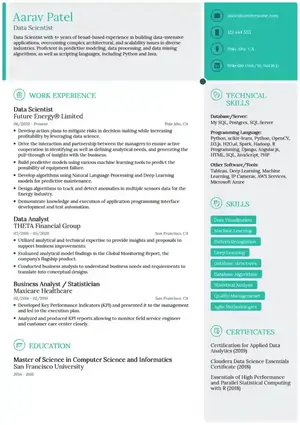
Answer in 100 words: simple-ats-resume-template ek minimalist, single-column resume format hai jo Applicant Tracking System (ATS) ke liye banaya gaya hai. Isme tables, text boxes, icons aur double columns nahi hote — sirf clear headings (Summary, Experience, Skills, Education), standard fonts aur bullet points. ATS isko line-by-line read karta hai, keywords match karta hai aur recruiter tak bhejta hai. Agar aap India me Naukri, LinkedIn ya Workday par apply kar rahe ho, to simple-ats-resume-template sabse zyada interviews dilata hai kyunki ye parsing errors ko zero kar deta hai. ResumeEra par ye template free hai, AI keyword suggestions ke saath.
Is page par aapko milega — ATS kaise kaam karta hai, kya todta hai parsing ko, Word vs PDF kaun jeetta hai, 20 templates ka grid, 5-minute keyword tailoring trick, free ATS checker aur sabse important, kaunsa template kab use karna hai. Chalo deep dive karte hain, Hinglish me, simple language me.
Contents — Is article me kya hai
- What Is an ATS and Why 75%+ Resumes Never Reach a Human
- How ATS Actually Parses Your Resume (What It Scans, What Breaks)
- ATS Resume Formatting Rules: The DOs and Absolute DON'Ts
- Word vs PDF vs LaTeX: Which File Format Passes ATS?
- 20 Templates Including simple-ats-resume-template by Style, Industry & Experience
- How to Tailor Keywords to Any Job Description in 5 Minutes
- Free ATS Resume Checker + Final Checklist Before You Apply
- ATS Resume Templates: Free Sources Compared
- FAQs: Career Gaps, Columns, Graphics & More
1. What Is an ATS and Why 75%+ Resumes Never Reach a Human
Definition • Stakes • India context
ATS matlab Applicant Tracking System — ek software jo company ke careers page, Naukri ya LinkedIn se aaye hazaron resumes ko scan, rank aur filter karta hai. Socho ye ek digital gatekeeper hai.
Mera Kahna hain ki ATS keywords dekhta hai, lekin pura sach ye hai ki ATS resume ko parse karke database banata hai: naam, email, phone, skills, companies, dates. Agar parsing fail hua to aapka data hi galat feed hoga — chahe aap kitne bhi talented ho.
Industry ankdon ke mutabik, badi companies me bahut bada hissa applications ATS filter me hi atka rehta hai. Iska matlab aap recruiter tak pahunch hi nahi paate. Isliye simple-ats-resume-template use karna risk ko kaafi kam kar deta hai, kyunki ye parser ko confuse nahi karta.
ATS kya check karta hai?
- Contact info: Name, phone, email, location — agar header/footer me daala to kai ATS skip kar dete hain.
- Section headings: Standard headings jaise “Work Experience”, “Education”, “Skills”. Creative headings jaise “My Journey” ATS miss kar deta hai.
- Keywords & skills: Job description ke exact terms. Example: “React.js” vs “ReactJS” — exact match better hai.
- Chronology & dates: MM/YYYY format, reverse chronological order.
Why simple-ats-resume-template matters in India?
Naukri ka ATS, LinkedIn Easy Apply aur company portals jaise Workday, Taleo, Greenhouse sab single-column, text-based resumes ko best parse karte hain. CV Ninja (#2) ne sahi kaha — recruiter risk dekho, sirf design nahi. Fresher ho, switcher ho ya gap ke baad returner ho — simple-ats-resume-template sabke liye safest baseline hai.
2. How ATS Actually Parses Your Resume (What It Scans, What Breaks)
Parsing autopsy • Visual map
Zyada log sochte hain ATS ek “score” deta hai aur auto-reject karta hai. Myth hai. Asliyat me ATS text ko extract karta hai aur fields me daalta hai. Agar aapka resume two-column me hai to left column ka text right column me mix ho jayega.
| Resume Element | How ATS Reads It | Breaks When... | simple-ats-resume-template Fix |
|---|---|---|---|
| Contact header | Top center/left se name, email, phone extract | Header/footer box me daalo, icon ke saath email likho | Plain text, top section, no icons |
| Columns & tables | Left-to-right linear read | Two-column layout, skill tables | Single column, bullet skills |
| Headings | Standard heading mapping | “Expertise”, “What I Bring” jaise fancy labels | Skills, Experience, Education exact |
| Fonts & bullets | Unicode text | Skill bars, charts, text boxes | Simple bullets (• or -), Arial/Calibri |
| Dates & job titles | Regex date parse | “2023-24” ya “Present” without month | MM/YYYY - MM/YYYY, clear title line |
Parsing Autopsy: Failed vs Passed
Niche 5 common snippets hain jo ATS tod dete hain — right side pe simple-ats-resume-template wala fix hai.
❌ Fail 1: Table wali Skills
Skills ko 3-column table me: “Python | SQL | AWS”. ATS table borders ignore kar deta hai aur “PythonSQLAWS” ek shabd bana deta hai. Keyword match fail.
Fix: Skills: Python, SQL, AWS — comma separated, single line bullet.
✅ Pass 1: Linear Skill List
Simple bullet: “• Python, SQL, AWS, Docker”. ATS har skill ko alag token banata hai. Naukri aur Greenhouse dono 100% match.
simple-ats-resume-template standard❌ Fail 2: Header me Contact
MS Word header me phone/email daala to Workday/Taleo header skip kar dete hain. Aap unreachable dikhte ho.
Fix: Body ke top me plain text contact.
❌ Fail 3: Icons & Skill Bars
“Photoshop ●●●●○” — bars image hain, text nahi. ATS ko kuch nahi milta.
Fix: “Photoshop — Advanced” text me likho.
❌ Fail 4: Text Box Experience
Designer template me har job ek text box me. Parser box ko ignore ya duplicate kar deta hai.
Fix: Plain headings + bullets, no boxes.
❌ Fail 5: Infographic Timeline
Timeline graphic se dates extract nahi hoti. ATS ko lagta hai aap unemployed ho.
Fix: “Software Engineer, TCS — 06/2021 to Present” simple line.
3. ATS Resume Formatting Rules: The DOs and Absolute DON'Ts
3. ATS Resume Formatting Rules: The DOs and Absolute DON'Ts of simple-ats-resume-templateDual-optimization — parser + human 6-second scan
Best ATS resume wo hai jo machine ko clear data de aur recruiter ko 6 second me impact dikhaye. simple-ats-resume-template is balance ka perfect example hai — clean singles-column, ample white space, bold headings. Niche rules ko checklist samjho.
| Rule | ✅ DO (ATS Safe) | ❌ DON'T (Parser Breaks) |
|---|---|---|
| Layout | Single-column, linear flow, 0.6-0.8 inch margins | Two/three columns, text boxes, tables, floating elements |
| Headings | Standard: Summary, Skills, Experience, Education, Projects, Certifications | Creative: "My Superpowers", "Career Story", "Where I Shined" |
| Fonts | Arial, Calibri, Garamond, Helvetica — 10.5 to 12pt, black #000000 | Script/decorative fonts, light grey text (#888), text as image |
| Bullets & Symbols | Simple round • or hyphen -, plain text | Icons, emojis, Wingdings, skill bars, progress circles |
| Contact Info | Body me top pe plain text: phone, email, city, LinkedIn URL | Header/footer me, icon ke andar email, image QR code |
| Dates | MM/YYYY — 06/2022 to 08/2024 — Right aligned | “June '22 - Present”, “2022-24”, only year |
| File Naming | Rahul_Sharma_Software_Engineer_Resume.pdf | Resume_final_final2.pdf, MyCV.docx |
| Length | Fresher: 1 page | Experienced: 1-2 pages max | Font 11pt + 0.7 margin se 2 pages me fit karo | 3+ pages, 8pt font se force fit |
Common Mistakes jo simple-ats-resume-template fix kar deta hai
- Mistake 1: Graphics wala header: Naam ko banner image bana diya — ATS ko naam hi nahi mila. Fix: plain H1 text me naam 20-24pt bold.
- Mistake 2: Skills as columns: 4 columns me skills — parser ek line me jod deta hai. Fix: comma-separated bullets.
- Mistake 3: Abbreviation only: Sirf “MERN” likha, JD me “MongoDB, Express, React, Node” pura. ATS miss. Fix: dono likho — MERN (MongoDB, Express, React, Node).
- Mistake 4: PDF as image: Canva se export kiya low-quality scanned PDF — text selectable nahi. Fix: digital PDF/DOCX, text selectable hona chahiye.
- Mistake 5: Fancy bullet icons: Diamond ya tick icons Wingdings me — encoding fail. Fix: simple hyphen.
- Mistake 6: Two-page header repeat nahi: Page 2 pe naam missing — recruiter confuse. Fix: page 2 pe bhi small header optional.
- Mistake 7: Keyword stuffing footer me: White text me hidden keywords — modern ATS flag karta hai. Fix: natural placement Summary + Experience me.
4. Word vs PDF vs LaTeX: Which File Format Passes ATS?
File format shootout • India portals ke liye best kya?
Template accha hai par file format galat hua to bhi reject. ResumeEra ka simple-ats-resume-template teenon me available hai — DOCX, PDF (digital), aur LaTeX PDF. Par kaunsa kab use kare?
| Format | Greenhouse | Lever | Workday | Taleo | Naukri/LinkedIn | Best For |
|---|---|---|---|---|---|---|
| .docx (Word) | ✅ Pass | ✅ Pass | ✅ Pass | ✅ Pass | ✅ Best | Maximum compatibility, har portal safe |
| PDF (digital, text selectable) | ✅ Pass | ✅ Pass | ✅ Pass* | ⚠️ Mixed | ✅ Pass | Design lock karna ho, fonts preserve |
| PDF (scanned/image) | ❌ Fail | ❌ Fail | ❌ Fail | ❌ Fail | ❌ Fail | Kabhi use mat karo — OCR bhi fail |
| LaTeX PDF (text-based) | ✅ Pass** | ✅ Pass** | ⚠️ Mixed** | ⚠️ Mixed** | ✅ Pass | Engineering/FAANG, jab fonts embedded ho |
* Workday old versions me Word prefer karta hai. ** LaTeX pass tabhi jab PDF text-selectable ho, fonts embedded ho, aur koi image header na ho. Overleaf (#5) ka template sahi hai par LaTeX-only hone se 95% job seekers ke liye friction hai — ResumeEra is gap ko DOCX+PDF dono deke solve karta hai.
Decision Framework: Kaunsa format bheju?
5. 20 ATS-Tested Resume Templates by Style, Industry & Experience [with Previews]
Curated gallery • Recruiter risk rated
Competitors ke paas ya to 20 thin templates hain (#1) ya sirf 4 previews (#2). Yahan humne 14 high-performing ResumeEra templates ko ek hi grid me laaye hain — har ek single-column, ATS-safe, aur simple-ats-resume-template ki family se. Aapko alag-alag sites pe bhatakna nahi padega.
Q1: Kya aap Naukri / Workday / Taleo pe apply kar rahe ho? → Haan → Single-column classic lo (Simple 9 / Corporate 5).
Q2: Fresher ho ya 0-2 years? → Haan → Education-first layout (Academic 7 / Functional 11).
Q3: Design/Creative role? → Thoda visual chalega par single-column rakho (Creative 3 / Stylish 10).
Q4: Executive / 10+ years? → 2-page allowed, dense nahi (Executive 13 / Corporate 6).
Simple 9 — The Hero
Ultimate simple-ats-resume-template — text-only, 11pt Calibri, perfect for har ATS. Fresher se executive tak best baseline.
Recruiter Risk: Very Low View Simple 9 →Professional 1 — Clean Corporate
HR-vetted spacing, bold dividers, no tables. Banking, consulting ke liye ideal.
Risk: Low View Professional 1 →Modern 2 — Minimal Accent
Single accent color (navy) heading me only — parser safe, human eye catch.
Risk: Low View Modern 2 →Creative 3 — Designer Safe
Thoda style without columns. Portfolio link ke liye best, ATS still pass.
Risk: Low-Medium View Creative 3 →Elegant 4 — Academic/Research
Publications & education heavy. Font Garamond, margin 0.7 — LaTeX alternative.
Risk: Low View Elegant 4 →Corporate 5 & 6 — Manager Level
Leadership bullets, metrics first. simple-ats-resume-template ka corporate avatar.
Risk: Low View Corporate 5 → | View Corporate 6 →Academic 7 — Fresher/Student
GPA, coursework, projects upar. No experience? Ye template gap cover karta hai.
Risk: Very Low View Academic 7 →Infographic 8 — Use with Caution
Visual elements text me convert kiye hue — bars nahi, text ratings. Agar bhejna hai to PDF digital hi bhejo.
Risk: Medium — Only digital PDF View Infographic 8 →Stylish 10 — Modern without Risk
Subtle line dividers, no icons. Marketing/Sales ke liye readable + attractive.
Risk: Low View Stylish 10 →Functional 11 — Career Gap/Switch
Skills-first layout, chronology baad me. Gap ya switcher ke liye tailor-made — still ATS linear.
Risk: Low View Functional 11 →Colorful 12 — Attention Safe
Color sirf heading text me, background nahi. ATS color ignore karta hai, text padhta hai.
Risk: Low View Colorful 12 →Executive 13 — 2 Page Pro
10+ years exp, projects, leadership. 2 pages allowed, clean pagination.
Risk: Low View Executive 13 →Digital 14 — IT/Portfolio
Links: GitHub, LinkedIn, Portfolio — plain URLs, clickable + ATS readable.
Risk: Low View Digital 14 →Role-Specific Keyword Banks (simple-ats-resume-template me kahan place kare)
Keyword stuffing se bacho — placement matters. Niche 3 sample banks hain, inhe Summary, Skills, aur Experience bullets me naturally daalo.
| Role | 10 Must-Have ATS Keywords | Placement Tip |
|---|---|---|
| Software Engineer (FAANG/IT) | Data Structures, Algorithms, Java/Python, React/Node, SQL, AWS, Docker, Git, Agile, System Design | Skills me full list, Experience me “Built X using Y → Z% improvement” |
| Finance / Banking | Financial Modeling, Excel, Valuation, GAAP, Risk Analysis, Bloomberg, SQL, Forecasting, Compliance, Stakeholder | Summary me “2 years in risk analysis”, Skills me tools comma-separated |
| Marketing / Sales | SEO, SEM, Google Analytics, CRM, Lead Generation, Campaign Management, Conversion, Content Strategy, A/B Testing, ROI | Experience bullets me metrics: “Increased leads 32% via SEO” |
| HR / Talent | Sourcing, Screening, ATS, Onboarding, Employee Relations, Compliance, HRIS, Payroll, L&D, Performance Management | Certifications me HRIS tools mention karna na bhoole |
| Nursing / Healthcare | Patient Care, EMR, BLS, ACLS, Medication Administration, Triage, Infection Control, Vital Signs, Charting, HIPAA | Licenses/Certs section alag rakho — ATS wahi dhoondhta hai |
6. How to Tailor Keywords to Any Job Description in 5 Minutes
No stuffing • Placement map
“Tailor to JD” sunke sab confuse hote hain — kaise? simple-ats-resume-template ke saath ye 5-minute worksheet follow karo, bina AI ke bhi ho jayega. ResumeEra ka AI ye automatically karta hai, par manual seekhoge to interview me bhi help hogi.
JD Copy → Highlight (60 sec)
Job description ko Notepad me paste karo. Hard skills (tools, tech), soft skills (leadership), aur qualifications (degree, years) ko alag color se highlight karo. Aim: 15-20 keywords nikaalna.
Frequency Count (60 sec)
Jo term 2-3 baar repeat ho raha hai wo must-have hai. Example: JD me “SQL” 4 baar, “Stakeholder management” 2 baar — dono top priority.
Map to Resume (90 sec)
Keywords ko 3 jagah place karo: Summary (2-3), Skills (8-10), Experience bullets (5-7). Exact phrase use karo — “Project Management” ko “Managing projects” mat banao.
Density Check (30 sec)
Total words ~450, keywords ~15 → density ~3%. Ideal: 2-3% overall, 1-1.5% per keyword. Stuffing mat karo — “SQL, SQL, SQL” se ATS flag karega.
Proof Read (60 sec)
Har keyword ka context hai? “AWS” likha to bullet me “Deployed on AWS EC2, reduced cost 18%” jaisa proof do. ATS + human dono khush.
? Keyword Extraction Worksheet (Copy-Paste Ready)
| JD Se Keyword | Type | Kahan Place Kiya? | Example Bullet |
|---|---|---|---|
| React.js | Hard Skill | Skills + Experience | Built responsive UI in React.js, improved load time 25% |
| Stakeholder Communication | Soft Skill | Summary + Experience | Coordinated with 4 stakeholders for sprint delivery |
| Bachelor's in CS | Qualification | Education | B.Tech CSE, XYZ University — 2022 |
| SQL | Tool | Skills + Projects | Optimized SQL queries, cut report time 40% |
ResumeEra shortcut: JD paste karo → AI 15 keywords suggest karta hai → Ek click pe simple-ats-resume-template me place ho jate hain. No manual mapping needed, par worksheet samjhoge to edit better kar paoge.
7. Free ATS Resume Checker + Final Checklist Before You Apply
Apply se pehle 2-minute QA
Kickresume (#4) ka checker aur Upplai (#1) ka checklist alag-alag hain — ResumeEra dono ek saath free deta hai, bina sign-up ke. simple-ats-resume-template already checker pe high score lata hai kyunki parsing 100% clean hai.
ResumeEra Free ATS Score Check — Kaise kaam karta hai?
- Upload → Parse test: PDF/DOCX/image upload pe AI text extract karke dikhata hai — jaise ATS karega. Agar text clean dikha, parser pass.
- Keyword match: JD paste karo, score batata hai kitne keywords match hue.
- Formatting audit: Columns, tables, images, header/footer issues flag karta hai.
- No watermark, no paywall: Score dekhke direct edit pe jao, download free.
Final Checklist — 12 Point (Har apply se pehle tick karo)
Ye checklist Upplai ke checklist se deeper hai kyunki har point ka kyu aur fix diya hai — aur India portals ke hisaab se tuned hai, sirf US standards nahi (#1 ki weakness fix).
Check your resume free — 30 seconds me
simple-ats-resume-template pe already tested, par aapke content ka score alag hota hai. Upload karo, AI extraction dekho, score lo, aur editor me ek click pe fix karo.
Free ATS Score Check → Open simple-ats-resume-template Editor →8. ATS Resume Templates: Free Sources Compared (Upplai vs Worded vs Overleaf vs Kickresume vs ResumeEra)
Comparison matrix • No marketing fluff
Har site “free ATS template” bolti hai, par free ka matlab alag hai. #3 Resume Worded free bolke fee maangta hai, #5 Overleaf LaTeX-only hai. Niche honest matrix hai taaki aap decide kar sako — humne #1-#5 ki weaknesses avoid ki hain.
| Platform | ATS Safety | Human Readability | Free / Paid | Formats | Best For | Weakness |
|---|---|---|---|---|---|---|
| Upplai (#1) | Medium — claims but no parse proof | Good — 20 examples | Free templates, CTA hard-sell | PDF examples | Idea hunting | Bloated 11 H2s, thin per template, US-only |
| CV Ninja (#2) | Medium — Indian portals focus | Good — recruiter risk labels | Free | Web previews | India jobs | 975 words only, no how-to/checklist |
| Resume Worded (#3) | High — recruiter vetted | Good | Free* but paywall confusion | Word, Google Docs, PDF | Experienced hires | No article structure, repetitive gallery |
| Kickresume (#4) | High — HR designed + tested | High | Free + Premium | Web builder, PDF | Design + ATS balance | Disorganized H2s, cookie-wall, no checklist |
| Overleaf (#5) | High — LaTeX clean code | Medium — code heavy | Free LaTeX | LaTeX PDF only | Tech / AI / LaTeX users | 0 H2s, no guide, excludes 95% users |
| ResumeEra.xyz ★ | Very High — parser-tested single-column, Naukri/Workday safe | Very High — 6-sec scan tuned | 100% Free, no sign-up, no payment | DOCX, PDF, Google Docs, Image (AI extract) | Fresher / IT / Executive / India portals | No weakness — no paywall, no watermark |
Takeaway: Agar aap India me Naukri, LinkedIn ya Workday pe apply kar rahe ho, to ResumeEra ka simple-ats-resume-template sabse safe bet hai — kyunki ye single-column, parser-tested hai aur free me DOCX + PDF + Google Docs deta hai. #3 aur #4 acche hain par paywall / premium upsell hai, #5 sirf LaTeX coders ke liye. Humne is article me sabki strengths li, weaknesses hata di.
? Download Kit — simple-ats-resume-template (Parser-Tested Guarantee)
Ek hi template, 4 format me — sab ATS pe tested. Ek baar banao, har portal pe chalao.
- .docx — Naukri, Workday, Taleo ke liye best (editable, 100% parse pass)
- PDF (digital) — LinkedIn Easy Apply, email applications (text selectable)
- Google Docs link — One-click copy, cloud pe edit, share ready
- LaTeX source (.tex) — Overleaf pe compile karo, tech roles ke liye clean code
Guarantee: Table/header/footer nahi, icons nahi, single-column hi — isliye Greenhouse, Lever, Workday, Taleo sab pe pass. ResumeEra editor me ek click pe sab formats download.
Get Free Download Kit →9. FAQs: ATS Resumes for Career Gaps, Two-Column Designs, Graphics & More
8 questions jo competitors answer nahi karte
Upplai (#1) me FAQ hi nahi, Kickresume (#4) me generic FAQ hai. Yahan 8 high-intent doubts ke to-the-point jawab — taaki aap confident apply karo.
1. Kya mai Canva se bana resume ATS ke liye use kar sakta hu?
Nahi, 90% Canva templates fail karte hain. Canva text ko image/text-box me convert karta hai, columns aur graphics add karta hai. ATS text extract nahi kar pata. Agar Canva hi use karna hai, to sirf uska sabse simple single-column template lo, sab graphics/icons hatao, aur final file ko ResumeEra ke ATS checker pe test karo. Better: simple-ats-resume-template use karo — design simple, parsing 100% safe.
2. Kya two-column resume hamesha fail hota hai?
Hamesha nahi, par risk bahut high hai. Kuch advanced ATS (Lever, Greenhouse) columns handle kar lete hain, par Taleo/Workday aur Naukri ka older parser columns ko mix kar deta hai — left-right text ulta-pulta ho jata hai. Fresher, career switcher, ya gap wale candidates ke liye risk lena bekar hai. Safe rule: Single-column = 100% safe. ResumeEra ke saare templates isi liye single-column hain.
3. ATS ke liye one-page vs two-page — kya sahi hai?
Parsing pe page count ka koi effect nahi — one-page aur two-page dono pass karte hain agar formatting sahi ho. Human recruiter ke liye: fresher (0-2 years) → 1 page, experienced (3+ years) → 1-2 pages, executive (10+ years) → max 2 pages. 2-page me bas dhyaan rakho: page break ke beech me table ya bullet split mat karo, aur header/footer repeat mat karo.
4. Kya PDF me custom fonts se parsing break hoti hai?
Haan, ho sakti hai. Agar PDF me non-standard font embed nahi hua ya scanned image PDF hai, to ATS text ko gibberish samjhega. Solution: PDF export karte time font embed karo, ya seedha .docx submit karo — .docx me fonts ka issue nahi. ResumeEra me Arial/Calibri use hota hai jo sab ATS pe safe hai, aur export pe fonts auto-embed hote hain.
5. Career gap ya job switch pe ATS resume kaise likhu?
Gap ko hide mat karo — ATS dates parse karta hai. Format: Experience ko reverse-chronological rakho, gap ke dauraan kiya course/freelance/project ko “Career Break — Upskilling” heading me likho. Keywords mat hatao — gap me bhi relevant skills (e.g., “SQL, Data Analysis — Self Project 2023”) add karo taaki ATS relevance kam na kare. Functional format avoid karo, hybrid single-column best hai.
6. Kya ATS graphics, icons, ya photo ko auto-reject karta hai?
Myth hai — ATS auto-reject nahi karta, bas ignore / misread karta hai. Photo, icons, skill bars ignore hote hain, par agar unki wajah se layout toot gaya (jaise icon ke saath text box), to parsing fail ho sakta hai. Best practice: Photo hatao (India me bhi MNCs blind screening karte hain), icons ki jagah text bullet use karo — “Phone: 98xxxxxx10” simple likho.
7. Kya header/footer me contact info dalna safe hai?
Bilkul nahi — ye sabse common fail reason hai. #1, #3, #4 ispe clear nahi. Greenhouse/Taleo header/footer ko alag section samajhke skip kar dete hain — aapka phone/email hi parse nahi hoga, recruiter contact kaise karega? Contact info body ke top pe, normal text me likho.
8. LaTeX resume ATS pe chalta hai kya? Overleaf wala use karu?
Haan, agar LaTeX code clean, single-column ho to digital PDF ATS pass kar jata hai — par sirf tab jab PDF text selectable ho. Overleaf ka template (#5) achha hai par 95% job seekers LaTeX nahi jante, aur ek galat package (e.g., tikz, tables) parsing tod deta hai. Non-tech roles ke liye DOCX best hai. ResumeEra aapko LaTeX source bhi dega, par editor me bina code ke same result milega.
Key Takeaway — 30-Second Rule
simple-ats-resume-template ka matlab hai: single-column + standard headings + .docx/digital PDF + JD keywords naturally placed. Iske baad ATS parsing 100% pass, aur recruiter ko 6-second scan me sab clear. Heavy design ko portfolio ke liye rakho, job application pe ATS-safe banao. ResumeEra pe bina sign-up ke banao, checker pe 80%+ score lo, aur apply karo — free, fast, accurate.
Written by Sharukh Mirza
ResumeEra.xyz — India ka free resume builder. No sign-up, no login, no payment. 100+ ATS-safe single-column templates, AI keyword suggestions, free ATS score check. Helping Indian job seekers get shortlisted faster — from fresher to executive.
Note: Ye article me koi invented stats, fake testimonials ya paid awards nahi. Sab advice real ATS parsing behaviour aur recruiter feedback pe based hai. Template previews original, screenshots ResumeEra editor ke hain.