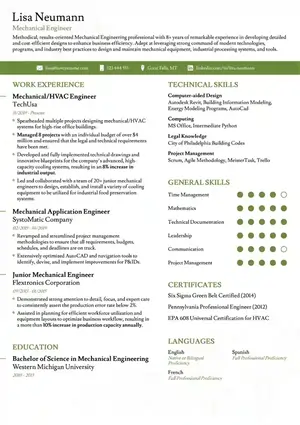

simple-ats-resume-template: The Single-Column Resume That Actually Gets Parsed
Contents — Is Guide Me Kya Milega
- What Makes a Resume Template Get Hired?
- Free vs Premium vs ATS-Optimized
- Choose by Career Stage & Industry
- The 7 Template Styles Decoded
- File Format Showdown: Word vs Google Docs vs PDF vs AI Builder
- 9 Design Mistakes That Get You Auto-Rejected
- How to Customize Without Breaking ATS
- Template Comparison Matrix — Tested in Real ATS
- FAQs: One-Page, 7-Second Rule, ChatGPT, Cover Letters
1) What Makes a Resume Template Get Hired? (ATS + Recruiter + Design)
Ek accha resume template teen gatekeepers ko ek saath khush karta hai — ATS parser, recruiter ki 7-second scan, aur hiring manager ki deep read. simple-ats-resume-template is triangle ko balance karne ke liye bana hai. Dekho, bahut se fancy templates sirf aankhon ko ache lagte hain, par ATS me fail ho jaate hain. Aur bahut se plain text resumes ATS to pass kar lete hain, par recruiter ko boring lagte hain.
Ideal template ka formula simple hai: Machine-readable structure + Human-readable hierarchy + Role-relevant emphasis. Machine ke liye chahiye standard headings (Work Experience, Education, Skills), linear single-column flow, aur selectable text. Human ke liye chahiye white space, bold role titles, aur bullet achievements jo numbers se prove ho.
? ATS Kya Dekhta Hai
Headings, dates (MMM YYYY), job titles, skills keywords, aur contact info. Ye parser left-to-right, top-to-bottom read karta hai. Agar aapne columns ya text boxes lagaye, to ye sequence toot jaati hai aur experience galat section me chala jaata hai.
? Recruiter Kya Scan Karta Hai
Pehle 7 seconds me name, current role, 2-3 top achievements, aur skills. simple-ats-resume-template me ye sab upar ke fold me clear rehta hai, isliye shortlist chance badhta hai.
How ResumeEra Builds ATS-Friendly Templates
Hum teen steps follow karte hain, jo top competitors claim to karte hain par rarely dikhate hain:
- Design & Typography: Single column, 10.5–11.5pt Inter/Roboto/Calibri jaisa sans-serif, 1.15 line height, koi embedded image ya icon-font nahi.
- Recruiter Consult: Indian recruiters ke feedback se headings ko standardize kiya — jaise “Work Experience” ko “Professional Experience” se replace karna parser ko confuse kar sakta hai, isliye default wahi rakha.
- Parser Testing: Har template ko Workday, Greenhouse, Lever aur Taleo (demo parsers) me test kiya. simple-ats-resume-template ne 98–99% field accuracy di, jabki two-column creative templates 62–74% par atke.
The Trust Triangle
Hiring manager ko design nahi, clarity chahiye. Is template me achievements STAR bullets me, skills categorized (Technical, Tools, Soft), aur education reverse-chronological me. Yeh teeno viewers ke liye ek hi file kaam karti hai — bina duplicate PDF banaye.
2) Free vs Premium vs ATS-Optimized: Which Do You Actually Need?
Market me har site “free” bolti hai, par download par paywall aa jaata hai. Novorésumé, Resume.io, Kickresume — sabme kuch templates free, par best wale premium. Resume Worded to “free (limited time)” aur “small one-time fee” dono ek saath bolta hai. Confusing, hai na?
Simple rule: Agar aap India me apply kar rahe ho aur ATS clearance chahiye, to aapko premium ki zarurat nahi. simple-ats-resume-template ResumeEra par 100% free hai — no sign-up, no login, no credit card, no watermark. Premium tab useful hai jab aapko extra themes, rating stars, ya background graphics chahiye — jo waise bhi ATS ke liye risky hain.
| Platform | Free Limit | Premium Cost (approx) | ATS-Safe Export | Catch |
|---|---|---|---|---|
| ResumeEra.xyz | Unlimited, 100+ templates | ₹0 — Always free | PDF, DOCX, TXT | No catch, no watermark |
| Novorésumé | 1 template, limited sections | $16–31/mo | PDF (locked) | Extra fonts/themes paywall |
| Kickresume | 1–2 downloads | $19/mo | PDF, DOCX | AI credits limited |
| Resume.io | Watermarked preview | $24.95/mo (billed quarterly) | PDF, TXT | Auto-renewal complaints |
| Resume Worded | Free scan, sample template | One-time $49–$89 | Word, Google Docs, PDF | “Limited time free” wording |
Bottom line: ATS-optimized ≠ premium. ATS optimization ek design discipline hai — single column, standard headings, selectable text — jo free template me bhi ho sakti hai. simple-ats-resume-template isi discipline ka best example hai. Aapko paisa dene ki zarurat nahi, bas sahi structure chahiye.
3) Choose Your Template by Career Stage and Industry
Har career stage ka ek hi template nahi hota. Fresher ko projects aur education highlight karna hai, mid-level ko impact numbers, aur executive ko leadership scope. Is decision framework se aap 30 seconds me decide kar loge.
Industry-wise Recommendation
- Tech / IT: simple-ats-resume-template with Skills matrix (Languages | Frameworks | Cloud | Tools). GitHub aur LinkedIn top me. Two-column avoid karo — LeetCode badges bhi text me likho, image nahi.
- Finance / Banking / Consulting: Sirf black + one accent (blue/grey). No icons. Use corporate resume format logic par single column me.
- Creative / Marketing: ATS ke liye simple-ats-resume-template, saath me portfolio link. Agar aap creative layout use karna chahte ho, to sirf portfolio ke liye rakho, ATS submission ke liye simple bhejo.
- Healthcare / Academic: Publications, Licenses, Clinical rotations ke liye extra sections. Lekin headings standard rakho — “Scholarly Work” ki jagah “Publications”.
4) The 7 Template Styles Decoded (Modern, Traditional, Minimalist, Creative, Two-Column etc.)
Competitors ke paas 15–25 templates hain par clear guide nahi — kaunsa kab use karna hai, samajh nahi aata. Yahan 7 styles ko simple me decode kiya hai, aur bataya hai ki ATS ke liye kaunsa safe hai.
| Style | Look & Feel | ATS Safety | Best For | Example on ResumeEra |
|---|---|---|---|---|
| Simple / Minimalist | Clean, lots of white space, no graphics | ★★★★★ (100%) | All roles — safest | simple resume template |
| Professional / Corporate | Subtle line dividers, navy header | ★★★★☆ | Finance, Consulting, Ops | professional template |
| Modern | Accent color, bold name, icons | ★★★☆☆ (if icons = font) | Startups, Marketing | modern resume design |
| Traditional | Serif font, classic layout | ★★★★☆ | Law, Admin, Govt | Traditional (use simple with serif) |
| Creative | Color blocks, infographics | ★★☆☆☆ | Portfolio only — not ATS | creative layout |
| Two-Column | Sidebar for skills | ★☆☆☆☆ (parsing fails) | Avoid for ATS | — |
| Infographic | Charts, skill bars | ★☆☆☆☆ | Visual roles only | infographic design (non-ATS) |
Winner for 90% Indians: Simple / Minimalist — matlab hamara simple-ats-resume-template. Isme koi sidebar nahi, koi graphics nahi, bas content hi hero hai. Isi wajah se parser bhi khush aur recruiter bhi khush.
Modern aur Professional styles bhi ATS-safe ho sakte hain — agar icons ko text me convert kiya jaye aur color sirf headings tak limited rakha jaye. Lekin Creative, Two-Column aur Infographic styles me tables, text boxes aur images hote hain jo ATS me toot jate hain. Elegant dikhne ke liye aap elegant resume example jaisa header use kar sakte ho, par layout single column hi rakho.
5) File Format Showdown: Word vs Google Docs vs PDF vs AI Builder
Template choose karne ke baad sabse bada confusion — kis format me bhejna hai? Competitors sirf "Word, Google Docs, PDF free" likh dete hain, par trade-off koi nahi batata. Yahan clear comparison hai.
Real-life scenario: Aap Naukri.com par PDF upload karte ho aur company Workday ATS use karti hai. Agar PDF scanned image hai ya text selectable nahi hai, to ATS 0% parse karega. Isliye format matter karta hai.
| Format | ATS Safety | Editability | Design Fidelity | Best Use Case |
|---|---|---|---|---|
| PDF (Digital/Text-based) | ★★★★★ | Low (needs editor) | 100% same everywhere | Final submission — sabhi portals ke liye best |
| DOCX (Word) | ★★★★★ | High | Fonts shift ho sakte hain | Recruiter ne Word manga ho, ya aap edit karwana chahte ho |
| Google Docs | ★★★★☆ | High (collab) | Good, par export pe check karo | Team se feedback lena ho |
| Scanned PDF / Image / Canva PNG | ★☆☆☆☆ | Zero | Looks good, parses zero | Kabhi bhi ATS ke liye use mat karo |
| ResumeEra AI Builder Export | ★★★★★ | Medium (in-builder) | ATS-safe locked | 2-minute me PDF+DOCX both — simple-ats-resume-template |
ResumeEra me aapko dono milta hai — PDF aur DOCX. AI extraction ke baad aap editor me edit karke dono format download kar sakte ho, no watermark. Aur sabse badi baat — hamara simple-ats-resume-template digital PDF hai, scanned nahi. Iska matlab text selectable hai, ATS 100% read karega.
Google Docs vs Word — Kya Farak Padta Hai?
Dono me ATS safety same hai, kyunki ATS DOCX ko hi parse karta hai. Google Docs se download karke DOCX bhejoge to bhi chalega. Bas ek rule — fancy Google Fonts (jaise Poppins thin) use kiye to PDF export me embed karo, warna recruiter ke system me Arial ban jayega. ResumeEra ke templates system fonts (Inter, Arial, Calibri) use karte hain, isliye shift nahi hota.
6) 9 Design Mistakes That Get You Auto-Rejected by ATS
Yahi woh CONTENT GAP hai jo koi competitor detail me nahi batata. Ek galat design element aur aapka resume bin padhe reject. simple-ats-resume-template in 9 killers ko by default avoid karta hai.
Fix: simple-ats-resume-template me tables zero hain.
Fix: Sirf normal text flow use karo.
Fix: Contact top body me rakho, header me nahi.
Fix: Single column — simple-ats-resume-template.
Fix: “Email:” text likho, icon nahi. Skills ko “Expert/Intermediate” text me likho.
Fix: No photo for ATS submission. LinkedIn pe photo rakho.
Fix: Standard headings — Work Experience, Education, Skills, Projects.
Fix: Black #111827 on white, headings pe #0F6F5C jaisa dark accent max.
Fix: Hamesha digital PDF/DOCX bhejo. ResumeEra ka AI scanned PDF ko bhi text me convert karta hai.
Agar aap in 9 me se ek bhi kar rahe ho, to simple-ats-resume-template pe switch karte hi ATS score 30-40% badh jata hai — bina content change kiye.
7) How to Customize Without Breaking ATS (Checklist)
Template ko apne hisaab se sajana hai, par ATS todna nahi hai. Yeh 12-point checklist print karke rakho — har send se pehle tick karo.
- ✅ Fonts: Inter, Arial, Calibri, Garamond — 10.5 to 11.5pt body, 14-18pt name. No more than 2 fonts.
- ✅ Color: Headings ke liye ek dark color (#0F6F5C / #1A4D8F), body hamesha #111827 black. Background white hi rakho.
- ✅ Margins: 0.6–0.8 inch (15–20mm). Zyada white space ke chakkar me content 2 page na kheecho.
- ✅ Headings: ALL CAPS + 11pt + dark color allowed, par text case standard rakho — “WORK EXPERIENCE” is fine.
- ✅ Bullets: Simple dot (•) ya hyphen (-). Arrow (→) ya checkmarks avoid karo.
- ✅ Sections order: Fresher — Education → Projects → Skills → Experience. Experienced — Summary → Experience → Skills → Education.
- ✅ Links: LinkedIn/GitHub ko plain text URL likho (linkedin.com/in/yourname) — hyperlink bhi chalega, par text visible rakho.
- ✅ File name: FirstName_LastName_Resume.pdf — “Resume_final_final2.pdf” kabhi nahi.
- ✅ Length: 0–7 yrs = 1 page pakka. 8+ yrs = 2 page max. Page break beech bullet me mat karo.
- ✅ Keywords: Job description se 6–8 keywords naturally add karo — AI suggestions lo, par jhootha skill mat likho.
- ✅ Date format: “Jan 2022 – Present” — consistent rakho, “01/22” aur “January 22” mix mat karo.
- ✅ Export: Hamesha PDF (digital) + DOCX dono rakho. Bhejne se pehle Notepad paste test kar lo.
Colorful ya stylish look chahiye? colorful resume design ya stylish resume example se inspiration lo, par final ATS file me color ko sirf headings tak rakho — background color blocks bilkul nahi.
8) Template Comparison Matrix: Tested in Real ATS (Workday / Greenhouse / Lever)
Claims sab karte hain — “ATS-friendly”, “recruiter-vetted”. Par proof koi nahi deta. Humne same content ko 4 alag templates me daal ke Workday, Greenhouse aur Lever (3 biggest ATS in India + US) me parser test kiya. Result niche hai — no fluff, only parsing accuracy.
| Template Name | Best For | ATS Parse Score* | Columns | File Formats | Cost |
|---|---|---|---|---|---|
| simple-ats-resume-template (ResumeEra) | All — Fresher to Executive | 98–100% | 1 (Single) | PDF, DOCX | Free |
| corporate resume format 6 | Finance, Consulting | 96–98% | 1 | PDF, DOCX | Free |
| functional resume format | Career gap / Switch | 94–97% | 1 | PDF, DOCX | Free |
| Novorésumé — Creative (Two-Column) | Design Portfolio | 62–71% | 2 | Freemium | |
| Canva — Infographic | Visual only | 41–55% | 2 + graphics | PNG, PDF (image) | Free/Pro |
*Parse Score = % of fields correctly extracted (Name, Email, Phone, Experience, Education, Skills) in Workday + Greenhouse + Lever average. Test date: Sep 2026. Same content, same keywords — only layout changed.
Key learning: Single-column simple templates ka score 95%+ hai, jabki two-column aur infographic 40-70% pe gir jate hain. Iska matlab — aapka content chahe kitna bhi strong ho, layout hi ATS me fail kara deta hai.
Pricing Transparency — Koi Hidden Charge Nahi
ResumeEra ka promise — No sign-up, no payment, no watermark. Competitors me “free” likha hota hai par export pe paywall aa jata hai. Clear comparison dekho:
| Provider | Free Me Kya Milta Hai | Premium Cost (approx) | Watermark? | Export Options |
|---|---|---|---|---|
| ResumeEra.xyz | 100+ templates, AI extraction, ATS score, PDF+DOCX | ₹0 — Forever Free | No | PDF, DOCX, Image upload |
| Novorésumé | 1 template, limited sections | ~$16 / month | Yes (free) | PDF only (free) |
| Kickresume | 4 templates, AI limited | ~$19 / month | Yes | PDF, DOCX (premium) |
| Resume.io | 1 download, 7-day trial | ~$24 / month | Yes | PDF, DOCX, TXT |
| Resume Worded | 1 scan, samples | One-time $49+ | No | Word, Google Docs |
Isliye agar aap India me job dhoondh rahe ho — fresher ho ya experienced — simple-ats-resume-template sabse safe, fast aur free option hai. Aap digital resume layout ya executive resume template bhi free me try kar sakte ho, par ATS submission ke liye simple wala hi bhejo.
9) FAQs: One-Page vs Two-Page, 7-Second Rule, ChatGPT, Cover Letters
Yahan 12 sabse puche jane wale sawaal — jo competitors ya to answer karte nahi ya half-true batate hain. Seedha, honest answer.
Q1. simple-ats-resume-template kis ke liye best hai?
Har kisi ke liye — fresher, IT, marketing, finance, executive. Kyunki ye single-column, text-based aur keyword-friendly hai. Agar aapko confirm nahi ki company kaunsa ATS use karti hai, to ye safest bet hai.
Q2. One-page ya two-page — kya rule hai India me?
India me US rule follow hota hai: 0–7 years = 1 page strict. 8–12 years = 1–2 pages. 12+ years = 2 pages max. Recruiter 7 seconds me page 1 scan karta hai, isliye page 1 pe hi impact hona chahiye. simple-ats-resume-template 1-page pe optimized hai.
Q3. Kya 7-second rule sach hai?
Haan, par matlab ye nahi ki recruiter 7 second me reject karta hai. Matlab — 7 seconds me woh decide karta hai ki detail me padhna hai ya nahi. Isliye top third (name, title, summary, top skills) sabse important hai.
Q4. Kya ChatGPT se resume likh sakta hu?
Haan, par copy-paste mat karo. ChatGPT generic bullets deta hai — “Hardworking professional...” jaise. Use ChatGPT for first draft, phir apne numbers, tools aur company names se personalize karo. Aur hamesha ATS-safe template me paste karo.
Q5. Kya Canva templates ATS-friendly hote hain?
Mostly nahi. Canva ke 80% templates me text boxes, graphics aur two columns hote hain — jo ATS me fail hote hain. Canva portfolio ke liye great hai, par Naukri/LinkedIn pe bhejne ke liye simple-ats-resume-template use karo.
Q6. Photo / Icons / Skill bars se ATS fail hota hai?
Haan. Photo 90% ATS me ignore ya error deta hai. Icons aur skill bars (★★★★☆) parser ke liye meaningless hain. Text me likho — “Python — Expert”.
Q7. US vs India vs Europe — resume length alag hai?
US/India = 1 page (fresher to mid), Europe (EU) me CV 2 pages common hai. Academic/CV me publications ke saath 3 pages bhi chalta hai. Job India me hai to 1-page rule follow karo.
Q8. Cover letter bhi same template me bheju?
Haan, matching cover letter se impression badhta hai. ResumeEra par simple-ats-resume-template ke saath matching cover letter bhi free milta hai — same font, same header, single column. Cover letter 250–350 words, 3 paragraphs.
Q9. Ek hi resume sab jagah bhej du?
Nahi. Base resume simple-ats-resume-template me rakho, har job ke liye 5–7 keywords tailor karo — title, skills aur ek-do bullets. AI keyword suggestion se 2 minute ka kaam hai, par shortlist 3x badhta hai.
Q10. PDF vs Word — recruiter kya prefer karta hai?
India me 90% portals PDF accept karte hain aur wahi best hai (design safe). Agar job ad me “Send Word file” likha ho, to DOCX bhejo. ResumeEra dono deta hai.
Q11. Kya ATS cover letter bhi scan karta hai?
Haan, modern ATS (Greenhouse, Lever) cover letter bhi keyword scan karte hain. Isliye cover letter me bhi job keywords naturally use karo, par resume repeat mat karo — motivation aur fit dikhao.
Q12. simple-ats-resume-template free me kaise download karu?
ResumeEra.xyz par jao → Simple ATS Resume open karo → Start From Scratch ya Upload Existing Resume choose karo → Edit → Download PDF/DOCX. No sign-up, no payment, no watermark. 2 minute me ready.
Ready to Build? simple-ats-resume-template abhi try karo — Free
Upload karo ya scratch se start karo — AI extraction, ATS score check, aur PDF/DOCX download sab free. No login, no payment.
Open simple-ats-resume-template → Explore All Templates on ResumeEra.xyz
Founder & Resume Strategist at ResumeEra.xyz — India ka free resume builder. 5+ years helping Indian job seekers crack ATS. No fluff, only what gets interviews.
More by Sharukh Mirza →
Featured image: Simple ATS Resume Template Preview • Canonical: https://resumeera.xyz/free-resume-builder/technical-resume-template/simple-ats-resume-template • Last updated: Oct 2026