Professional Resume Template That Gets Shortlisted
Featured image profetional_resume_3.webp ka clean, single-column professional format — jo ATS clear kare aur recruiter ko 6 second me value samjhaye. No clutter, only results.
View / Download Featured Image ↗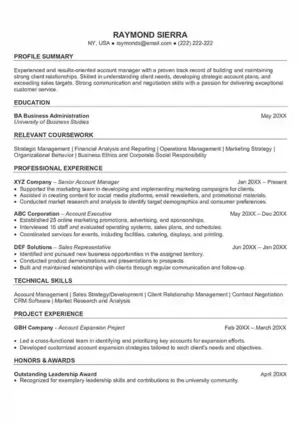

Free Builder • AI Keywords

Resume strategist for Indian job seekers • Featured image: profetional_resume_3.webp — single-column professional layout
Professional resume template ek clean, single-column, ATS-readable layout hota hai jo recruiter ko 6–8 second me aapki value samjha de. Featured image profetional_resume_3.webp isi approach ka perfect example hai — top pe naam + contact, phir summary, skills, experience with numbers, education aur certifications, bina graphics ke.
India me jahan 70%+ companies ATS use karti hain, double-column ya infographic resumes aksar parse hi nahi hote aur aapke skills invisible reh jaate hain. Isliye professional resume template sabse safe bet hai — fresher ho, IT, banking, sales ya government-to-private switch. ResumeEra.xyz pe aap isi featured layout ko reference bana ke free resume builder me text-based ATS-safe PDF 2 minute me bana sakte ho, bina sign-up ke.
Is guide me hum deep dive karenge: professional template ki pehchan, India me kyun zaroori hai, must-have sections, comparison table, decision framework, step-by-step build, summary formula, mistakes aur pro tips — saath me profetional_resume_3.webp ko kaise replicate karna hai.
What Makes a Resume Template Professional?
Har sundar design professional nahi hota. Recruiter ke liye professional = readability + hierarchy + credibility. profetional_resume_3.webp ye teeno deta hai.
Ideal specs: Body 10–11pt, Name 14–18pt, line spacing 1.15–1.4, margins 0.6–0.8 inch. Heading me subtle divider line, color sirf ek accent tak — jaise teal ya navy — taaki PDF aur print dono me sharp lage.
5 non-negotiables
1. Linear order: Upar se neeche, left-to-right — ATS aur human ek hi flow me padhen. 2. Standard labels: “Anubhav” nahi, “Work Experience” likhen. 3. Keyword alignment: JD ke core skills (Excel, GST, React, SQL) naturally experience/skills me aayen — ATS score check se verify karo. 4. White space: Sections ke beech 12–16px gap. 5. Proof: Duty nahi result — “Sales 22% badhayi”.
Why Choose a Professional Layout in India?
Ek post pe 250–600 applications. Recruiter 6–8 second me decide karta hai. Professional single-column is race me jeet-ta hai kyunki ye teeno stage clear karta hai:
India-specific reason: print. Walk-in, campus aur PSU interviews me hard copy abhi bhi mangte hain. Featured image jaisa high-contrast minimal design B/W print me bhi crisp nikalta hai, jabki dark creative templates toner kha jaate hain.
Professional Resume ke Core Sections
profetional_resume_3.webp ka order hi best practice hai — isko follow karo:
Har section me kya likhen
Header: Full name 16–18pt, baaki 9.5–10.5pt. Photo avoid (bias risk). Summary: Role + years + top 2 skills + 1 quantified win + intent. Skills: Hard skills pehle (Excel, Tally, Python), phir tools. Experience: 3–5 bullets, har bullet = Action Verb + Task + Result + Number. Education: Degree, institute, year, %/CGPA. Freshers me education ko skills ke just baad rakhen. Career gap ho toh “Relevant Projects” ko Experience ke upar place karo — ATS-friendly resume template me bhi yehi flexibility hai.
Single Column vs Fancy Layouts — Honest Comparison
| Feature | Professional Single-Column (profetional_resume_3) | Double-Column / Infographic | Creative Color-Heavy |
|---|---|---|---|
| ATS Parsing | Excellent 95%+ accuracy | Weak Columns misread | Poor Graphics ignored |
| Recruiter Scan | 6–8 sec me clarity | Eye jumps, points miss | Color distracts |
| Print & PDF | Sharp B/W, 80–130KB | Alignment break | Heavy ink, dull |
| Best For | IT, Finance, Sales, HR, Fresher — sab | Portfolio only (with text version) | Events, not corporate |
| Customization | Easy, ATS safe | Hard, layout toot-ta hai | Hard + risky |
Conclusion: Primary resume hamesha professional single-column rakho. Creative version sirf portfolio ke saath extra do.
Decision Framework — Kaunsa Template Kab?
? Fresher / Campus
Skills + education + projects upar. Photo nahi.
- 1 page, single-column
- Projects me tech stack + result
- Internship = experience
? Experienced (3–8 yrs)
Recent role detailed, purane compact.
- 1–2 pages max
- 3–5 impact bullets per role
- JD-matched 10–12 skills
? Career Switch / Gap
Transferable skills hero banao.
- Summary me intent clear
- Certifications upar
- Gap ko project se bridge
? MNC / Abroad
Global ATS strict — minimal.
- City + LinkedIn only
- Standard headings
- PDF, not image
Rule: JD me Workday/Taleo/SuccessFactors likha ho toh professional ATS template compulsory samjho.
Step-by-Step: 7 Steps Me Resume Banao
Target role & JD pick karo
2–3 JD se 8–10 repeated keywords note karo — yehi bullets/skills me aayenge.
Featured layout ko reference banao
profetional_resume_3.webp ko dekho, phir free builder me single-column professional theme select karo.
Summary 3-line formula
[Role] + [Years] + [Top 2 skills] + [1 number win] + [Value].
Experience = STAR + Numbers
Har bullet: “Improved X by Y% by doing Z”. 3–5 bullets per role.
Skills align karo
AI suggestions se 10–12 hard skills. Jhoothe tools mat likho.
Education compact
Degree, institute, year, score — 1–2 lines me.
ATS check + PDF export
ATS score check pe 85+ lao, file name: FirstName_LastName_Role.pdf
No login • AI keywords • Single-column professional format
Professional Summary Kaise Likhe
Summary 45–60 words, 3–4 lines. Formula: Who you are + What you bring + Proof + What you want.
Copy-ready examples (India)
Fresher (B.Com): “B.Com graduate with Tally Prime, Advanced Excel & GST filing. Internship me 120+ ledgers reconciled, errors 18% kam kiye. Seeking Accounts Executive role where accuracy drives growth.”
IT Support (2 yrs): “IT Support Executive (2 yrs) — Windows, Networking, Zoho Desk. 95% tickets within SLA, repeat issues 22% kam via KB articles. Product startup me scale karna chahta hu.”
Sales (5 yrs): “Area Sales Manager, 5 yrs FMCG, 40+ retailers, ₹2.1Cr target. FY25 me primary sales 27% growth via beat planning. D2C brand me revenue drive karna hai.”
Avoid: “Hardworking, seeking challenging environment” jaisa generic. Har word skill, number ya intent dikhaye.
Common Mistakes Jo Reject Karwate Hain
ATS ignore karta hai, tables tod deta hai.
Right column ke skills parser miss kar deta hai.
“Responsible for sales” nahi — “Achieved 112% (₹18L)” likho.
Fresher 1 page, experienced 2 pages max.
coolboy123@gmail.com aur “Recieve” trust tod dete hain.
30 keywords spam lagte hain — JD se 10–12 hi rakho.
Pro Tips — Recruiter-Level Polish
Thoda extra jo shortlist badhata hai
- Verb power: Led, Built, Improved, Reduced, Achieved se start karo.
- Numbers har jagah: Time (30% faster), Money (₹12L saved), Scale (40+ clients).
- White space = premium: Dense resume = skip.
- One accent only: Teal/navy heading line — print friendly.
- Hyperlink smart: LinkedIn + portfolio clickable, QR code nahi.
- Tailor 10–15%: Har JD pe title + top 3 bullets tweak karo.
Hidden tip: ATS score check ke baad kisi senior ko 30-sec scan do — agar woh 5 sec me role + top win bata de, layout pass hai.
profetional_resume_3.webp ka Best Use Kaise Karein
Ye file ek image hai — final resume image nahi, text-based PDF hona chahiye. Is image ka best use hai layout reference: top-aligned header, thin divider, left-aligned bullets, bottom me compact education.
Replicate kaise karein: ResumeEra.xyz open karo → Professional template select karo → Is featured image jaisa spacing rakho (heading 12pt bold, body 10.5pt). Header me phone, email, city, LinkedIn bas. Skills 2 rows me 4–5 each, experience me company | role | location | year ek line, phir 3 bullets. Education 1 line per degree. Export PDF 90–130KB, 1 page.
Agar confuse ho ki professional vs ATS-friendly me kya farak hai — answer simple: professional single-column hi ATS-friendly hota hai. Isliye is featured template ko master copy banao aur har JD pe tailor karte jao.
FAQs
Summary — Professional Template = Shortlist Ka Shortcut
Professional resume template ka magic design me nahi, clarity me hai. Featured image profetional_resume_3.webp yehi clarity dikhata hai: naam upar, summary crisp, skills JD-aligned, experience impact-driven, single-column flow. Is structure ko ResumeEra free builder me banao, har application pe 10–15% tailor karo, aur ATS score 85+ lao. No sign-up, no payment — bas ek polished PDF jo print me sharp aur inbox me top pe rahe.
Next step: Free builder open karo aur featured layout ko apne content se replicate karo — image ko upload nahi, reference banao.