Minimalist ATS Resume Template That Clears Every ATS Filter
Saaf, single-column design jo recruiter ko 6 second mein impress kare aur ATS robot ko bina error ke pass ho jaye. ResumeEra par free, bina login ke, 2 minute mein ready.
Build Your Minimalist ATS Resume — Free ↗ Open Editor
Free resume builder for India • No sign-up, no payment • AI keyword suggestions
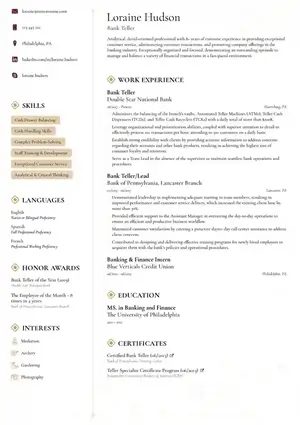
Live preview: Minimalist single-column layout with generous white space. Supports PDF, DOCX & image upload with AI extraction.
Minimalist ATS resume template ek single-column, clutter-free resume format hai jo ATS (Applicant Tracking System) ko 100% readable text deta hai aur recruiter ko calm, premium feel deta hai. Agar aap ResumeEra.xyz ka minimalist ATS template use karte ho, aapko bina sign-up ke, AI keyword suggestions ke saath, lagbhag 2 minute mein ek ATS-safe resume mil jata hai — upload karo ya scratch se start karo, dono options ready hain.
Short answer: minimalist = zyada white space + ek hi column + simple headings + koi table, textbox ya heavy graphic nahi. ATS ko yahi sabse aasan lagta hai parse karne mein. Is article mein hum cover karenge — ye template kab effective hota hai, ATS kaise scan karta hai, kaunse sections must hain, aur ResumeEra par step-by-step kaise banaye, bina koi mistake kiye.
India mein 80%+ mid-to-large companies ab Naukri, LinkedIn Easy Apply ya in-house ATS use karti hain. Jab aapka resume image-heavy ya two-column hota hai, ATS usko tod-marod ke galat data padh leta hai — skills gayab, dates ulte, aur auto-reject. Minimalist single column iska simple ilaaj hai.
What Is a Minimalist ATS Resume Template?
Minimalist ATS resume ek aisa layout hai jahan design content ko support karta hai, usse compete nahi karta. Socho — ek saaf typography, left-aligned headings, bullet points, aur kaafi breathing space. Koi background shadowing, koi two-column skill bar, koi icon-only info nahi.
ResumeEra ka minimalist ATS template default single-column hi deta hai kyunki ATS PDFs ko left-to-right, top-to-bottom read karta hai. Multi-column se order bigad jata hai. Isliye ye template corporate, tech, freshers aur experienced sabke liye safe base hai.
ResumeEra.xyz free hai — no sign-up, no login, no payment. AI aapke pasted JD se keywords suggest karta hai aur aapka resume lagbhag 2 minute mein ready ho jata hai. Single-column ATS-safe templates default mein milega.
Is template ki pehchan: Simple header (name + role + phone/email/LinkedIn), Summary 2-3 lines, Skills keywords, Experience with action verbs + numbers, Education, aur Certifications/Projects agar relevant ho. Bas — koi extra bharaav nahi.
Agar aapko thoda zyada visual chahiye toh aap baad mein creative ATS resume template explore kar sakte ho, lekin first shortlist ke liye minimalist hi safest bet hai.
Are Minimalist Resumes Effective? India Ke Context Mein
Haan — jab goal ATS clear karna aur recruiter ka trust jeetna ho, minimalist sabse effective hai. Recruiter resume ko average 6-8 second skim karta hai. Clean hierarchy se eyes naturally top se bottom flow karti hain. No distraction, only signal.
Minimalist tab weak lag sakta hai jab aap bina content ke sirf white space chhod do. Design khali nahi, content khali lagta hai. Isliye har section mein tight, quantified points likhna zaroori hai. ATS keyword match + human readability, dono ek saath chahiye.
Competitor sites minimal ko sirf “white space” bolke chhod dete hain, lekin India mein asli edge ye hai ki aapka PDF digital ho ya scanned image — ResumeEra ka AI extraction dono handle karta hai, bina formatting bigade. Iska detail hum step flow mein dekhenge.
Pros and Cons of Clean Minimalist ATS Resume
| Aspect | Minimalist ATS | Graphic / Two-Column |
|---|---|---|
| ATS Parse Accuracy | High — single column text | Low — tables & textboxes break |
| Recruiter Skim | Fast, 6-sec flow | Eye jumps, info misses |
| Customization | Easy, content pe focus | Design tweaks mein time waste |
| File Safety | PDF/DOCX both stable | Design shift on different devices |
| Best For | Tech, corporate, freshers, BFSI | Portfolio roles where PDF is hand-checked |
Pros: ATS-friendly by default, print-friendly, har device pe same dikhega, aur aap keywords par focus kar paoge. Cons: Agar aap design-heavy role (fashion, motion) mein ho jahan visual portfolio chahiye, toh minimalist akela kaafi nahi — aapko portfolio link + ek creative sidebar CV template with photo jaisa supplement chahiye.
How Does ATS Scan and Rank Your Resume?
ATS ek robot filter hai jo pehle resume ko text mein convert karta hai, phir headings pehchanta hai (Experience, Education, Skills), phir keywords match karta hai JD se, aur phir rank deta hai. Minimalist template mein headings standard rehte hain, isliye parser confuse nahi hota.
Scan ka order: Header → Summary → Skills → Experience → Education. Isi order ko ResumeEra ka minimalist template follow karta hai. Agar aap basic ATS resume template ya simple ATS resume template dekho, sabka flow same logic pe hai — bas visual tone alag.
Warning: Images ke andar likha text, header/footer mein contact info, aur tables ke andar skills — ye teeno ATS ke liye invisible ho sakte hain. Minimalist template inhe avoid karta hai, isliye aapka phone/email kabhi miss nahi hoga.
Ranking ke 3 factor: Keyword relevance (JD ke exact phrases), Recency & relevance (naya experience upar), Formatting hygiene (standard fonts, .docx/.pdf). ResumeEra AI aapko JD paste karte hi missing keywords suggest karta hai, toh guesswork khatam.
What Sections Should a Minimalist ATS Resume Include?
Minimalist ka matlab sections hatana nahi, unhe crisp rakhna hai. ATS ke liye 6 core sections must hain:
1. Header: Name (16–20pt), Role title, Phone | Email | City | LinkedIn | Portfolio (optional)
2. Professional Summary: 2–3 lines, role + years + top 2 skills + ek result (example: “Reduced query time by 32%”)
3. Core Skills: 9–14 keywords, pipe-separated, JD se match (example: “SQL | Python | Power BI | ETL”)
4. Experience: Reverse chronological, bullets with verb + task + result + metric
5. Education: Degree, institute, year, CGPA only if strong
6. Add-ons: Projects / Certifications / Achievements — tabhi jab job se relevant ho
- Har heading ko plain text rakho: “Work Experience” not “My Journey ?”
- Dates ko ek format mein rakho: “Jan 2023 — Present”
- Skills ko paragraph nahi, line mein likho taaki parser easy tokenize kare
Functional gaps ho toh functional ATS resume template jaisa skill-first order soch sakte ho, lekin fresher ho toh bhi minimalist mein Projects ko Experience se upar le aana kaafi hai — extra template ki zaroorat nahi.
How to Make Your Resume More ATS-Friendly?
Ye checklist follow karo — 10 minute mein ATS score badh jayega:
Single column lock karo
Ek hi column, left aligned. Sidebar, double column ya floating textboxes hatao. ResumeEra default yahi deta hai.
Standard headings use karo
Summary, Skills, Experience, Education, Projects — ATS inhi ko samajhta hai. Fancy synonyms avoid.
Keywords exact likho
JD mein “Power BI” hai toh “PowerBI” mat likho. AI suggestions on karo, phir natural sentence mein daalo.
File type sahi rakho
Export as PDF (text-based) ya DOCX. Scanned image PDF bhi chalega kyunki ResumeEra OCR se extract karta hai, lekin final export text-PDF rakho.
Metrics add karo
Har bullet mein number: “Improved delivery by 18% in 3 months” — ATS + human dono ko pasand hai.
Modern touch chahiye toh modern ATS resume template dekh sakte ho, lekin minimalist base ko hi refine karna zyada safe hai. Zyada color = zyada risk.
Decision Framework: Kab Minimalist Template Choose Karein?
1. Fresher / Campus Placement
Projects & internships hi hero hain. Minimalist se space bachega aur skills clear dikhenge.
- Choose: Minimalist ATS
- Avoid: Infographic heavy
2. Experienced Tech / Manager
Multiple roles, tools, aur leadership metrics dikhane hain. Clean hierarchy must.
- Choose: Minimalist or executive ATS resume template
- Avoid: Two-column with skill bars
3. Creative / Portfolio Role
Visual work bahar dikhana hai, resume sirf gateway hai.
- Choose: Minimalist resume + portfolio link
- Supplement: Behance / GitHub
4. Government / Traditional Firms
Conservative readers — simple fonts, no color, full formality.
- Choose: Minimalist / Traditional
- Avoid: Bright accent colors
Rule of thumb: Agar JD mein “ATS” ya “online application” likha hai, toh minimalist hi pick karo. Agar walk-in portfolio review hai, tab visual add karo.
Common Mistakes That Kill Your ATS Score
- ×Header/footer mein contact info
Bahut ATS header/footer skip karte hain. Contact ko body ke top pe rakho, plain text mein.
- ×Table mein skills ya experience
ATS table cells ko tod deta hai. Skills ko simple line mein likho: “Java | Spring | MySQL”.
- ×Image-only resume upload
Designer ne JPG bheja — ATS ne kuch nahi padha. Hamesha selectable-text PDF/DOCX export karo.
- ×Keyword stuffing
Same keyword 15 baar white text mein chhupana — ATS ab penalty deta hai. Natural usage rakho.
- ×Fancy headings & icons only
“⚙️ Skill Stack” ATS nahi samjhega. “Skills” likho, icon optional rakho.
- ×Long paragraphs in experience
4-5 lines ka paraab koi nahi padhta. 3–5 bullets, har bullet 12–18 words.
In mistakes se bachne ke liye ek baar tech ATS resume template ka clean bullet style copy kar sakte ho — wahi minimalist logic tech roles ke liye tune kiya gaya hai.
Pro Tips: Recruiter-Approved Minimalist Formatting Tricks
Font & Size
Body: 10.5–11pt, Name: 18pt max. Font: Inter, Calibri, Garamond. Letter-spacing thoda tight rakho, readability badhegi.
White Space
Har section ke baad 8–12px gap. Margins 0.6–0.7 inch. Saans lene do — dense block se recruiter bhagta hai.
Bullets
Start with strong verb: Built, Led, Reduced, Automated. End with metric: %, ₹, time saved.
Links
LinkedIn & portfolio ko blue underline mat karo — plain text + clickable PDF link kaafi hai, ATS safe.
Dates
Ek format fix rakho poore doc mein. ATS date parsing isi se hota hai.
File Name
“Sharukh_Mirza_Minimalist_ATS_Resume.pdf” — recruiter ke drive mein search-friendly, professional.
Cover letter bhejna ho toh same visual language rakho — minimalist cover letter template se matching header banao, consistency trust banati hai.
ResumeEra Par Minimalist ATS Resume Kaise Banaye — 2-Step Smart Flow
Target page par 2 rasta hai — Start From Scratch ya Upload Existing Resume. Dono ka end same editor pe hota hai, jahan AI extraction aapka kaam aadha kar deta hai.
Step — Method Choose Karo
Top pe “Start From Scratch → Open Editor” ya “Upload Existing Resume → Extract Now” dikhega. Fresh ho toh scratch, already resume hai toh upload karo — PDF (digital/scanned), DOCX, JPG, PNG sab supported.
Step — File Upload & AI Extraction
“Click or Drag File Here” zone mein file daalo. Progress 0% se 100% tak AI text nikalta hai — scanned PDFs ka OCR bhi auto. Raw extracted text preview mein check karo, 0 words se start hoke full content tak.
Step — Continue to Editor & Polish
“Continue to Editor” pe click — minimalist ATS template auto-applied. Ab AI keyword suggestions on karo, JD paste karo, missing skills add karo, bullets ko metric ke saath rewrite karo.
Step — Export & Apply
Final PDF/DOCX download karo. File name professional rakho, aur ATS score check tool se ek baar verify kar lo before apply.
Upload karo, AI khud extract karega
Digital PDF, scanned PDF, image ya DOCX — ResumeEra sab parse karta hai. No sign-up, 2 minute mein editor ready.
Extra help chahiye toh same family ke professional data analyst resume jaise role-based example se bullet tone copy kar sakte ho — structure minimalist hi rahega, content role-specific ban jayega.
Real Content Example: Minimalist Mein Kya Likhein?
Design ke baad asli game content ka hai. Ek hi experience ko do tarah se dekhte hain:
Before (vague): “Worked on backend and improved performance.”
After (ATS+human): “Built REST APIs in Node.js for payment module; reduced p95 latency from 420ms to 260ms (−38%) by adding Redis caching; handled 12k daily transactions.”
- Verb: Built, Reduced, Handled
- Tool: Node.js, Redis — exact JD keywords
- Metric: −38%, 12k daily — proof
Skills line example: “Core: Java | Spring Boot | MySQL | Redis | Docker | AWS (EC2, S3) | REST | Git”
Summary example: “Computer Science graduate (2024) with 8-month internship in backend development. Ships clean APIs, writes testable code, and optimizes DB queries. Seeking backend engineer role where low-latency systems matter.”
Freshers ke liye Projects ko Experience ki jagah hero banao — har project mein Problem → Stack → Impact 2 lines mein. Is approach se aapka resume bina fake experience ke bhi strong lagta hai.
FAQs — Minimalist ATS Resume
Minimalist ATS resume kya hota hai aur ye normal resume se kaise alag hai?
Kya minimalist resume freshers ke liye bhi effective hai?
ResumeEra par bina sign-up ke kaise banau?
Scanned PDF ya image resume bhi upload kar sakte hain?
ATS score kaise check karu ki resume pass hoga ya nahi?
Summary — Saaf Resume, Strong Shortlist
Minimalist ATS resume template jeetata hai kyunki wo ATS aur human dono ko respect deta hai — robot ko readable text, recruiter ko calm hierarchy. Single column, standard headings, quantified bullets aur exact JD keywords — bas ye chaar cheeze sahi, aur shortlist ke chances double. ResumeEra.xyz par ye sab free hai, bina sign-up ke, AI extraction aur keyword help ke saath. Aaj hi upload karo ya scratch se start karo, 2 minute mein minimalist ATS resume ready karo aur confidently apply karo.