Creative ATS Resume Template — Design dikhe, ATS bhi pass ho
Creative dikhna hai par ATS me reject nahi hona. Yeh single-column Creative ATS Resume Template colour + hierarchy deta hai, bina tables, text-box ya graphics ke — parsing 100% safe.
Build Creative ATS Resume Free →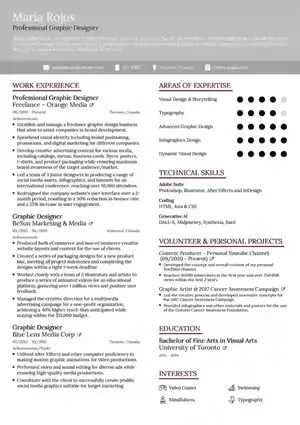

Resume strategist at ResumeEra.xyz — ATS + hiring manager dono ke liye likhta hoon. Brand niche: free builder, single-column templates by default.
Is article me kya milega
Creative ATS Resume Template ka seedha jawab: ek aisa single-column resume jo visually creative lage — accent colour, clean hierarchy, subtle icons — lekin andar se 100% ATS-readable ho. ResumeEra.xyz ka yeh template tables, text-boxes aur multi-column graphics avoid karta hai, isliye recruiter ko attractive lagta hai aur ATS parser ko bhi samajh aata hai.
India me designer, marketer, content, UI/UX, media ya client-facing roles me aapko thoda personality dikhana padta hai. Plain black-white resume safe hai par bheed me kho jata hai. Dusri taraf Canva-style heavy creative resume ATS me toot jata hai — text image ban jata hai, headings detect nahi hoti, keywords miss ho jate hain. Is article me hum deep dive karenge ki Creative ATS Resume Template kaise balance banata hai, kab isko choose karna chahiye, isme kya likhna chahiye, aur ResumeEra par 2-minute me kaise banana hai — chahe aap scratch se start karo ya purana PDF upload karo.
ResumeEra.xyz India ke liye bana free builder hai: no sign-up, no login, no payment. Aapko AI keyword suggestions milte hain, aur default single-column ATS-safe layout milta hai. Is page ka core flow simple hai — 1 Choose Method → 2 Upload File → 3 AI Extraction → 4 Continue to Editor — jisme digital PDF, scanned PDF, DOCX, JPG, PNG sab support hota hai.
Creative ATS Resume Template kya hai aur kaise kaam karta hai?
Yeh template “creative” aur “ATS” dono ka hybrid hai. Creative isliye kyunki isme typography, spacing aur ek-do accent colours se visual hierarchy banti hai. ATS isliye kyunki structure strictly linear hai — top se bottom tak ek hi column, proper heading tags (H1 for name, H2 for section), aur plain text bullets. Koi table, koi floating textbox nahi.
ResumeEra ka Creative ATS Resume page khaas isliye useful hai kyunki aapko design ke liye alag tool sikhne ki zarurat nahi. Aap ya to Start From Scratch karke blank template me bharte ho, ya Upload Existing Resume karke AI se auto-extract karate ho. Dono cases me output wahi clean single-column file hoti hai jo Naukri, LinkedIn Easy Apply aur company ATS gateways me parse ho jati hai.
? Creative edge
Accent header, thin rule lines, Inter + display font pairing se recruiter ka eye stop hota hai — bina readability khoye.
? ATS-safe core
Single column, searchable text, standard headings — parser ko confuse karne wala kuch nahi.
⚡ 2-min setup
Upload karo toh AI seconds me name, experience, education, skills nikal deta hai. Phir editor me polish karo.
?? India-first
INR, Indian phone format, fresher + experienced dono ke liye sections — extra fluff nahi.
Creative vs Minimal vs Traditional — kab kisko choose kare?
Har role ke liye same template sahi nahi hota. Neeche decision framework diya hai jisse aap turant decide kar sako ki Creative ATS lena hai ya koi aur variant.
| Template type | Best for | Design level | ATS risk |
|---|---|---|---|
| Creative ATS Resume Template | Design, Marketing, Content, Media, Startup roles jahan personality chahiye | Medium — colour accent + hierarchy, par single column | Low — text-only, linear |
| Minimalist ATS Template | Corporate, Finance, Consulting — jahan clean + formal chahiye | Low — whitespace, no colour | Very Low |
| Modern ATS Template | Tech, Product, Analytics — thoda contemporary look | Medium | Low |
| Simple ATS Template | Freshers, Govt jobs, mass applications | Minimal | Very Low |
| Functional ATS Template | Career gap / switch — skills pe focus | Low-Medium | Low |
Decision framework — Example se
Example: Aap ek social media manager ho jisko D2C brand me apply karna hai. JD me “creative mindset + data-driven” likha hai. Yahan basic ATS resume bahut plain lagega. Pure Canva creative risky hai. Toh Creative ATS best hai — aap portfolio link, campaign metrics aur brand tone dikha sakte ho, ATS keywords (“Instagram Ads”, “UGC”, “GA4”) bhi safe rahenge. Isi tarah agar aap accountant ho toh traditional ATS resume zyada credible lagega.
Rule of thumb: JD me “creative”, “storytelling”, “brand”, “portfolio” words aaye → Creative ATS. JD me “compliance”, “audit”, “operations” aaye → Minimalist ya Traditional.
Creative dikhega, par ATS kaise pass hoga? — Technical checklist
Designers aksar ATS ko magic samajhte hain. Asal me ATS bas text parser hai. Uske 5 rules hote hain — Creative ATS Resume Template inhi par bana hai:
- Linear reading order: Top-to-bottom single column. Do-column me left-right jump se experience dates skills me mix ho jati hain.
- Standard headings: “Work Experience”, “Education”, “Skills”, “Projects” — fancy headings jaise “My Journey” ATS skip kar deta hai.
- Searchable text: Koi bhi text image me convert nahi. Icons bhi font-based ya subtle, background graphic nahi.
- No tables/textboxes: ResumeEra default me inko avoid karta hai; isiliye parsing error kam hota hai.
- Clean file export: PDF (text-based) aur DOCX dono ATS-friendly. Scanned image PDF upload karoge toh AI OCR karke text bana deta hai.
Agar aapke paas pehle se Canva PDF hai jisme design heavy hai, toh usko seedha upload mat karo. ResumeEra ke Creative ATS page par upload karo — AI raw text extract karke editor me le aayega, jahan se aap wahi content clean template me set kar sakte ho. Yeh extra step hi rejection bachata hai.
Competitor templates dekho toh Kickresume creative templates me zyada visual weight hai, hipCV ne alag-alag ATS templates diye hain, Resume.io ne “when to pick creative” par focus kiya hai. Un sabko beat karne ke liye ResumeEra ka angle unique hai: creative look + single-column guarantee + AI extraction — jo Indian freshers aur designers dono ke liye practical hai.
Creative ATS Resume me kaun se sections hone chahiye — aur kis order me?
Single column ka matlab yeh nahi ki sections kam ho. Bas order logical hona chahiye taaki recruiter 6-second scan me sab pakad le.
Header — Name + Role + Contact
Full name bada, niche target role (Example: “Graphic Designer | Brand & Social”). Phone, email, city, LinkedIn, portfolio link. Photo optional — India me tech/design me chalega, banking me avoid.
Professional Summary — 3 lines
Kaun ho + kitne saal + core tools + ek result. Example: “2+ yrs UI designer, Figma + Framer, D2C brands ke liye 12+ landing pages, avg conversion +18%.”
Skills — ATS keywords
JD se 8-12 keywords. Group karo: Design — Figma, Illustrator; Marketing — SEO, GA4; Dev — React, Tailwind. AI suggestions yahin help karte hain.
Experience — Bullet + numbers
Reverse chronological. Har bullet = Action + Tool + Result. “Instagram reels 3x/week banaye — reach 240k se 610k in 4 months.”
Projects / Portfolio
Creative roles ke liye must. 2-3 projects, har ek me link, role, toolkit, outcome. “Case Study: Fintech app redesign — bit.ly/portfolio”
Education + Certifications
Degree, institute, year, city. Niche certifications — Google UX Design, Meta Marketing. Year-wise gap mat chhupao, explain karo.
Extra sections jaise Awards, Volunteer ya Languages tabhi add karo jab jagah bache aur JD se match kare. Creative ATS me ek page freshers ke liye, max two pages experienced ke liye ideal hai.
2-Step Smart Flow — Upload Existing Resume vs Start From Scratch
Is page par do clear buttons hain — yeh hi aapka starting decision hai:
? Upload Existing Resume — kab kare
- Purana resume PDF/DOCX/Image me hai, dobara type nahi karna.
- Scanned college printout bhi chalega — AI OCR kar dega.
- Progress bar 0% se 100% tak raw extracted text dikhata hai, phir Continue to Editor.
✏ Start From Scratch — kab kare
- Pehli baar resume bana rahe ho ya purana bilkul outdated hai.
- Blank Creative ATS template me guided fields fill karne hain.
- AI keyword suggestions saath-saath milenge.
Example flow: Priya ke paas Canva me bana pink-blue resume hai. Usne “Upload Existing Resume → Extract Now” click kiya, file drag ki. System ne digital PDF detect kiya, text extract kiya — “Raw Extracted Text — 312 words” dikha. Usne “Continue to Editor” me jaake wahi content Creative ATS layout me auto-place dekha. Bas fonts, spacing aur bullets polish kiye, portfolio link add kiya — 2 minute me ATS-safe file ready.
Agar aap scratch se start karte ho toh flow aur simple hai: Open Editor → details bharo → AI keywords add karo → Download PDF/DOCX. Dono flows me output single-column hi rehta hai.
Step-by-step: ResumeEra par Creative ATS Resume kaise banaye (single column)
Yeh steps actual page context se liye gaye hain — Choose Method se leke Editor tak:
Method choose karo
Page open karte hi 1 Choose Method dikhega. Decide karo: Upload ya Scratch. Creative ATS ke liye dono ka result same template hota hai.
File upload / Editor open
Upload kar rahe ho toh “Click or Drag File Here” zone me PDF (digital/scanned), DOCX, JPG, PNG drop karo. Scratch me “Open Editor →” se blank form khulega.
AI Extraction check karo
Upload ke baad “AI Extraction” step me raw text preview aayega — word count, headings auto-detect. Galat mapping lage toh wahi correct kar do: Example — “Internship” ko “Experience” me le aao.
Editor me polish karo
Single-column canvas me sections drag nahi, order fixed rehta hai taaki ATS safe rahe. Bas content edit karo, accent colour (teal/red/amber) choose karo, icons minimal rakho.
Keywords + ATS check
AI suggestions se JD keywords add karo: “Figma”, “Brand Guidelines”, “Campaign Management”. Phir ATS Score Check run karo — missing keywords highlight honge.
Download & apply
PDF (print-ready) + DOCX dono download karo. Naukri, Indeed, LinkedIn par same file use karo. File name: “FirstName_Role_Creative_ATS.pdf”.
Content writing framework — har bullet ka formula
Design sirf half kaam hai. Creative ATS me bhi content hi shortlist dilata hai. Har section ke liye ek simple framework rakho:
Experience bullets ka STAR-micro formula
Action + Tool + Result + Number — ek hi line me. Example: “Figma me 8 landing pages design kiye — A/B test se conversion 2.1% se 3.4% (+62%)”. Number nahi hai toh scope likho: “12-member team ke liye brand kit banaya, 3 brands me reuse hua.”
Skills kaise likhe taaki ATS pakde
Skills ko paragraph me mat chhupao. Separate “Skills” heading ke niche comma-separated list rakho. Grouping example: Design: Figma, Adobe XD, Illustrator, Photoshop | Marketing: SEO, GA4, Meta Ads, Copywriting. AI keyword suggestions yahan kaam aate hain — JD paste karo, missing skills auto-suggest.
Agar aap fresher ho toh fresher web developer example ya bank resume for freshers example dekh sakte ho — structure same rahega, content aapka.
Portfolio link ka sahi placement
Creative roles me portfolio link header me aur Projects section me dono jagah do. ATS hyperlink ko text samajhta hai, isliye plain URL bhi likho: “Portfolio: behance.net/yourname | Case study: bit.ly/project”.
Creative dikhna hai, par ATS bhi pass karna hai?
ResumeEra ka Creative ATS Resume Template — single column, AI keywords, 2-min me ready.
Common mistakes jo Creative ATS ko bhi reject kara dete hain
Template sahi hote hue bhi content galtiyan ATS score gira deti hain. Yeh list har review me check karo:
- Heading rename: “Work Magic” ya “My Expertise” likhne se parser heading miss karta hai. Hamesha “Work Experience”, “Skills” likho.
- Table me experience: Do-column table me date aur company alag columns me — parser line tod deta hai.
- Image me text: Logo ke andar role ya skill likhna — searchable nahi.
- Keyword stuffing: “SEO SEO SEO” repeat karne se ATS spam flag karta hai. Natural sentence me use karo.
- File name galat: “Resume_final_final.pdf” se kuch pata nahi chalta. “Aman_GraphicDesigner_Creative_ATS.pdf” rakho.
- Font size bahut chhota: 9pt se niche ATS bhi padhega par recruiter skip karega. 10.5–11.5pt body rakho.
Ek aur subtle mistake hai creative layout me bahut saare colours use karna. Creative ATS me max 2 colours — ek ink, ek accent (teal/red/amber). Background colour halka rakho, text hamesha dark.
Pro-tips — Role-wise customization (2 unique angles)
1) Designer / Content ke liye “Proof strip”: Experience ke neeche 1-line proof strip add karo — “Tools: Figma, Webflow | Result: +18% signup | Link: bit.ly/case”. Isse recruiter ko scanning me metric mil jata hai, ATS ko bhi keywords milte hain, aur design bhi clutter nahi hota.
2) Marketer / PM ke liye “Context header”: Summary ke just neeche ek 2-line context header rakho — “Target: D2C beauty brands | Strength: Performance creatives + GA4 | Availability: Immediate”. Yeh hiring manager ko 3 second me fit batata hai, aur ATS me “D2C”, “GA4” keywords top pe aate hain jahan weight zyada hota hai.
Dono angles competitor outlines me missing the — Kickresume, hipCV aur Resume.io ne template features bataye par yeh micro-positioning nahi diya. ResumeEra ke single-column me yeh strips bina structure tode fit ho jati hain.
Related templates — Explore more
FAQs
Creative ATS Resume Template sach me ATS pass karta hai? +
Creative aur normal ATS template me kya farak hai? +
Kya mai scanned PDF ya photo upload kar sakta hoon? +
Is template me kitne pages rakhne chahiye? +
Kya ResumeEra par yeh template free hai aur login chahiye? +
Summary — Creative bano, ATS bhi jeeto
Creative ATS Resume Template unke liye hai jo dikhna creative chahte hain par ATS gate miss nahi karna chahte. Single-column, standard headings, searchable text aur subtle colour se yeh dono worlds ka best deta hai. ResumeEra.xyz par aap chahe purana resume upload karo ya scratch se start karo — AI extraction, keyword help aur clean export sab free me milta hai. Ek page me proof, numbers aur portfolio links rakho, fancy tables aur rating dots avoid karo, aur har application se pehle ATS score check karo. Design se attention, content se shortlist — yahi formula kaam karta hai.
Author: Sharukh Mirza • Brand: ResumeEra.xyz — Free builder, no login • Featured: Creative ATS Resume Template • Need help? Try Simple ATS / Functional ATS