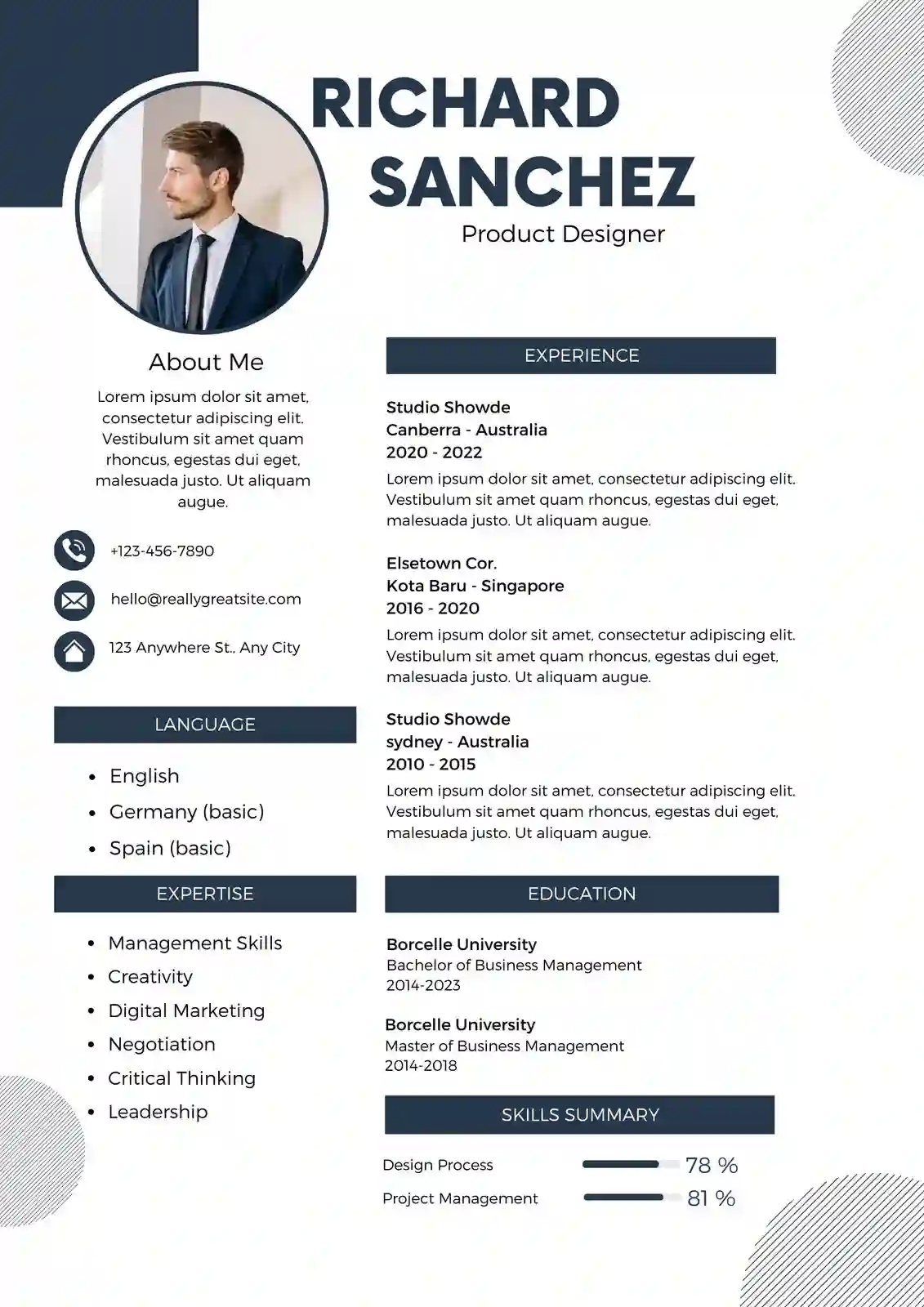
An elegant resume format is not about decoration. It is about clarity, balance and professional restraint. In 2026, Indian recruiters on Naukri, LinkedIn and company career portals spend less than 8 seconds on the first scan, and applicant tracking systems (ATS) used by TCS, Infosys, Wipro, HDFC Bank and hundreds of startups filter resumes before a human ever sees them. An elegant format helps you clear both filters. It uses clean typography, generous white space, subtle dividers and a logical hierarchy that guides the eye from your name to your most relevant achievements without distraction. Unlike flashy creative layouts that confuse ATS or dense single-column templates that hide your strengths, an elegant resume keeps the focus on content while signalling maturity and attention to detail. For freshers applying to mass recruiters and experienced professionals targeting manager or client-facing roles, this refined approach increases shortlist rates because it looks polished on PDF, prints well, and remains fully readable on mobile screens where many recruiters now review profiles.
What Is an Elegant Resume Format and Why Recruiters Prefer It in 2026
An elegant resume format is a refined professional layout built on minimalism and structure. It prioritises readability over graphics, uses one or two professional fonts, maintains consistent alignment, and presents information in a calm visual order. The goal is to make your experience, skills and education easy to scan while conveying a sense of polish that suits corporate, consulting, banking, education, hospitality and senior technical roles. In India, where recruiters often handle 200 to 500 applications for a single opening on Naukri or LinkedIn, elegance translates to efficiency. A hiring manager can locate your current designation, total experience, key skills and last employer within seconds without hunting through colours or icons.
Indian ATS software such as Naukri RMS, Zoho Recruit, Darwinbox and SAP SuccessFactors, which are widely used by IT services, BFSI and manufacturing companies, parse text-based resumes far more accurately than image-heavy designs. An elegant format is naturally ATS-friendly because it avoids text boxes, heavy tables, header-footer content and embedded graphics that break parsing. It keeps all critical information in the main body layer, uses standard headings like Work Experience, Education and Skills, and relies on simple bullet points. This ensures your resume is searchable by keywords like Java, GST, Digital Marketing, Business Analyst or Mechanical Design when recruiters run filters.
Core Elements of an Elegant Resume
Every elegant resume shares a few defining traits that separate it from basic or overly creative versions. These elements work together to create a document that feels premium yet remains functional for both human readers and ATS.
- Refined typography: Combination of a serif for headings like Playfair Display or Garamond and a sans-serif for body text like Inter, Calibri or Helvetica. Font size stays between 10 and 11.5 pt for body and 14 to 18 pt for your name.
- Balanced white space: Margins of 0.6 to 0.8 inches, line spacing of 1.0 to 1.15, and clear space between sections so the page breathes without looking empty.
- Subtle dividers: Thin horizontal lines or light grey rules to separate sections instead of thick coloured bars or sidebars that waste space.
- Consistent alignment: Left-aligned text for most content with right-aligned dates and locations for quick scanning. No centre-aligned paragraphs except for the header.
- Muted colour palette: Black text with one accent colour such as navy, charcoal, deep teal or burgundy used sparingly for headings or lines. No bright gradients.
- Text-based structure: No icons for contact details, no skill bars or circular charts, and no photos unless specifically required for international hospitality or modelling roles.
Who Should Choose an Elegant Format in the Indian Job Market?
An elegant format is versatile, but it delivers the highest impact for specific profiles. Freshers from B.Tech, BCA, BBA, MBA, B.Com and B.Sc backgrounds benefit because the layout makes internships, academic projects and certifications look structured even without long work history. For example, a fresher applying for a Graduate Engineer Trainee role at L&T or a Management Trainee role at ICICI Bank can use the elegant format to highlight final year project, summer internship at a local firm, and tools like Excel, Python or Tally in a clean sequence that recruiters trust.
Experienced professionals with 3 to 15 years of experience gain even more. If you are a software engineer, business analyst, HR executive, sales manager, teacher, accountant or operations lead, elegance signals seniority and client readiness. It is especially effective for roles where communication and presentation matter, such as client servicing, consulting, banking relationship management and academic leadership. Senior professionals targeting Director or AVP positions also prefer this format because it allows a two-page presentation without looking crowded, with clear grouping of leadership achievements, team size managed, revenue handled and process improvements delivered.
Anatomy of an Elegant Resume That Clears ATS Used by Indian Companies
Indian employers rely heavily on ATS to manage volume hiring. Even mid-sized companies in Pune, Hyderabad, Bangalore and Gurgaon use Naukri RMS or Zoho Recruit to auto-rank resumes based on keyword match, experience and education. An elegant resume is built to be parsed correctly on the first attempt. That means using standard section headings, saving as a text-selectable PDF or Word file, and avoiding elements that ATS cannot read.
The header should contain your full name in larger font, followed by phone number with +91, professional email, city and state like Pune, Maharashtra, and links to LinkedIn and portfolio if relevant. Do not place contact details in the header or footer area of Word, as many ATS ignore that layer. Keep them in the main body at the top. Use a professional email like firstname.lastname@gmail.com rather than nicknames. For LinkedIn, customise your URL to linkedin.com/in/yourname for a cleaner look.
Recommended Section Order for Maximum Readability
Order matters because recruiters read in an F-pattern. Place the most relevant information where eyes land first. For most Indian job seekers, this sequence works best:
- Header: Name, contact, LinkedIn, location.
- Professional Summary: 3 to 4 lines tailored to the target role, mentioning years of experience, core domain and one or two standout achievements.
- Key Skills: 10 to 14 skills grouped by category such as Technical Skills, Tools, Management Skills. Use exact keywords from the job description like Advanced Excel, SAP FICO, SEO, React.js.
- Work Experience: Reverse chronological order with company name, location, designation, employment dates in Month YYYY format, and 3 to 5 bullet points per role.
- Education: Degree, university, year of passing, percentage or CGPA if above 7.5 or 65%.
- Certifications and Projects: Relevant certifications like Google Analytics, AWS, NISM, PMP with year, and 1 to 2 academic or professional projects with outcome.
- Achievements and Additional Information: Awards, languages known, volunteer work if relevant.
For freshers with limited experience, move Education above Work Experience and expand the Projects and Internships section. For experienced professionals, keep Work Experience at the centre and limit Education to one line per degree. Always use simple bullet points with a hyphen or dot, not arrows or checkmarks, and start each bullet with a strong action verb like Led, Developed, Managed, Achieved, Reduced, Implemented.
Avoid common ATS blockers: tables for layout, text boxes, multiple columns that split content, images, logos, and headers with background shading. If you want a two-column look for skills, use a simple single table with invisible borders or better, use comma-separated lists. Save the file as FirstName_LastName_Resume.pdf or .docx and keep file size under 1 MB for easy upload on Naukri and company portals.
Elegant Resume Templates for Freshers, Mid-Level and Senior Professionals
ResumeEra.xyz offers elegant templates tuned for Indian hiring expectations. Each template is available in both PDF and Word, with A4 size, print-ready margins and fonts that render correctly on Windows and Mac. You can edit directly in the browser and download without watermarks.
For freshers, the elegant fresher template uses a single page with a slightly larger education and project area. It includes placeholders for 10th and 12th details if you are applying to companies like TCS NQT or Infosys SP that still ask for them, plus dedicated space for internships, final year project with technology stack and outcome, and extracurricular leadership. The design keeps the top half focused on summary and skills so campus recruiters can quickly match you to eligibility criteria.
For mid-level professionals with 3 to 8 years of experience, the elegant professional template allows a clean two-page option. It features a compact header, a horizontal skill tag area that saves vertical space, and experience blocks with company, designation and tenure clearly separated. This is ideal for IT professionals switching from service-based to product-based companies, sales executives showing territory and revenue growth, or analysts showing tools and domain expertise. The template supports adding metrics like Managed team of 6, Improved process efficiency by 22%, Handled portfolio of Rs 4.5 Cr.
For senior professionals with 8+ years, the elegant executive template emphasises leadership and impact. It provides a broader summary area, a core competencies grid, and experience sections with space for key achievements under each role rather than just duties. It handles multiple companies, promotions within the same organisation, and career breaks with clarity. The layout remains calm even with dense content because of consistent spacing and thin dividers that prevent visual fatigue during detailed review by hiring managers and CXOs.
All templates use ATS-safe fonts and standard headings. You can switch accent colours from navy to charcoal without affecting parsing, and toggle between single and two-page length based on your experience. Each template is tested against Naukri RMS and Zoho Recruit parsing to ensure your name, email, phone, skills and experience are extracted correctly.
Elegant vs Other Popular Resume Formats: Which One Should You Pick?
Choosing the right format depends on your industry, experience and where you are applying. An elegant format sits between simple and modern layouts. It is more polished than a basic single-column resume but less graphic than a creative one. Understanding the difference helps you avoid using a flashy design for a conservative bank or a dull layout for a design agency.
| Format Type | Best For | ATS Compatibility | Visual Style |
|---|---|---|---|
| Elegant | Corporate, BFSI, consulting, education, experienced professionals, client-facing roles | Excellent - text-based, standard headings | Minimal, refined, thin dividers, muted accent |
| Modern | IT, startups, marketing, product roles | Very Good - clean but sometimes uses columns | Bold headings, two-tone, slightly graphic |
| Simple | Freshers, mass applications, government jobs | Excellent - single column, no graphics | Plain, functional, black and white |
| Creative | Design, media, advertising, portfolios | Poor to Moderate - icons, charts, images | Colourful, infographic, visual heavy |
| Professional | Mid to senior level across industries | Good - structured but can be dense | Formal, dense, traditional corporate |
If you are applying through Naukri, LinkedIn Easy Apply or company ATS portals, elegant and simple formats give you the highest parsing accuracy. If you are sending a resume directly to a hiring manager via email or carrying a printout to an interview in India, elegant stands out because it looks premium on paper without appearing overdesigned. For creative roles that require a portfolio, you can still use an elegant resume for the text application and attach a separate portfolio PDF or Behance link.
How to Build Your Elegant Resume on ResumeEra.xyz in 7 Simple Steps
ResumeEra.xyz is built for Indian job seekers who need a fast, accurate and free way to create a polished resume without design skills. The builder guides you section by section, suggests relevant skills and summaries based on your target role, and ensures the final PDF is ATS-ready. You do not need to adjust margins or fonts manually.
- Select the elegant template: Go to https://resumeera.xyz and open the Formats section. Choose the Elegant Resume template in single or two-page variant based on your experience. Preview how it looks for fresher and experienced examples.
- Enter header details accurately: Add your full name, phone with +91, professional email, city and LinkedIn URL. Double-check spelling and contact numbers to avoid missed interview calls.
- Write a targeted professional summary: Replace the placeholder with 3 to 4 lines specific to the job. Mention your role, years of experience, core skills and one measurable achievement. Example for a digital marketer: Digital Marketing Executive with 3 years of experience in SEO and Google Ads, managed campaigns worth Rs 12 lakh monthly, increased organic traffic by 68% for an e-commerce client.
- Add work experience with metrics: Enter each role in reverse order. For each, add 3 to 5 bullets starting with action verbs and include numbers where possible. Instead of Responsible for sales, write Achieved 118% of quarterly sales target for Pune territory, adding 22 new retail accounts in 6 months.
- Fill education, skills and certifications: Add degrees with university and year, list 10 to 14 skills matching the job description, and add certifications with issuing body and year. For freshers, add final year project title, technology used and outcome.
- Format and proofread: Use the builder's spacing and font controls to keep consistency. Run a spell check, verify dates, and ensure all headings are in title case. Keep the resume to one page if you have less than 5 years of experience, two pages if you have more.
- Download and test: Download as PDF for Naukri and email applications and as Word if the employer specifically asks for .docx. Upload the PDF to a free ATS parser or send it to yourself and copy-paste the text into Notepad to verify no content is missing or jumbled.
After downloading, name your file professionally. Use FirstName_LastName_Elegant_Resume.pdf or FirstName_LastName_TargetRole.pdf. Avoid names like resume_final_final.pdf. When applying on Naukri, update your profile headline and key skills to match the resume for better search ranking. On LinkedIn, copy your summary and experience bullets to your profile for consistency, as recruiters cross-check both.
Writing Content for Your Elegant Resume: What Indian Recruiters Actually Read
Design gets attention, but content gets interviews. Indian recruiters look for relevance, clarity and proof of impact. An elegant format gives your content room to breathe, but you must fill it with specific, role-aligned information. Avoid generic objectives like Seeking a challenging position where I can utilise my skills. Replace them with a summary that mirrors the job description language while remaining honest.
Use the STAR approach in bullet points without writing paragraphs. Focus on Situation, Task, Action and Result in one line. Quantify wherever possible because numbers are faster to trust than adjectives. For an accountant, write Reconciled monthly accounts for 45+ vendors, reducing pending discrepancies by 30% within 4 months using Tally Prime and Advanced Excel rather than Handled accounting work. For a teacher, write Taught Mathematics to 120 students of Class 9 and 10, improving average board scores from 68% to 81% in one academic year.
How to Write Achievement-Focused Bullet Points
Strong bullets follow a simple formula: Action Verb + Task + Tool or Skill + Measurable Result. Keep each bullet to one or two lines, not three. Start with verbs that show ownership.
- For freshers: Developed an e-commerce website using React and Firebase as final year project, featuring cart, payment gateway integration and admin panel, scored 8.9 CGPA and selected for college tech expo.
- For sales: Expanded distribution network in Nagpur region from 18 to 34 dealers, driving 27% revenue growth in FY 2024-25.
- For IT support: Resolved 95% of L1 tickets within SLA, reduced average response time from 4.2 hours to 1.8 hours by creating a knowledge base of 60+ solutions.
- For HR: Coordinated recruitment for 40 positions across operations and sales, closing 92% of roles within 25 days through Naukri and LinkedIn sourcing.
Tailor your skills section to each application. If a job post mentions Power BI, SQL and stakeholder management, ensure those exact phrases appear in your skills or experience if you possess them. Do not add skills you cannot discuss in an interview. Indian interviewers often ask for a practical example for every skill listed.
Recruiters in India often filter resumes by exact keyword matches before reading summaries. If the job says Business Development and you write Biz Dev, the ATS may not count it. Always mirror the terminology used in the job description while keeping the elegant layout intact.
Keep language simple and professional. Use Indian English conventions, write dates as Jan 2023 to Mar 2025, and mention locations for employers. Avoid abbreviations without expansion on first use. Write Search Engine Optimization (SEO) the first time if space allows, then use SEO thereafter.
Common Mistakes That Make an Elegant Resume Look Unprofessional
Even a refined template can look poor if content and formatting are inconsistent. These are the most frequent errors seen in resumes submitted to Indian recruiters, and how to fix them.
- Overcrowding the page: Trying to fit 10 years of experience on one page by reducing font to 8 pt and margins to 0.3 inches. Fix by allowing two pages for 5+ years of experience and trimming older or less relevant details.
- Inconsistent date and location formatting: Mixing Jan 2022, January 2022, 01/22 and leaving some roles without location. Use one format throughout, ideally MMM YYYY, and always include city.
- Using photos, icons and skill bars: Adding a profile photo, envelope icons or 90% skill bars. These add no value for most Indian corporate roles and often break ATS parsing. Remove them and use text only.
- Generic summary copied for every job: Sending the same summary to a data analyst and a business analyst role. Customise the summary and top 5 skills for each application to improve shortlist rate.
- Spelling and grammar errors: Mistakes like managment, recieved or inconsistent capitalisation. Proofread twice and read the resume aloud. Ask a friend to review.
- Listing duties instead of achievements: Writing Job role includes handling customers. Replace with Handled 40+ customer queries daily, maintaining 4.8/5 satisfaction rating on internal feedback.
- Saving as image PDF or using header/footer for contact: Exporting from Canva as image-only PDF or placing phone and email in Word header. Always export as text-selectable PDF and keep contact in the main body.
- Excessive colours and fonts: Using three colours and two decorative fonts. Stick to one accent colour and one or two professional fonts for a truly elegant feel.
Before you apply, do a final 30-second test. Open the PDF on your phone, zoom to 100%, and check if your name, current role, top skills and last company are visible without scrolling too much. If not, adjust the order or trim less important points.
Free Download and Sharing: PDF and Word for Naukri, LinkedIn and Direct Applications
Once your elegant resume is ready on ResumeEra.xyz, you can download it instantly in both PDF and Word formats without payment or watermarks. PDF is preferred for most applications in India because it preserves formatting across devices and is accepted by Naukri, LinkedIn, Indeed and company portals. Word is useful when a recruiter or consultancy explicitly asks for an editable file to add their logo or when you need to make quick edits offline.
For Naukri, upload the PDF to your profile and also update the Naukri resume headline, key skills and employment details to match the document. This improves your search appearance when recruiters filter by skills and experience. For LinkedIn, use the resume to update your About section and Experience bullets, and attach the PDF to your Featured section for easy access. When applying via email to a hiring manager or HR, attach the PDF with a clear subject line like Application for Business Analyst - 4 Years Experience - Pune - Rohan Sharma and write a concise 4 to 5 line email body highlighting your fit.
Keep two versions ready: a one-page elegant resume for quick applications and campus drives, and a detailed two-page version for experienced roles and email applications where more context helps. Store both on Google Drive and your phone so you can share immediately when a recruiter asks on WhatsApp or LinkedIn chat, which is increasingly common in Indian hiring. Always check the file opens correctly on mobile before sending.
Frequently Asked Questions About Elegant Resume Format
What is an elegant resume format?
An elegant resume format is a clean, refined layout that uses balanced white space, subtle dividers, professional typography and a muted colour palette to present your information clearly. It focuses on readability and hierarchy rather than graphics, making it suitable for corporate and client-facing roles while remaining fully ATS-friendly for portals like Naukri and Zoho Recruit.
Is the elegant resume format ATS-friendly for jobs in India?
Yes, when built correctly. An elegant format that uses standard headings, text-based bullets, no images or text boxes, and a selectable PDF or Word file is parsed accurately by ATS used in India such as Naukri RMS, Darwinbox and SAP SuccessFactors. Avoid placing contact details in headers or footers and avoid multi-column designs with text boxes.
Can freshers use an elegant resume format?
Absolutely. Freshers from B.Tech, BCA, MBA, B.Com and other streams can use the elegant format to highlight education, internships, academic projects, certifications and skills in a structured way. Place education and projects higher on the page and keep the resume to one page for better impact during campus placements and off-campus applications.
Should I download my elegant resume as PDF or Word?
Download as PDF for most applications on Naukri, LinkedIn and company career sites because it locks formatting and looks consistent on all devices. Keep a Word version ready for recruiters or consultancies who specifically request .docx for editing. ResumeEra.xyz provides both formats for free.
How long should an elegant resume be?
For less than 5 years of experience, keep it to one page. For 5 to 10 years, one to two pages is acceptable. For 10+ years or senior leadership roles, two pages is standard. Never reduce font below 10 pt or margins below 0.6 inches just to fit one page. Clarity is more important than length.
Which fonts and colours work best for an elegant resume?
Use professional fonts like Calibri, Helvetica, Inter, Garamond or Georgia. Keep body text at 10 to 11.5 pt and name at 14 to 18 pt. For colours, use black for body text and a single muted accent like navy #1B2A4E, charcoal #2F3640 or deep teal #144552 for headings and dividers. Avoid bright reds, gradients or more than one accent colour.
How is an elegant resume different from a simple or creative resume?
A simple resume is very plain and functional with no accent design, a creative resume uses heavy graphics, icons and colours for design roles, while an elegant resume sits in between. It adds refined visual polish through typography and spacing without graphics, making it both attractive to human readers and safe for ATS, which is ideal for most corporate jobs in India.
Where can I create and download an elegant resume format for free?
You can create and download an elegant resume for free on https://resumeera.xyz. Choose the elegant template, enter your details in the builder, and download a print-ready PDF and Word file without watermarks. The templates are designed for Indian recruiters and tested for ATS compatibility.
An elegant resume format works because it respects the reader's time and the system's rules. It presents your experience with calm confidence, whether you are a fresher from Nagpur applying to your first IT job or a sales manager in Mumbai targeting a regional lead role. By keeping the design restrained, the content specific and the file ATS-ready, you increase your chances of being shortlisted on Naukri, noticed on LinkedIn and remembered in interviews. Build your version on ResumeEra.xyz, tailor the summary and skills for each job, and keep both PDF and Word copies ready to share. A refined, well-structured resume often makes the difference between being scrolled past and being called for the next round.