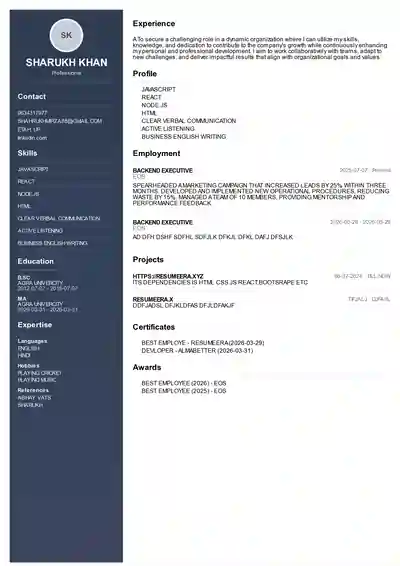
A creative resume layout in 2026 is not about adding colours for the sake of design, it is about presenting your skills, projects and experience in a structure that grabs attention in the first six seconds while still clearing the ATS filters used by Naukri, LinkedIn and company portals across India. For designers, marketers, content creators, UI/UX professionals, architects and even freshers applying to startups in Bengaluru, Hyderabad or Gurugram, a design-forward resume helps you stand out in a pile of identical Word templates. ResumeEra.xyz offers free creative resume templates in both PDF and Word that balance visual appeal with recruiter readability, so you do not have to choose between looking professional and looking memorable. This guide explains exactly when to use a creative layout, what to include, how to keep it ATS-friendly, and how to build one step by step for the Indian job market, with specific examples for freshers, experienced professionals and career switchers targeting both MNCs and Indian startups.
What Is a Creative Resume Layout and Who Should Use It in 2026?
A creative resume layout is a professionally designed format that uses visual hierarchy, thoughtful typography, colour accents, icons and structured sections to highlight your strengths more effectively than a plain chronological format. Unlike a simple black-and-white resume, a creative layout organises information into clear blocks, sidebars or columns, uses subtle design elements to guide the recruiter’s eye, and gives more weight to portfolio links, skills and achievements. In 2026, Indian recruiters do not reject creative resumes outright, but they do expect them to remain readable, well-structured and ATS-compatible. The key is controlled creativity, where design supports content instead of overpowering it. If your work itself is visual or communication-driven, a creative layout acts as a sample of your aesthetic sense and attention to detail.
Key Characteristics of a Design-Forward Resume
A strong creative resume in 2026 shares five common traits that make it effective for the Indian hiring process. First, it maintains a clear visual hierarchy with a prominent header for your name and target role, followed by distinct sections for summary, skills, experience and education. Second, it uses limited colour, typically one primary accent and one neutral shade, to highlight section headings or key metrics without distracting from the text. Third, it integrates icons sparingly for contact details, LinkedIn and portfolio links, which saves space and improves scanning. Fourth, it balances white space and text density so the resume looks uncluttered even when printed or viewed on mobile, which many recruiters in India do on Naukri or LinkedIn apps. Fifth, it remains fully selectable as text, not an image-based PDF, so ATS software used by TCS, Infosys, Wipro, Accenture and mid-size startups can parse it accurately.
- Structured grid: Two-column or sidebar layout with main content on the left or right, keeping the most important information above the fold.
- Typography pairing: One clean sans-serif for headings like Poppins or Inter and one highly readable font for body text like Calibri or Open Sans.
- Accent colour block: A vertical bar, header background or skill meter in muted blue, teal, charcoal or maroon rather than bright neon shades.
- Portfolio integration: Clickable links to Behance, Dribbble, GitHub, personal website or LinkedIn featured section directly under your name.
- Achievement focus: Bullet points that start with action verbs and include numbers, such as increased Instagram engagement by 42% in 4 months.
Which Indian Industries and Roles Prefer Creative Layouts
Creative layouts work best where presentation, originality and communication are part of the job. In India, these roles show the highest acceptance and even preference for design-forward resumes. For graphic designers, UI/UX designers, product designers, video editors, animators, photographers and architects, a creative resume is almost expected, as it reflects your design sensibility. For marketing, branding, social media, content writing, public relations and advertising roles in agencies across Mumbai, Delhi and Bengaluru, a well-designed resume signals that you understand audience attention. Even for product managers, business analysts and startup roles, a clean creative layout with data visualisation for skills can help you stand out if kept professional. However, for highly regulated fields like banking, core engineering, government jobs, medical and legal roles, a traditional or hybrid format is safer. Freshers applying to creative agencies, D2C brands and IT services companies with design verticals can use a creative layout to compensate for limited experience by showcasing projects, internships and freelance work more visually.
- Highly recommended: Graphic design, UI/UX, fashion design, interior design, animation, photography, advertising, content creation, social media management.
- Recommended with restraint: Digital marketing, product management, HR and talent branding, startup business development, edtech and content roles.
- Use traditional format: Core mechanical, electrical, civil engineering site roles, banking operations, chartered accountancy, medical, legal and PSU applications.
If you are a fresher from a Tier 2 or Tier 3 college applying through Naukri or LinkedIn Easy Apply, a creative layout with a strong projects section and skills matrix can help you get shortlisted faster than a plain text resume that buries your practical work under education details.
Creative vs Traditional Resume Formats: What Indian Recruiters Actually Prefer
Indian recruiters typically spend 6 to 8 seconds on an initial scan, and ATS software does the first filtering before a human sees your resume. A traditional reverse-chronological resume is the safest for ATS because it is linear, text-heavy and easy to parse. A creative resume adds visual cues that help human readers but can confuse ATS if built with text boxes, heavy tables or images. The solution for 2026 is a hybrid creative layout that looks designed to humans but remains linear and text-based for machines. ResumeEra.xyz templates are built this way, using standard headings, proper reading order and selectable text while still offering colour and layout variety. Understanding the trade-offs helps you choose correctly based on where you are applying.
| Feature | Creative Layout 2026 | Traditional Chronological Layout |
|---|---|---|
| Visual appeal | High, with colour accents, icons and sidebar sections | Low to moderate, single column, black and white |
| ATS compatibility | High if built correctly with text layers and standard headings | Very high, easiest for all ATS to parse |
| Best for | Design, media, marketing, content, startup and portfolio roles | Banking, engineering, government, legal, medical and senior corporate roles |
| Recruiter scan time | Faster for human eye due to hierarchy and icons | Requires more effort to locate skills and achievements |
| File format | PDF for design fidelity, Word for Naukri updates | Word and PDF both work well |
| Risk factor | Can fail ATS if made with images or text boxes | Very low risk, but can look generic |
For most private sector jobs in India where you apply via Naukri, LinkedIn, Indeed or company career pages powered by Taleo, SuccessFactors or Zoho Recruit, a controlled creative layout performs well. If you are applying through the National Career Service portal or a PSU application that specifically asks for a plain resume, switch to a traditional format. A practical approach is to keep both versions ready on ResumeEra.xyz and use the creative PDF when emailing hiring managers or messaging on LinkedIn, and the traditional Word version when uploading to ATS-heavy portals.
Recruiters in India often open resumes on mobile first. A creative layout with a clear header, short summary and skill tags at the top helps them decide in seconds whether to scroll further, whereas dense paragraphs get skipped. Keep your top one-third powerful and scannable.
Essential Elements of a High-Impact Creative Resume Layout for 2026
A creative resume must still contain all the core information a recruiter expects, just presented more intelligently. In 2026, the most effective layouts for the Indian market follow a predictable information order while using design to emphasise what matters. Start with a header that includes your full name, target job title, city, phone, professional email, LinkedIn URL and portfolio link. Follow with a 3 to 4 line professional summary tailored to the role, not a generic objective. Then prioritise sections based on your experience level. Freshers should place education, projects and internships before experience, while experienced professionals should lead with work experience and achievements. Skills, certifications and tools should be grouped logically, not listed as a long comma-separated paragraph. Every section heading must use standard wording like Work Experience, Education, Skills, Projects and Certifications so ATS can recognise them.
Visual Hierarchy and Typography That Passes ATS in India
Visual hierarchy decides where the recruiter’s eye goes first. Use size and weight to create three levels. Your name should be 22 to 26 points, section headings 12 to 14 points in bold with accent colour, and body text 10 to 11 points in regular weight. Stick to one or two fonts across the entire document. Recommended combinations for Indian recruiters are Poppins for headings with Inter for body, or Montserrat with Calibri. Avoid script fonts, thin light weights and all-caps paragraphs. Line spacing should be 1.1 to 1.3, with 8 to 12 points of space between sections. Margins of 0.6 to 0.7 inches keep the resume to one page for freshers and two pages maximum for those with 5+ years of experience. Importantly, do not place core content inside text boxes, shapes or headers and footers in Word, as many ATS ignore those areas. Use simple horizontal lines or thin colour blocks to separate sections instead of heavy borders.
- Use bold for job titles and company names, regular for descriptions and dates aligned to the right for easy scanning.
- Keep bullet points to 12 to 16 words, starting with verbs like Designed, Led, Built, Increased, Managed and Optimised.
- Left-align all text, avoid justified alignment which creates uneven spacing when parsed by ATS.
- Export as text-based PDF, not image PDF, and test by trying to select and copy text from the PDF.
Colour, Icons and Graphics – How Much Is Too Much?
Colour should guide, not decorate. For 2026, the most recruiter-approved palettes in India are navy with light grey, teal with charcoal, maroon with beige and black with a single blue accent. Use colour only for your name banner, section headings, icons and perhaps a left sidebar background if the text contrast remains high. Ensure a contrast ratio of at least 4.5:1 for readability. Icons should be simple line icons for phone, email, location, LinkedIn and portfolio, not large illustrations. Avoid skill bars, circular charts and infographics that ATS cannot read, instead use a clean comma list or grouped tags like Tools: Figma, Adobe XD, Photoshop, Illustrator. Progress bars that show 90% Photoshop look subjective and are often ignored by recruiters. If you want to show proficiency, write it as Expert in Figma and Adobe Creative Suite with 3+ years of daily use. Photos are not required for most Indian private sector jobs and can introduce bias, so skip the photo unless you are applying for acting, modelling or front-office hospitality roles where it is explicitly requested.
- Limit to one accent colour plus black and grey, avoid more than two colours on one page.
- Use icons at 8 to 10 points size, aligned with text, not as large graphic elements.
- Replace skill graphs with grouped skill categories: Design Tools, Marketing Tools, Programming Languages.
- Keep background white or very light, ensure printing in black and white still looks clean.
When you download a ResumeEra.xyz creative template, the colour codes and icon sets are already balanced for both screen and print, so you do not need to experiment with shades that may look unprofessional when printed at a cyber cafe or on an office printer.
Step-by-Step Guide to Building Your Creative Resume on ResumeEra.xyz
Building a creative resume does not require Photoshop or advanced design skills. With ResumeEra.xyz you can create a polished, ATS-friendly creative layout in under 20 minutes by following a structured process that focuses on content first and design second. This method is tailored for Indian job seekers who need both a PDF for LinkedIn and email and a Word file for Naukri profile updates.
- Pick the right creative template: Browse ResumeEra.xyz creative templates and choose a layout based on your role. For UI/UX and graphic design, pick a sidebar with portfolio link prominence. For marketing and content, pick a top-header layout with summary and key achievements highlighted.
- Set up your header correctly: Enter your full name, target role exactly as in the job description, city and state, mobile number, professional Gmail address and clickable LinkedIn and portfolio URLs. Test that links work in the exported PDF.
- Write a tailored 3-line summary: Mention your role, years of experience or fresher status, core tools and one standout achievement. Example: UI/UX Designer with 2 years of experience in Figma and Webflow, delivered 15+ landing pages that improved conversion by 28% for D2C clients.
- Add experience with metrics: List your last 2 to 3 roles in reverse order. For each, add company, location, dates and 3 to 5 bullets with numbers. Freshers should add internships, freelance projects and college major projects with the same structure.
- Group skills intelligently: Create categories like Design: Figma, Adobe XD, Illustrator; Marketing: SEO, Google Analytics, Meta Ads; Code: HTML, CSS, JavaScript. This helps both ATS keyword matching and human scanning.
- Insert projects and portfolio: Add 2 to 3 best projects with a one-line description, tools used and a short link. For example, E-commerce App Redesign – Figma prototype – bit.ly/portfolio-link – increased task completion by 34% in user testing.
- Check ATS basics: Use standard headings, avoid text boxes, keep font size above 10 points, save file as YourName_Role_Resume.pdf and also export Word version as YourName_Resume.docx for Naukri.
- Proof and export: Run a spell check, verify dates, ensure phone and email are correct, check PDF text selection, and keep the final file under 1 MB for easy uploading to Naukri, LinkedIn and company portals.
After exporting, upload the Word version to your Naukri profile and keep the PDF ready for direct emails to hiring managers. Many candidates in India lose opportunities because their Naukri resume is outdated while their PDF is new, so update both together on the same day.
Best Creative Resume Layout Examples for Different Experience Levels
The ideal creative layout changes with your career stage. A fresher needs to highlight education and projects, a mid-level professional needs to emphasise achievements and leadership, and a career switcher needs to bridge old and new skills. ResumeEra.xyz offers variations that address each scenario without making the resume look empty or overcrowded.
- Fresher creative layout (0 to 1 year): Use a one-page template with a strong top summary, education with CGPA or percentage, 2 to 3 academic or freelance projects with links, internship experience, technical skills and certifications like Google UX Design or HubSpot Content Marketing. Example structure for a B.Des fresher from NIFT: Header, Summary, Education, Projects with Behance links, Internship at local agency, Skills, Certifications, Languages.
- Experienced creative layout (2 to 6 years): Use a two-column layout where the left sidebar holds contact, skills, tools and awards, and the main column holds summary, experience and projects. Focus on metrics. Example for a digital marketer in Gurugram: Managed Rs 12 lakh monthly ad spend, grew organic traffic from 8k to 42k in 9 months, led a team of 3 content writers.
- Senior and career switcher layout (6+ years or switching domains): Use a clean header with a concise leadership summary, followed by core competencies, career highlights and then chronological experience. For a teacher switching to instructional design, highlight curriculum design, e-learning tools like Articulate and Canva, and freelance course projects before teaching experience.
For all levels, keep the resume to one page if you have less than 4 years of experience, and strictly two pages if you have more. Indian recruiters rarely read a third page. If your creative template has a sidebar, ensure the sidebar does not push important experience to the second page unnecessarily. Test print on A4, as most Indian companies still print resumes for interview panels, and check that colours remain subtle in grayscale.
When applying to startups via LinkedIn or AngelList, you can afford slightly bolder design with a portfolio QR code in the header. When applying to large IT services or consulting firms via their ATS portal, choose the most minimal creative template with no background shading to maximise parsing accuracy.
Common Mistakes to Avoid in Creative Resume Layouts
Even a beautiful template can hurt your chances if common errors are overlooked. These mistakes are frequently seen in creative resumes submitted to Indian recruiters and often lead to rejection before the interview stage.
- Overdesigning with too many colours and fonts: Using three or more colours, multiple font styles and decorative borders makes the resume look like a poster and distracts from your experience. Stick to one accent colour and two fonts maximum.
- Making the resume image-based: Exporting from Canva or Photoshop as a flat image PDF means ATS cannot read any text. Always export as selectable text PDF and verify by copying text.
- Using non-standard section headings: Headings like My Journey or What I Bring confuse ATS. Use Work Experience, Education, Skills, Projects, Certifications and Achievements exactly.
- Adding irrelevant graphics and skill charts: Pie charts, star ratings and progress bars look creative but convey no verifiable information and are ignored by both ATS and senior recruiters.
- Ignoring file size and naming: Uploading a 5 MB file named resume_final_final.pdf looks unprofessional and may fail to upload on Naukri. Keep under 1 MB and name as Ananya_Sharma_UIUX_Designer.pdf.
- Forgetting to tailor for each job: Sending the same creative resume to a graphic designer role and a social media role without changing keywords reduces shortlisting. Mirror 5 to 7 keywords from each job description in your skills and summary.
- Placing key information in header or footer: Contact details or skills placed in Word header or footer are often missed by ATS. Keep all critical text in the main body of the document.
Another frequent error is using a creative layout with dense paragraphs instead of bullets. Recruiters scan bullets 40% faster, so convert every responsibility into a bullet with a result. Finally, do not include personal details like father’s name, religion, marital status or full home address, which are outdated for private sector jobs in India and waste valuable space.
Optimising Your Creative Resume for ATS, Naukri and LinkedIn in India
A creative resume must work across three channels that dominate hiring in India: ATS software, Naukri search and LinkedIn visibility. ATS used by large employers like TCS iON, SAP SuccessFactors, Oracle Taleo and Zoho Recruit scans for keywords, headings and chronological order. Naukri’s internal search ranks resumes based on title, skills, summary and recency. LinkedIn’s algorithm and recruiters using LinkedIn Recruiter look at headline, about section and skills that match your resume. To satisfy all three, keep your wording consistent across platforms and ensure your creative PDF and Naukri profile tell the same story.
- Keyword optimisation: Extract 8 to 10 core keywords from the job description and place them naturally in your summary, skills and experience bullets. For a performance marketing role, include Google Ads, Meta Ads, ROAS, conversion rate, Google Analytics and A/B testing.
- Standard headings and date format: Use Month YYYY to Month YYYY for experience, and keep headings in title case. Avoid tables for experience, use simple lines and bullets.
- File compatibility: Keep both PDF and DOCX versions ready. Upload DOCX to Naukri for best parsing, send PDF via email and LinkedIn where design fidelity matters.
- LinkedIn alignment: Copy your resume summary to your LinkedIn About section, ensure your LinkedIn headline matches your resume target title, and add portfolio links to the Featured section.
- Test before applying: Upload your resume to a free ATS checker, copy-paste text into Notepad to see if order remains correct, and view it on mobile to check readability.
For freshers, update your Naukri profile every 7 to 10 days, as Naukri boosts recently updated resumes in recruiter searches. For experienced professionals, add a short cover note when applying on LinkedIn that references one achievement from your creative resume to encourage the recruiter to open the PDF. Always keep your resume filename professional and include the role, which helps recruiters searching their downloads folder later.
With ResumeEra.xyz you can edit your creative resume online and re-export in seconds, so you can quickly create role-specific versions for different applications without rebuilding from scratch. This agility is crucial in 2026 when most active job seekers in India apply to 15 to 25 roles per week across multiple portals.
Frequently Asked Questions About Creative Resume Layouts
Is a creative resume layout accepted by ATS used in India?
Yes, if it is built correctly. ATS can read creative layouts that use selectable text, standard headings and a linear reading order. Problems occur only when the resume is image-based, uses text boxes, heavy tables or places content in headers and footers. ResumeEra.xyz creative templates are designed to be ATS-friendly while still looking designed, so they pass filters on Naukri, Taleo and Zoho Recruit when exported as text-based PDF or Word.
Should freshers in India use a creative resume for their first job?
Freshers can use a creative layout when applying to design, media, marketing, content and startup roles where presentation matters. For freshers, a one-page creative template that highlights projects, internships, certifications and tools is more effective than a plain resume that only lists education. For bank, government or core engineering fresher roles, use a traditional format instead.
What is the best file format for a creative resume – PDF or Word?
Keep both. Use PDF to preserve design, colours and icons when emailing recruiters or applying via LinkedIn and company websites. Use Word DOCX when uploading to Naukri and other ATS portals, as Word is parsed most accurately. Name files professionally like Rahul_Verma_GraphicDesigner.pdf and keep size under 1 MB.
How many colours and fonts should a creative resume have in 2026?
Use one accent colour plus black and grey, and a maximum of two fonts. For example, navy for headings and lines with black body text, using Poppins for headings and Inter for body. This keeps the resume professional, printable in grayscale and easy to scan. Avoid neon colours, script fonts and more than two font families.
Do I need to include a photo in my creative resume for Indian jobs?
No, a photo is not required for most private sector jobs in India and is best avoided to prevent bias and save space. Only include a photo if the job description explicitly asks for it, such as acting, modelling, cabin crew or certain hospitality roles. Focus that space on portfolio links and achievements instead.
Can I use the same creative resume for Naukri, LinkedIn and direct emails?
You can use the same content but optimise the format per channel. Upload the Word version to Naukri for ATS parsing, use the PDF version for LinkedIn Easy Apply and direct emails where design matters, and ensure your LinkedIn headline, About and Skills match your resume keywords for consistency across platforms.
How long should a creative resume be for Indian recruiters?
For freshers and professionals with up to 4 years of experience, keep it to one page. For 5+ years of experience, two pages are acceptable if every line adds value. Recruiters in India rarely read beyond two pages, so prioritise recent and relevant experience, remove outdated college details and keep bullets concise.
A creative resume layout for 2026 is your opportunity to show both substance and style without sacrificing clarity or ATS compatibility. When you control colour, typography and structure, you help Indian recruiters see your best work in seconds while still ranking high on Naukri and LinkedIn searches. Choose a template that matches your industry, tailor it with metrics and keywords for each role, and keep both PDF and Word versions updated. Build your design-forward resume today on ResumeEra.xyz and present a version of your profile that is as polished and professional as the work you want to be hired to do.