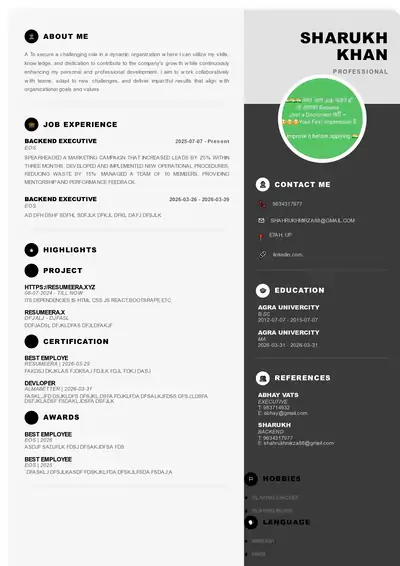
Colorful resume dekhne me attractive lagta hai, lekin kya wahi resume Naukri, LinkedIn ya company career portal ke ATS ko bhi pasand aayega? India me 90% se zyada badi companies aur consultancy ab resume ko pehle ATS (Applicant Tracking System) se scan karwati hain, uske baad hi recruiter tak bhejti hain. Isliye design aur ATS compatibility ke beech sahi balance banana sabse zaruri hai. Bahut se fresher Canva ya Photoshop me neele, narangi, ya teal color ke resume bana lete hain jo Instagram par achha lagta hai, par jab wahi file Naukri ya Workday, Greenhouse, SAP SuccessFactors jaise ATS me upload hoti hai to text parse hi nahi hota. Is article me hum ek practical Colorful Resume Design Example - Free ATS Resume ko base bana kar samjhenge ki kaise aap color ka use karke bhi 100% ATS friendly resume bana sakte hain, kaun se color, font aur layout safe hain, aur kaise ResumeEra.xyz par free me aisa resume 15 minute me taiyaar kiya ja sakta hai.
1. Colorful Resume Aur ATS Kya Hai - Basic Samajh
Colorful resume ka matlab ye nahi ki poora page rang-biranga bhar diya jaye. Iska matlab hai strategic tarike se 1-2 professional color ka use karna taaki aapka naam, section heading, ya skill bar highlight ho jaye aur recruiter ki nazar 6-7 second me important information par chali jaye. ATS ka kaam alag hai. ATS ek software hai jo resume ke text ko padhta hai, keywords ko match karta hai aur candidate ko rank karta hai. Agar aapka resume image ke form me hai, ya text boxes aur heavy graphics me uljha hua hai, to ATS usko blank samajh leta hai. India me TCS, Infosys, Wipro, Accenture, Capgemini, Deloitte jaise employers ke saath-saath chhoti startups bhi Naukri RMS, Zoho Recruit, Darwinbox, aur Taleo jaise ATS ka use karti hain. Isliye aapka colorful design tabhi kaam karega jab uska structure ATS ke liye readable ho.
1.1 ATS Kaise Kaam Karta Hai India Me
ATS sabse pehle aapki resume file ko text me convert karta hai. Phir wo heading ko pehchanta hai jaise Work Experience, Education, Skills, Projects. Uske baad wo Job Description (JD) ke keywords se aapke resume ke keywords ko milata hai. Jaise agar JD me "Digital Marketing, SEO, Google Analytics, Content Strategy" likha hai aur aapke resume me ye words sahi spelling aur sahi section me hain, to aapka score badh jayega. ATS font, color ya thoda bahut bold/italic samajh leta hai, lekin wo multiple column, header-footer me likha text, image ke andar likha text, aur graph/chart ko nahi samajh pata. Isliye ek hi page par do column wala design jisme left side me skills aur right side me experience ho, aksar ATS me gadbad kar deta hai. Single column layout sabse safe mana jata hai, chahe aap color use karein ya na karein. ResumeEra.xyz ke templates isi logic par bane hain - upar naam aur contact, uske baad summary, experience, education, skills, ek ke neeche ek.
1.2 Colorful Design Ka Attraction Aur Risk
Recruiter jab LinkedIn ya Naukri par 50 resume ek saath kholta hai, to sabhi black-white resume ek jaise lagte hain. Halka navy blue heading, grey divider line, ya teal color me aapka naam thoda alag dikhta hai aur yaad reh jata hai. Creative field jaise Graphic Designer, UI/UX, Marketing, Content, Architecture me to halka color expected bhi hota hai. Lekin risk tab aata hai jab aap neon color, poore background me color fill, ya 4-5 alag color ek saath use kar dete hain. ATS ke alawa recruiter ko bhi aise resume me padhne me dikkat hoti hai. Best practice ye hai ki 60-30-10 rule follow karein - 60% white space, 30% black/dark grey text, 10% ek accent color. Jaise heading ke liye #0F4C75 (navy blue) ya #2E7D6F (teal green) aur baaki text #222222 me. Ye combination print me bhi saaf dikhta hai aur ATS parsing me bhi koi dikkat nahi deta.
2. Kya Colorful Resume ATS Friendly Ho Sakta Hai? Myth vs Sach
Bahut se YouTube video aur Telegram group me kaha jata hai ki ATS sirf black-white resume hi padh pata hai, color use karte hi reject ho jayega. Ye adha sach hai. Asli sach ye hai ki ATS ko color se koi problem nahi hai, usko problem hai design structure se. Enhancv, Resume Worded aur Resume.io ne 2024-2026 me Workday, Greenhouse aur SAP SuccessFactors par test karke dikhaya hai ki single column wale, standard heading wale, aur text-based colorful template 100% parse ho jate hain. Matlab agar aapne color sirf heading text, line, ya icon ke liye use kiya hai aur saara content actual text ke roop me hai, na ki image ke roop me, to ATS aaram se padh lega. Problem tab hoti hai jab log Canva me poora resume ek badi image bana kar PDF export kar dete hain. Us case me ATS ko sirf ek image dikhti hai, text nahi. Isliye colorful = ATS fail ye myth hai. Sahi colorful = ATS pass ye sach hai.
2.1 Research Kya Kehti Hai
Resume.io aur Enhancv ki 2026 guide ke mutabik, jo template clean heading hierarchy (H1 for Name, H2 for Section) aur standard font (Calibri, Arial, Garamond, Noto Sans) use karte hain, wo chahe unme halka color ho, ATS me sahi parse hote hain. 1MillionResume ne bhi bataya hai ki do column layout aur text box wale design ka parsing score 30-40% gir jata hai, jabki single column colorful design ka score 95%+ rehta hai. Iska matlab aapko color chhodne ki zarurat nahi, aapko layout sudharne ki zarurat hai. Indian context me Naukri ka ATS resume ko .docx aur searchable PDF dono me achhe se padh leta hai, lekin agar aapne resume ko scanned image PDF banaya to wo fail ho jayega. Isliye hamesha export karte waqt "Save as PDF - Text selectable" option check karein.
Aap is baat ko aise samjhiye - ATS ek andha reader hai jo sirf text padhta hai, aankh se design nahi dekhta. Recruiter ek design dekhne wala reader hai jo 6 second me decide karta hai. Aapko dono ko khush karna hai. Isliye color ka use aankh ke liye, aur clean structure ka use ATS ke liye karein. Dono saath-saath ho sakte hain.
Pro Tip: Apna colorful resume banane ke baad usko Notepad me copy-paste karke dekhein. Agar saara text sahi order me, bina toot-phoot ke dikh raha hai, to samjhiye ATS bhi usko sahi padh lega.
3. ATS Friendly Colorful Resume Banane Ke Design Rules
Ek perfect colorful ATS resume ke 7 golden rules hain jo har fresher aur experienced candidate ko follow karne chahiye. Pehla, single column layout rakhein. Dusra, color sirf 1-2 jagah use karein - naam, section heading aur divider line. Teesra, standard font size rakhein - naam 18-22pt, heading 11-13pt, body 10-11pt. Chautha, heading ka naam standard rakhein - "Work Experience" ko "Meri Kahani" ya "Career Yatra" mat likhein, ATS usko pehchanega nahi. Paanchva, icon ka use kam karein, aur agar karein to uske saath text zarur likhein jaise "? 98765-43210" ke saath "Phone: 98765-43210" bhi likhein. Chhatha, table aur text box se bachein, bullet points ka use karein. Saatva, file ko .docx ya text-based PDF me save karein, image PDF me nahi.
Color chunne ke liye hamesha professional palette chuniye. IT, Finance, Consulting ke liye Navy Blue (#0F4C75), Charcoal Grey (#333333) ke saath best hai. Marketing, Design, HR ke liye Teal (#2E7D6F) ya Maroon (#8B2635) thoda creative touch deta hai. Fresher ke liye halka blue-grey combination safe hai. Kabhi bhi halke peele ya halke gulabi text ka use white background par mat karein, wo print me dikhega hi nahi.
| Feature | ATS Friendly Colorful Design | ATS Fail Colorful Design |
|---|---|---|
| Layout | Single column, top to bottom flow | 2-3 column, text box, heavy sidebar |
| Color Use | 1 accent color sirf heading aur line par | 4-5 color, poora background rangin |
| Font | Calibri, Arial, Garamond, Noto Sans | Decorative, script, bahut patla font |
| Heading | Standard: Experience, Education, Skills | Creative: My Journey, What I Do |
| File Type | Searchable PDF ya .docx | Image PDF, JPG, PNG |
| Graphics | Minimal line/icon with text | Skill chart, progress bar, infographic |
| Parsing Result | 95-100% text correctly parsed | 40-60% text missing ya jumbled |
Is table se saaf hai ki color dushman nahi hai, galat layout dushman hai. Aap ResumeEra.xyz par jo colorful templates dekhte hain, wo isi ATS friendly logic par bane hain - upar se neeche tak linear flow, sahi heading tag, aur color sirf highlight ke liye.
4. Step-by-Step: ResumeEra.xyz Par Colorful ATS Resume Kaise Banaye
Ab practical baat karte hain. Maan lijiye aap ek B.Com fresher hain ya 3 saal ke Software Developer hain, aapko 15 minute me ek colorful par ATS friendly resume banana hai. Neeche diye gaye steps ko follow karein:
- Template Chuniye - Single Column Wala: ResumeEra.xyz par "ATS Resume" ya "Colorful ATS" category me jayein. Jo template single column ho, jisme left-right me alag box na ho, wahi chuniye. Preview me dekhiye ki heading ka color navy ya teal ho, par content ek hi column me ho.
- Contact Section Sahi Bharein: Sabse upar apna naam bade font me (accent color me), uske neeche phone, email, LinkedIn aur city likhein. Email professional rakhein jaise rahul.sharma@email.com. "Header/Footer" me contact mat daalein, seedha body me likhein taaki ATS padh sake.
- Professional Summary 3-4 Line Me Likhein: Fresher hain to "BCA Graduate with internship in Digital Marketing, skilled in SEO, Google Analytics, Canva. Looking for Entry-level Marketing role in Delhi NCR" jaise likhein. Experienced hain to "Software Developer with 3 years experience in Java, Spring Boot, MySQL, delivered 5 projects for BFSI clients" jaise. Yahan JD ke 2-3 keywords zarur daalein.
- Experience Ko Bullet Me Aur Number Ke Saath Likhein: Har job ke liye Company, Role, Duration, Location likhein. Uske neeche 3-5 bullet points jisme action verb + kaam + result ho. Jaise "Sales 18% badhayi, 120+ leads generate kiye, Excel aur CRM ka use kiya". Color ka use sirf Company Name ya Role heading par karein.
- Skills Ko Do Hisso Me Baantein: "Technical Skills: Java, Python, SQL, Power BI" aur "Soft Skills: Communication, Team Leadership" alag-alag bullet me likhein. Skill bar ya percentage circle ka use mat karein, ATS usko nahi samajhta. Simple comma separated list best hai.
- Education Aur Projects Saaf Likhein: Degree, College, Year, CGPA/Percentage ek line me. Project me Title, Technology, aur 2 bullet me kya banaya aur kya result mila. Color ka use sirf section heading "EDUCATION" ya "PROJECTS" par karein.
- Final Check Aur Export: Resume ko ek baar Notepad me paste karke check karein, spelling check karein, aur file ka naam "Rahul_Sharma_Resume_Marketing.pdf" jaise rakhein. ResumeEra.xyz se "ATS Optimized PDF" par click karke download karein. Naukri aur LinkedIn dono par yahi file upload karein.
In 7 steps se aapka resume dekhne me colorful aur professional lagega, aur ATS me bhi bina kisi error ke parse hoga. Yaad rakhiye, design ka kaam recruiter ko rokna hai, content ka kaam ATS ko pass karwana hai.
5. Fresher vs Experienced Ke Liye Color Strategy
Fresher aur experienced ka resume ek jaisa nahi hona chahiye, color strategy bhi alag hoti hai. Fresher ke paas experience kam hota hai, isliye unka resume education, internship, project aur skills par focus karta hai. Unke liye halka bright accent color jaise Teal ya Slate Blue achha rehta hai jo energy dikhata hai. Lekin fresher aksar galti karte hain - poore page ko design se bhar dete hain, college ka logo, badi photo, ya 2 page ka resume bana dete hain. Fresher ka resume hamesha 1 page ka hona chahiye, photo sirf tab lagayein jab job me manga gaya ho (jaise Cabin Crew, Acting). Color sirf heading aur naam tak limited rakhein.
Experienced candidate (2-10 saal) ke liye resume 1-2 page ka ho sakta hai, par color aur bhi minimal hona chahiye. Unke liye Navy, Charcoal, ya Deep Green zyada mature lagta hai. Experienced logon ko apne achievement ko number se dikhana chahiye - "Team of 6 ko lead kiya", "Cost 12 lakh bachaya", "Client retention 25% badhaya". In numbers ko bold karke aur heading color me highlight karne se recruiter ka dhyan turant jayega. Ek aur baat, experienced log aksar purane 10 saal ke saare kaam likh dete hain, jabki ATS aur recruiter ko last 5-7 saal ka relevant experience hi chahiye hota hai. Purana irrelevant kaam hata kar jagah bachayein aur white space badhayein.
Indian recruiters, khaas kar Naukri aur LinkedIn par, pehle 30 second me hi decide kar lete hain ki resume aage bhejna hai ya nahi. Isliye chahe aap fresher ho ya experienced, upar ka 1/3 hissa (naam, summary, top skills) sabse zyada colorful aur powerful hona chahiye, par ATS ke rules tod kar nahi.
6. Indian Job Portals Ke Hisab Se Optimization - Naukri, LinkedIn, Indeed
Har portal ka ATS thoda alag hota hai. Naukri ka system .docx ko sabse achhe se padhta hai aur skill ke basis par auto-tagging karta hai. Isliye Naukri par upload karte waqt .docx version bhi rakhein. LinkedIn Easy Apply me PDF chal jata hai, par wahan headline aur summary me keywords ka match bahut important hai. Indeed ka ATS simple hai, wo plain text ko prefer karta hai. Isliye ek hi colorful resume ko teeno jagah use kar sakte hain, bas file type ka dhyan rakhein.
Indian recruiters aksar JD me "MBA, Excel, Tally, GST, Digital Marketing, Java, React" jaise exact keywords daalte hain. Aapka kaam hai wahi exact spelling apne resume me daalna. Jaise JD me "Search Engine Optimization" likha hai to sirf "SEO" likhne se ATS match nahi karega, dono likhein - "Search Engine Optimization (SEO)". Location bhi important hai - "Delhi NCR", "Bangalore", "Pune" jaise words resume me hone se location filter me aapka resume upar aata hai. Colorful design me bhi ye keywords normal text me hone chahiye, kisi image ya chart ke andar nahi.
Ek aur Indian reality - bahut se candidate Naukri profile me resume headline, key skills aur summary alag se bharte hain, par resume file me wahi cheez alag likh dete hain. ATS dono ko cross-check karta hai. Isliye profile aur resume file me consistency rakhein. ResumeEra.xyz ka fayda ye hai ki aap ek baar resume bana kar usi content ko Naukri profile me copy-paste kar sakte hain, color hat jayega par keywords wahi rahenge.
7. Common Mistakes Jo Aapka Colorful Resume ATS Me Fail Kara Dete Hain
Hum roz ResumeEra.xyz par hazaron resume dekhte hain, sabse common galtiyan ye hain. Pehli galti - poora resume Canva me image bana kar PDF export karna. Dusri - header aur footer me phone/email likhna, ATS header-footer ko aksar skip kar deta hai. Teesri - fancy heading jaise "Where I Worked" ya "My Superpowers" likhna, ATS ko "Work Experience" aur "Skills" hi samajh aata hai. Chauthi - skill ko star rating ya progress bar se dikhana (★★★★★), ATS usko star samajh kar ignore kar deta hai. Paanchvi - 2 column layout me left side me saari skills aur right side me experience likhna, ATS dono ko mix kar deta hai. Chhathi - bahut chhota font (8pt) ya bahut halka grey text (#AAAAAA) use karna jo ATS to padh lega par recruiter ko dikhega hi nahi. Saatvi - file ka naam "Resume_Final_Final2.pdf" rakhna, isse recruiter confuse hota hai. Hamesha "Name_Role_Resume.pdf" rakhein.
In galtiyon se bachne ka sabse aasan tareeka hai ek tested ATS template use karna aur color ko sirf heading tak limit rakhna. Yaad rakhiye, recruiter ko aapka kaam chahiye, aapki rang-birangi kala nahi. Color sirf rasta dikhane ke liye hai, manzil to aapka content hi hai.
Ek chhota checklist bana lijiye: Kya mera resume Notepad me sahi dikh raha hai? Kya har heading standard hai? Kya maine JD ke 5-6 keywords daale hain? Kya file searchable PDF hai? Kya naam aur heading ke alawa kahin aur color nahi hai? Agar in sab ka jawab haan hai, to aapka colorful resume ATS ready hai.
8. FAQ - Colorful ATS Resume Se Jude Sawal
Kya colorful resume sach me ATS me reject ho jata hai?
Nahi, agar color sirf text heading aur line par use hua hai aur layout single column hai to ATS usko aaram se padh leta hai. Reject tab hota hai jab resume image-based ho ya multiple column aur text box se bhara ho. Color se nahi, structure se farak padta hai.
ATS ke liye kaun sa file format best hai - PDF ya DOCX?
Dono chalte hain, par India me Naukri aur kai company ATS .docx ko thoda zyada accurately parse karte hain. LinkedIn aur direct email ke liye searchable PDF best hai. Isliye dono version save karke rakhein aur portal ke hisab se upload karein.
Kya mujhe resume me photo lagani chahiye?
India me IT, Finance, Marketing jaise zyada tar role me photo ki zarurat nahi hoti aur ATS ke liye bhi ye extra data hai. Photo sirf tab lagayein jab JD me explicitly manga gaya ho jaise Hospitality, Cabin Crew, Modelling. Photo lagane se bhi ATS fail nahi hota, par jagah waste hoti hai.
Kitne color use karna safe hai?
Ek accent color + black + grey (white background par) sabse safe hai. Matlab naam aur heading ke liye ek color jaise navy blue, baaki text black/grey. 2 se zyada bright color use karne se resume bheed bhara lagta hai aur print me bhi kharab dikhta hai.
Fresher ke liye colorful resume me kya highlight karna chahiye?
Fresher ko education, internship, academic project, certification aur technical skills ko highlight karna chahiye. Color ka use karke "Internship" aur "Projects" heading ko highlight karein aur har project me technology aur result ko bullet me likhein. 1 page se zyada mat khichein.
Kya skill ko percentage ya graph me dikhana ATS friendly hai?
Bilkul nahi. ATS "Java 90%" ya progress bar ko nahi samajhta. Hamesha simple list likhein jaise "Skills: Java, Spring Boot, MySQL, REST APIs". Agar level batana hai to "Advanced", "Intermediate" jaise word use karein.
ResumeEra.xyz ka colorful ATS template free hai kya?
Haan, ResumeEra.xyz par kai colorful par 100% ATS friendly template free me available hain. Aap bina watermark ke PDF aur DOCX download kar sakte hain, aur baar-baar edit bhi kar sakte hain. Bas template chuniye, details bharie aur ATS optimized file download kijiye.
Ek achha colorful ATS resume wahi hai jo pehli nazar me recruiter ko pasand aaye aur pehle scan me ATS ko bhi samajh aaye. Iske liye aapko designer banne ki zarurat nahi, bas sahi template, sahi color aur sahi keywords ka combination chahiye. ResumeEra.xyz par bana har template isi soch se design kiya gaya hai ki aapka resume Naukri, LinkedIn, Indeed aur company portal - har jagah bina atke pahunche. Aaj hi ek simple, colorful aur ATS ready resume banaiye, apne JD ke keywords add kijiye aur confidence ke saath apply kijiye. Yaad rakhiye, naukri design se nahi, sahi presentation aur relevant skills se milti hai.