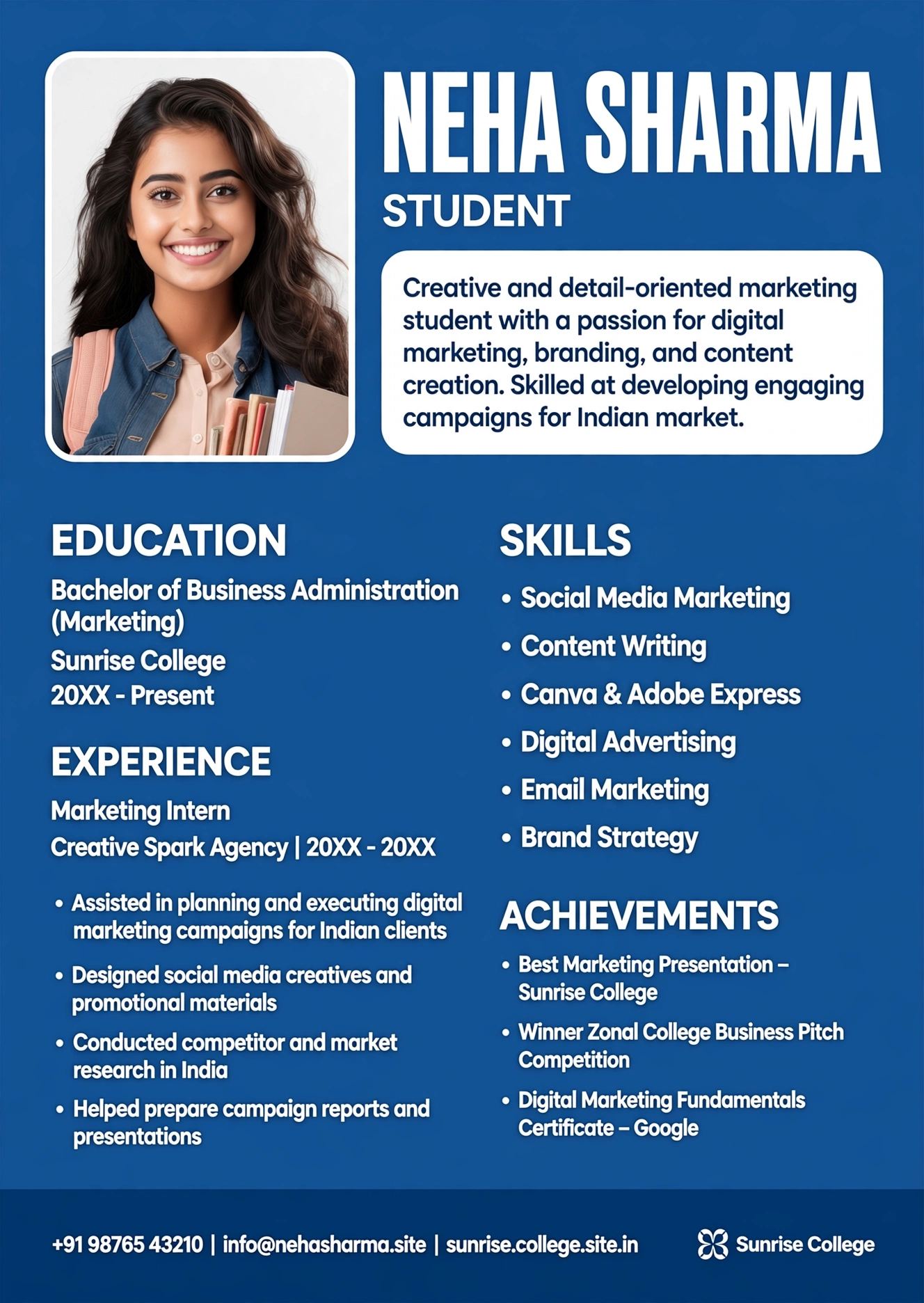
Marketing Student Infographic Resume Template India Fresher — Neha Sharma Edition
Answer first: marketing-student-infographic-resume-template ek visual, one-page resume hai jo marketing freshers ke liye banaya gaya hai — timeline, skill bars, campaign icons aur achievement blocks ke saath. India me freshers ke liye ye tab kaam karta hai jab aap internship, campus placement ya startup roles ke liye apply kar rahe ho aur recruiter ko 6 seconds me aapki story samajh aani chahiye. Neha Sharma version khas taur par BBA/MBA marketing students ke liye design kiya gaya hai jo projects, clubs, aur live campaigns se apna proof dikhana chahte hain bina experience ke bhi.
 Sharukh Mirza • Full-stack & SEO @ ResumeEra.xyzUpdated: Oct 202610 min read
Agar aap marketing student ho aur aapke paas 2-3 internships, college fest campaigns, ya Instagram page growth ka result hai lekin proper job experience nahi — to marketing-student-infographic-resume-template aapke liye shortcut hai. Traditional text-only resume me sab line-by-line padhna padta hai, jabki infographic me recruiter ko ek nazar me timeline, skills aur campaign outcomes dikh jaate hain. Lekin dhyan rahe — har company me ye format kaam nahi karta. Is guide me hum Neha Sharma ke fresher context se har angle cover karenge: kaunsa layout kab use karna, ATS ko kaise pass karna, aur kaunsa export format kaha bhejna hai. Sab kuch ResumeEra.xyz par free, bina signup ke.
1. What Is an Infographic Resume & When to Use It (And When to Avoid It)
Infographic resume ek visual storytelling resume hai. Text ke saath icons, timelines, progress bars, aur data blocks use hote hain taaki recruiter ko jaldi samajh aaye aapne kya kiya. marketing-student-infographic-resume-template iska student-focused version hai — jisme marketing-specific proof blocks hote hain jaise: Campaigns, Tools, Content, Analytics.
Simple definition ke beyond, iski asli power hierarchy me hai. Neha Sharma jaise fresher ke paas 0-1 year experience hai, par 4-5 proof points hain: college marketing club head, 2-month digital marketing internship, ek D2C brand ke liye 3 Instagram campaigns, aur Google Digital Garage certificate. Infographic layout in cheezon ko ek timeline + skill matrix me pack karta hai jo traditional bullet list se 2x faster skim hota hai.
When to Use — YES List
- Internships & campus placements in startups, agencies, D2C, edtech, media — jahan creativity valued hai.
- Portfolio + LinkedIn pe showcase — jahan ATS parsing mandatory nahi.
- Email to hiring manager — jab aap direct founder/marketing head ko bhejte ho.
- Design/marketing fests, competitions — jahan visual recall advantage hai.
When to Avoid — NO List
- Large MNC / Bank / Consulting / Government ATS — waha image-heavy PDF reject ho sakta hai. Hybrid use karo.
- Core finance, legal, PSU, TCS/Infosys mass drive — waha conservative one-column ATS resume safer hai. Aapko basic ATS resume template better lagega.
- Job portal auto-fill (Naukri, Workday) — waha text-selectable PDF chahiye, image-only nahi.
Agar aapke paas zero work experience hai to bhi tension nahi. Aap academic projects ko achievement me convert kar sakte ho — jaise “Led 5-member team for college fest sponsorship — ₹42k raised via cold DMs & stalls”. Yehi proof infographic me icon + number ke saath chamakta hai. Aur isko likhne ka formula hum section 3 me denge, plus no work experience guide bhi help karega.
2. Infographic vs Traditional vs Hybrid Resume: Which Gets You Hired?
India me fresher marketing roles ke liye teen format chalte hain — aur galat format choose karna directly reject ka reason banta hai. marketing-student-infographic-resume-template visual hai, traditional ATS-safe text-based hai, aur hybrid dono ka mix hai (single-column layout + light visual hierarchy bina heavy graphics ke). Har jagah infographic mat bhejo — samajh ke bhejo.
| Feature | Infographic Resume | Traditional ATS Resume | Hybrid Resume (Best of Both) |
|---|---|---|---|
| ATS Parse Score | 45–65% (agar image-only PDF ho to fail) | 95–100% (text-selectable, single column) | 88–95% (light icons, real text) |
| Best For | Startups, Agencies, D2C, Campus fest, Portfolio | MNC, Banks, Consulting, Naukri/Workday portals | Marketing fresher applying everywhere — 1 resume for all |
| Recruiter Scan Time | 6–7 sec — visual blocks se fast recall | 7–8 sec — headings se skim | 6 sec — timeline + bullets combo fastest |
| Risk | ATS reject, printing me color issue | Boring lag sakta hai creative role me | Almost zero — agar export sahi ho |
| File to Send | PDF (text-selectable) + PNG for LinkedIn | PDF / DOCX | PDF — yahi ResumeEra default hai |
| Neha Sharma Case | LinkedIn + direct email to founder | Deloitte / HUL ATS apply | Internshala, LinkedIn Easy Apply dono ke liye |
- Kya company 500+ employees wali hai aur ATS use karti hai? → Hybrid ya Traditional bhejo. minimalist ATS template dekho.
- Kya role creative hai (Social, Content, Brand)? → Infographic / Hybrid chalega, agar PDF text-selectable ho.
- Kya aap direct hiring manager ko email kar rahe ho? → Infographic wins — attachment ke saath portfolio link bhi do.
- Kya portal auto-parsing karta hai? → Traditional/DOCX. Infographic image kabhi mat bhejo.
Rule: Ek hi master resume rakho, par 2 exports banao — ATS-Hybrid.pdf for portals, Visual.pdf for humans. Dono ResumeEra se 1 click me ban jata hai.
3. 7 Essential Elements of a High-Converting Infographic Resume
Infographic ka matlab clipart bharna nahi. Har element ka ek hi kaam hai — recruiter ko proof jaldi dikhana. Neha Sharma template me ye 7 blocks fixed order me hone chahiye. Order change kiya to hierarchy toot jaata hai.
One-Page Layout Blueprint — Exact Order + Character Limits
- Header (Top 15%): Name + Role Target + 1-line value prop (60–80 chars). Ex: “BBA Marketing Fresher | Instagram Growth & Campaigns | 2 Internships” — photo optional in India, freshers ke liye avoid bhi kar sakte ho.
- Summary (2 lines, 180–220 chars): Formula — Who + What you do + 2 tools + 1 result. Ex: “Marketing student skilled in Canva, Meta Ads & Sheets. Grew college fest page 1.2k→8.4k in 45 days.”
- Skills Matrix (not bars): Groups — Tools / Marketing / Analytics. Har group me 4–5 skills max. Dots/bars ki jagah grouped pills use karo (neeche explain).
- Experience / Projects Timeline (40% space): 2–3 entries. Har entry: Role + Org + 2 bullets + 1 number. Timeline left side vertical line se connect.
- Education (10%): Degree + College + Year + CGPA/%. 1 line me.
- Certifications (8%): Google Digital Garage, HubSpot, Meta — icon + year.
- Footer Contact (5%): Phone, Email, LinkedIn, Portfolio/Behance, Location (City only).
Total target: 450–600 words, one page, 0.6–0.7" margins, 10–11pt body. Do page tabhi jab 2+ internships + 4 projects ho.
Element-wise Writing Formula
- Headline: [Degree] + [Aspiring Role] + [Top 2 Skills]. 8–10 words max.
- Summary: 2 lines, action verbs + 1 metric. resume summary guide me full formula hai.
- Bullets: Verb + Task + Result + Number. Ex: “Created 12 Reels for D2C skincare — 38k organic views, 412 link clicks.” quantify achievements aur action verbs yahi kaam karte hain.
- Skills: Bars mat do. “SEO ⭐⭐⭐⭐⭐” meaningless hai. Instead: Proficient: Canva, Meta Ads, Sheets | Familiar: Google Analytics, Mailchimp. Recruiter ko clarity chahiye, stars nahi.
✅ Visual Hierarchy — Good
- Header bold, 22–26pt; section titles 11pt uppercase with teal rule
- Timeline left-aligned, dates right-aligned, consistent spacing
- Skill groups as pills/tags, not 5-dot ratings
- Icons 16px, line icons, single color teal #0f766e
❌ Clutter — Bad
- 3 columns, 8 colors, photo + QR + giant pie charts
- Skill bars 70%, 80% — kisne measure kiya?
- Text inside images (ATS read nahi karega)
- Two fonts + shadows + gradients — print kharab
Yaad rakho — creative ka matlab readable + scannable hona chahiye. Agar resume ka screenshot leke WhatsApp pe forward karo aur text select na ho, to wo image hai, resume nahi. Aise me ATS fail.
4. How to Build marketing-student-infographic-resume-template in 5 Minutes (Template + Direct-on-Canvas Editing)
Canva/GraphMake me ghanton drag-drop karne se better — ResumeEra ka flow 5 minute ka hai. No signup, no watermark, direct canvas pe type karo, palette switch karo bina content khoye.
Method Choose Karo
Homepage ResumeEra.xyz kholo → “Start From Scratch” ya “Upload Existing Resume” (PDF/DOCX/Image). AI automatically details extract karke editor me daal deta hai. Scanned PDF bhi chalega.
Neha Sharma Infographic Template Select Karo
Internship → Marketing Student Infographic choose karo. Single-column, A4, text-selectable. Font embedded, margins print-ready.
Direct-on-Canvas Type Karo
Header pe click karke name/role likho, timeline block me internship/project add karo. Palette/Layout switch karne par content safe rehta hai — JSON backup auto-save hota hai. 80+ widgets (icons, dividers, tags) ek click me.
AI Keyword Suggestions Lagao
Right panel me AI “marketing intern” keywords suggest karta hai — jaise “campaign execution, content calendar, CTR, engagement rate”. Ek click me add. Is se ATS keywords match badhta hai.
Export — Text-Selectable PDF
Download → PDF (Text selectable, fonts embedded). PNG bhi milega LinkedIn ke liye. Link share karke recruiter ko live preview bhi bhej sakte ho. Check karne ke liye ATS score checker pe upload karke score dekho — 80+ hona chahiye hybrid ke liye.
5. Design Rules That Recruiters Actually Skim For
Recruiters design ko art ki tarah nahi, signal ki tarah dekhte hain. Unke 6-second skim me ye 5 rules decide karte hain aapko shortlist karna hai ya nahi.
- F-Pattern Hierarchy: Top header → left timeline → right skills. Eyes naturally F me move karti hain. Isliye timeline left, skills right — ulta mat karo.
- 1 Primary + 1 Neutral Color: Teal #0f766e + ink #0f172a + paper #ffffff bas. 3 se zyada colors se print me band baj jata hai. Background white rakho, sidebar light teal max 20% width.
- Real Text, Not Image Text: Har word selectable hona chahiye. Icon ke andar text mat likho. Graph ke labels bhi real text.
- White Space = Readability: Har section ke beech 16–20px gap, bullet ke beech 6px. Crowded lage to font 10.5 se 10 karo, par gap mat hatao.
- Consistent Icons: Ek hi style — line icons ya solid icons, mix nahi. Size 14–16px, stroke 1.5px.
Skill Visualization — Dots/Bars Kyu Avoid Kare?
“Canva 4/5 dots” ka matlab recruiter ke liye kuch nahi. Kya 5/5 = expert? Kisne certify kiya? Isse better:
- Grouped Proficiency: Core: Meta Ads, Canva, Excel | Working knowledge: GA4, HubSpot
- Proof-Linked: “Meta Ads (Ran ₹15k campaign, 2.1% CTR)” — number ke saath likho to trust banta hai.
- Tags as Pills: Rounded tags me skills — scannable, ATS bhi padh leta hai.
Accessibility bhi dekho — contrast ratio 4.5:1 se kam nahi, font sans 10pt se chhota nahi, aur color-blind safe palette (teal/ink/amber). Print karke dekho — agar black-white printer me bhi hierarchy clear hai, to design pass.
More design help: visually engaging resume tips aur color & font choices.
6. ATS Survival Guide: Make Your Visual Resume Parsable
Sabse bada myth — “Infographic = ATS reject.” Sach ye hai: text-selectable PDF infographic ATS pass karta hai, image-only nahi. Neha Sharma template ResumeEra pe text-selectable banta hai, isliye aapko tension nahi.
8-Point ATS Checklist — Download Se Pehle Tick Karo
- ✓ PDF me text select hota hai? (Ctrl+A → copy → Notepad me paste karke dekho)
- ✓ Fonts embedded hain? (ResumeEra auto-embed karta hai)
- ✓ Single column layout hai? (Timeline vertical, 2 heavy columns nahi)
- ✓ Icons ke andar text nahi hai? (Har label real text)
- ✓ Headings standard hain? (Experience, Education, Skills — fancy headings nahi)
- ✓ Tables/columns se data nahi banaya? (ATS table ko tod deta hai)
- ✓ File name:
Neha_Sharma_Marketing_Intern_Resume.pdf(spaces/emoji nahi) - ✓ ATS checklist + ATS formatting mistakes double-check kiye?
| Format | Best For | ATS? | When to Use |
|---|---|---|---|
| PDF (Text-selectable) | ATS + Email | ✅ Yes | Default for all applications |
| DOCX | Naukri/Workday auto-fill | ✅ Yes | Portal maange to |
| PNG | LinkedIn, Portfolio | ❌ No | Post/banner me, apply pe nahi |
| SVG | Print / Designer portfolio | ❌ No | High-quality print |
| Shareable Link | Recruiter chat | — | Email signature / DM |
Test karna hai to simple ATS template se apna PDF compare karo — dono ka text copy-paste same aana chahiye. Agar infographic ka text bhi copy ho raha hai, to aap safe ho. Details: AI screening pass guide aur ATS friendly guide 2026.
7. Choose the Right Template by Role: Fresher, Creative, Executive, Marketing
Template gallery me 100 options dekh ke confuse hona normal hai. Neeche selector matrix se 10 second me decide karo.
| Role Intent | Layout | Visual Feature | Recommended Pick |
|---|---|---|---|
| Marketing Student / Fresher | One-page, timeline left | Skill pills + campaign numbers | Neha Sharma Infographic (This Page) |
| Marketing Intern | Minimal, black-white | Project blocks, no photo | Aanya Gupta — Black & White Intern |
| Graphic / Creative Fresher | Portfolio-friendly | Color + work links | Simmi Bhawani — Creative Portfolio |
| Business Admin Student | Clean, teal header | Metrics + clubs | Arjun Mehta — Teal BBA |
| CS / Tech Fresher | Single-column, code tags | Stack pills, GitHub | Priya Sharma — CS Fresher |
| Executive / Manager | Two-page, hybrid | KPIs, bar minimal | Corporate Format 5 |
Marketing ke liye specific tip: Intern → Black-white, Fresher → Teal infographic, Executive → Modern Marketing Manager. Photo India me optional — MNC me skip karna safer, agency me chalega. Diya Singh mauve template (Diya Singh) bhi female freshers me popular hai agar thoda soft palette chaho.
Still confused? best resume templates by industry aur best format for freshers 2026 me role-wise breakdown hai.
8. 9 Mistakes That Get Infographic Resumes Rejected
Recruiters ne bataya — ye 9 galtiyan dekhte hi reject kar dete hain, chahe candidate talented ho.
- Text ko image me convert karna: Screenshot wala PDF ATS me blank dikhega. Hamesha text-selectable export lo.
- Skill bars/dots dena: “SEO 85%” ka koi standard nahi. Grouped proficiency likho.
- 2–3 columns ka layout: ATS left-to-right parse karke gadbad karta hai. Single column + light sidebar rakho.
- Heavy charts for 0 data: Fresher ke paas 3 campaigns hain to pie chart kyu? Numbers as bullets zyada believable.
- Fancy headings: “My Journey”, “Superpowers” — ATS “Experience/Skills” dhoondhta hai. Standard headings use karo. 10 essential sections check karo.
- 8+ colors & gradients: Print me kala dhabba. 2 colors max.
- 2-page bina content ke: Half page khali chhoda to impression kharab. One page tight rakho; dusra page sirf tab jab content ho.
- QR code pe depend hona: ATS QR read nahi karta, recruiter scan bhi rarely karta. Link text bhi likho: linkedin.com/in/...
- Generic summary: “Passionate marketing student seeking opportunity” — sab likhte hain. Result + tool + number likho.
9. Where to Use It: ATS, LinkedIn, Portfolio, Email — Distribution Strategy
Ek hi PDF har jagah kaam nahi karta. Yaha distribution clear hai:
- ATS Portals (Naukri, Workday, Taleo): Hybrid/Traditional PDF ya DOCX. File size < 500KB. ATS friendly resume 2026 follow karo.
- LinkedIn: PNG infographic as Featured + PDF upload. Banner me bhi 1 campaign metric daal do — “Grew page 7k+ in 60 days”. creative sidebar CV style yaha accha lagta hai.
- Portfolio/Website: SVG/PNG embed + downloadable PDF link. Behance/Notion pe bhi same visual rakh do.
- Direct Email to Founder/Hiring Manager: Infographic PDF attach + body me 3 bullet wins + portfolio link. Subject: “Marketing Intern — 3 Campaigns, 38k Views — Neha Sharma”.
Should you send both versions? Haan, par smartly. Email me likho: “ATS-friendly version attached for your system, visual version for quick skim.” Recruiter khush, ATS bhi khush. Cover letter ke saath bhejna ho to college cover letter template use karo — same palette me.
Internship hunting ka full plan: how to write resume 2026 aur tailor in 15 minutes se har apply se pehle 2–3 keywords tweak kar do — isse ATS match + human relevance dono badhega.
10. FAQ: File Format, Size, Printing, Cost, AI Help
Will ATS reject my marketing-student-infographic-resume-template?
Nahi, agar PDF text-selectable hai aur single-column hai to ATS parse kar lega. ResumeEra ka Neha Sharma template 88–95% ATS score deta hai hybrid mode me. Image-only PNG/JPG se hi ATS fail hota hai. Download ke baad text copy-paste test aur ATS score check zaroor karo.
Can I use infographic resume for corporate/finance roles?
Better nahi. Finance, consulting, banking me conservative traditional resume prefer hota hai. Marketing intern/agency/startup ke liye infographic perfect hai. Corporate apply karna hai to basic ATS resume ya corporate format use karo, infographic ko LinkedIn pe rakho.
Should I send both infographic and traditional versions?
Haan — ATS ke liye hybrid PDF, human ke liye visual version — dono ko clearly label karo. Email me likho: “ATS-friendly PDF + Visual PDF attached for quick review.” Recruiter jo chahe khol lega, aur ATS bina error ke parse kar lega.
What size, file format and printing settings are best?
Size hamesha A4 (210×297mm) rakho with 12–15mm margins. Export PDF (text-selectable, fonts embedded) for ATS + email, PNG 1080px wide for LinkedIn. Print ke liye PDF ko “Actual Size” pe, 300 DPI pe print karo — gradient aur thin icons ka test print ek baar le lena. File size 300KB–600KB ideal hai; 1MB se upar recruiter ka inbox heavy lagta hai. color & font choices me print-safe palettes explain kiye hain.
Is the Neha Sharma marketing-student-infographic-resume-template free? Can AI help me fill it?
Haan, 100% free — no signup, no watermark, no payment on ResumeEra.xyz. Neha Sharma template ko Upload Existing Resume se bharo — AI aapke PDF/DOCX/image se naam, education, projects, skills extract karke sahi sections me daal deti hai. Ya Start From Scratch se blank me type karo; AI keyword suggestions (like “Google Analytics,” “Meta Ads,” “SEO audit”) automatically deti hai. Dono flow 2 minute me ready. Aur AI resume builder plus AI guide 2026 me pura process step-by-step hai.
Summary: Ek Fresher Marketing Student ke Liye Smart Move Kya Hai?
marketing-student-infographic-resume-template tab best kaam karta hai jab usme clean visual hierarchy + real numbers + ATS-safe export ho. Neha Sharma template isi balance ke liye bana hai — single-column infographic look, icon + timeline + number-first bullets, aur PDF jo ATS me 88–95% parse hota hai.
Yaad rakho: Infographic = attention, Hybrid = selection. Startup/agency/internship aur campus drives me visual se shortlist tez hoti hai; MNC portals me hybrid se ATS clear hota hai. Isliye best strategy hai — ek hi content, do exports: Hybrid PDF for portals, PNG/PDF visual for LinkedIn & direct email.
Ab action lo: ResumeEra pe Neha Sharma template kholo → 5-minute canvas edit (headline + 3 projects + metrics) → download + ATS check → LinkedIn Featured me PNG lagao. Ek hi din me aapke profile views aur recruiter replies dono badhne lagenge. Ready ho? marketing intern template aur CS fresher template bhi dekho agar multiple roles me apply kar rahe ho — same Hinglish content, bas design alag.
Written by Sharukh Mirza
I’m Sharukh Khan, a full-stack developer and SEO specialist based in Delhi / Gurugram. I built ResumeEra.xyz with a simple goal — help millions of job seekers in India create professional, ATS-friendly resumes for free. No sign-up, no login, no payment — bas 2 minute me ready resume, 100+ templates, AI extraction aur free ATS score check.
View all articles by Sharukh →Disclaimer: ResumeEra.xyz is India ka free resume builder. Hum koi fake stats, awards ya testimonials nahi banate. Har template (including Neha Sharma infographic) ATS-safe, mobile-friendly aur recruiter-tested hai. Aapka data private rehta hai — no hidden charges, no credit card.
- computer-science-student-resume-template-india-cs-fresher-priya-sharma: ATS Resume for CS Freshers | ResumeEra
- Marketing Intern Resume Template India Fresher Black White Aanya Gupta — Free ATS Resume | ResumeEra
- computer-science-student-resume-template-india-cs-fresher-priya-sharma: Double Column vs Single Column ATS Guide 2026
- Browse All B ATS Templates →