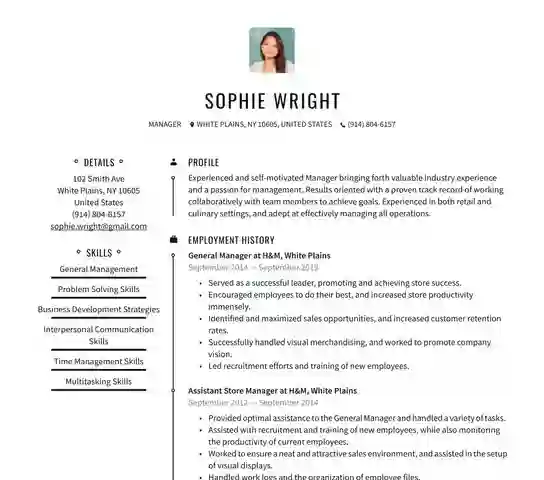
2026 में भारत में नौकरी के लिए apply करना सिर्फ resume भेजने तक सीमित नहीं रहा। चाहे आप fresher हों जो पहली बार Naukri.com पर profile बना रहे हों, या experienced professional जो LinkedIn Easy Apply से MNC में switch करना चाहते हों, आपका resume सबसे पहले इंसान नहीं बल्कि ATS यानी Applicant Tracking System स्कैन करता है। TCS, Infosys, Wipro, HDFC Bank, Zoho जैसी कंपनियाँ और यहाँ तक कि कई startups भी Taleo, Greenhouse, Lever, Zoho Recruit और Naukri RMS जैसे ATS का इस्तेमाल करती हैं। अगर आपका resume ATS friendly नहीं है तो recruiter तक पहुँचने से पहले ही reject हो जाता है। ResumeEra.xyz का Free Resume Builder 2026 इसी समस्या को हल करने के लिए बनाया गया है – No Sign-Up, AI Resume Extraction और 100% ATS optimized templates के साथ, ताकि आपका resume सीधे shortlist हो।
ATS क्या है और 2026 में भारत में यह इतना ज़रूरी क्यों है?
ATS एक सॉफ्टवेयर है जो हर online application को parse करता है, keywords को match करता है और candidates को rank करता है। भारत में लगभग 75% से ज्यादा बड़ी कंपनियाँ और 50% से ज्यादा mid-size कंपनियाँ अब ATS का उपयोग करती हैं। जब आप Naukri, LinkedIn, Indeed या कंपनी की career site पर resume upload करते हैं, तो ATS सबसे पहले आपके document को पढ़ता है। यह देखता है कि आपका नाम, contact, skills, experience और education सही sections में हैं या नहीं, और क्या आपने job description वाले keywords का इस्तेमाल किया है।
बहुत से भारतीय job seekers एक ही सुंदर design वाला resume हर जगह भेज देते हैं जिसमें tables, text boxes, images और fancy fonts होते हैं। यह design इंसान को आकर्षक लग सकता है, लेकिन ATS इसे पढ़ नहीं पाता। Result – आपका resume parsing error में फँस जाता है और recruiter के dashboard पर कभी दिखता ही नहीं। 2026 में ATS और भी smart हो गए हैं। वे अब सिर्फ keywords ही नहीं, बल्कि context, skill relevance और career gap को भी analyze करते हैं। इसलिए आपको एक ऐसे resume builder की ज़रूरत है जो design और ATS compliance दोनों को balance करे।
भारतीय recruiters का एक common feedback है – "हमें रोज़ 500+ resumes मिलते हैं, ATS ही तय करता है कि कौन से 20-30 resumes हम पहले देखेंगे।" अगर आपका resume ATS में top 30 में नहीं आया, तो interview call की संभावना 90% कम हो जाती है।
ResumeEra इसीलिए ATS-first approach पर काम करता है। हमारे templates को real ATS पर test किया गया है ताकि fresher B.Tech graduate से लेकर 10 साल के experienced sales manager तक, हर किसी का resume सही से parse हो और keywords सही जगह highlight हों।
ResumeEra का Free Resume Builder 2026 क्यों अलग है?
बाज़ार में कई resume builders हैं, लेकिन उनमें से ज़्यादातर में sign-up compulsory है, download के समय payment wall आता है, या templates ATS friendly नहीं होते। ResumeEra का philosophy simple है – बिना किसी रुकावट के, free में, professional ATS resume बनाओ और तुरंत download करो।
No Sign-Up, No Payment Wall, Unlimited Download
आपको resume बनाने के लिए email ID, mobile number या OTP की ज़रूरत नहीं। सीधे https://resumeera.xyz पर जाएँ, template चुनें, details भरें और PDF download करें। कोई watermark नहीं, कोई "7 दिन का trial" नहीं। आप चाहें तो एक ही दिन में 5 अलग-अलग versions बना सकते हैं – जैसे एक Software Developer के लिए, एक Data Analyst के लिए और एक Business Analyst के लिए – और सभी को free में download कर सकते हैं। यह flexibility खासकर freshers के लिए useful है जो अलग-अलग job roles के लिए resume customize करते हैं।
भारतीय Job Market के लिए बनाया गया
हमने ResumeEra को भारतीय context को ध्यान में रखकर design किया है। यहाँ Naukri.com पर recruiters "Current CTC", "Notice Period", "Location Preference" जैसे filters लगाते हैं, और LinkedIn पर "Open to Work" banner के साथ keywords बहुत matter करते हैं। हमारे builder में आप Indian format में details add कर सकते हैं – जैसे 10th/12th/Graduation percentage, CGPA, internship, training, और projects। साथ ही, हमने common Indian names, colleges (IIT, NIT, DU, Mumbai University, Anna University) और companies (TCS, Infosys, Accenture, Flipkart) के हिसाब से sample content भी दिया है ताकि आपको blank page syndrome न हो।
Real ATS Testing पर आधारित Templates
हर template को हमने Jobscan जैसे ATS parsers और Zoho Recruit, Taleo जैसे real systems पर test किया है। हम decorative elements जैसे images, icons के अंदर text, double columns और text boxes से बचते हैं। इसके बजाय हम clean headings (Work Experience, Education, Skills, Projects), standard fonts (Arial, Calibri, Garamond) और proper hierarchy का उपयोग करते हैं। इससे ATS आपका data 100% सही से read करता है और recruiter को भी पढ़ने में आसानी होती है।
AI Resume Extraction – पुराने PDF से नया ATS Resume 30 सेकंड में
क्या आपके पास पहले से एक पुराना resume है जो PDF या Word में है, लेकिन वह ATS friendly नहीं है? उसे दोबारा type करने में घंटों लगते हैं। ResumeEra का AI Resume Extraction feature इसी के लिए है। आप अपना existing resume upload करें – चाहे वह Canva से बना fancy design हो या पुराना college project वाला resume – हमारा AI 30 सेकंड में उसका content extract करके एक नए ATS template में auto-fill कर देता है।
यह feature खासकर उन लोगों के लिए वरदान है जिनके पास कई साल पुराना resume है और अब उन्हें जल्दी से Naukri या LinkedIn के लिए updated version चाहिए। AI सिर्फ copy-paste नहीं करता, बल्कि content को smartly categorize करता है। जैसे, अगर आपके पुराने resume में "Worked on Python and SQL for sales data" लिखा है, तो AI उसे Skills: Python, SQL और Experience: Sales Data Analysis में सही जगह रख देता है। यह headings को standardize करता है, dates को consistent format (जैसे Jan 2023 – Present) में बदलता है और bullet points को action verbs से शुरू करता है।
AI Extraction कैसे काम करता है?
Process बहुत simple है। आप Upload PDF/Word बटन पर click करते हैं, file select करते हैं और AI parsing शुरू हो जाता है। AI सबसे पहले text layers को पढ़ता है, फिर Natural Language Processing से sections को पहचानता है – जैसे Personal Info, Summary, Experience, Education। उसके बाद वह हर section को ResumeEra के ATS template में map कर देता है। आपको सिर्फ एक बार review करना होता है – कोई typo, कोई missing project या कोई गलत date हो तो edit कर सकते हैं। पूरा process mobile पर भी उतना ही smooth है, इसलिए आप phone से ही resume update करके तुरंत apply कर सकते हैं।
Important बात – आपका data secure रहता है। हम upload की गई file को permanently store नहीं करते। Extraction के बाद आप चाहें तो original file delete कर सकते हैं। यह feature 100% free है और बिना sign-up के काम करता है, जो इसे KudosWall या BuildResume जैसे tools से अलग बनाता है जहाँ अक्सर login compulsory होता है।
ATS Friendly Templates – सुंदरता और Parsing का सही Balance
बहुत से लोग सोचते हैं कि ATS friendly मतलब boring, plain text resume। ऐसा नहीं है। ResumeEra के templates professional दिखते हैं और साथ ही ATS compliant भी हैं। हमने 11+ templates बनाए हैं जो अलग-अलग career stages के लिए हैं – Fresher, Experienced, Executive, Creative, और Technical roles।
हर template में single-column layout को priority दी गई है, क्योंकि ATS double-column को अक्सर गलत पढ़ता है। Headings bold और clear हैं, bullet points standard (•) हैं और contact section सबसे ऊपर है। हम icons का इस्तेमाल करते हैं, लेकिन text के साथ, ताकि ATS icon को ignore करके भी text पढ़ ले। Color का इस्तेमाल subtle है – navy blue, charcoal grey – जो print और PDF दोनों में अच्छा दिखता है और ATS को confuse नहीं करता।
उदाहरण के लिए, एक fresher BCA graduate के लिए हमारा Minimal ATS Template सबसे अच्छा है – इसमें Education और Projects ऊपर होते हैं, Skills section में programming languages और tools clearly listed होते हैं। वहीं, एक 7 साल के Digital Marketing Manager के लिए Professional ATS Template बेहतर है – इसमें Work Experience में achievements को numbers के साथ दिखाया जाता है, जैसे "Managed ₹15 lakh monthly ad budget, increased ROAS by 42%"।
- Font Safe: Arial, Calibri, Helvetica जैसे ATS safe fonts, fancy script fonts नहीं।
- Heading Standard: "Work Experience" न कि "My Journey", "Education" न कि "Academics" – ताकि ATS सही section पहचाने।
- File Format: PDF (text-based) और DOCX दोनों में download, जो Naukri और LinkedIn दोनों पर accepted हैं।
- Keyword Placement: Skills और Summary में job description के keywords naturally add करने की जगह।
Step-by-Step Guide: ResumeEra पर 5 मिनट में ATS Resume कैसे बनाएँ
ResumeEra पर resume बनाना बहुत आसान है। आपको किसी design skill या content writing experience की ज़रूरत नहीं। नीचे दिया गया process follow करें:
- Template चुनें: https://resumeera.xyz पर जाएँ और "ATS Templates" section में से अपनी profile के हिसाब से template select करें। Fresher हैं तो Clean Fresher Template, experienced हैं तो Executive Template चुनें।
- Personal Details भरें: नाम, phone, email, LinkedIn URL, location (City, State) add करें। ध्यान दें – photo, date of birth, या full address डालने की ज़रूरत नहीं, क्योंकि भारतीय MNCs में अब ये ATS में irrelevant माने जाते हैं।
- Professional Summary लिखें: 3-4 lines में अपना role, experience और top skills लिखें। जैसे – "B.Tech CSE Fresher with internship in Python & SQL, built 3 projects on data analysis, seeking Data Analyst role." Builder में AI summary suggestion भी मिलता है।
- Work Experience / Internship Add करें: Company name, location, duration और 3-5 bullet points में achievements लिखें। हर point को action verb से शुरू करें – Developed, Managed, Analyzed। Numbers ज़रूर add करें।
- Education और Certifications भरें: Degree, college, year, percentage/CGPA सही format में लिखें। साथ ही NPTEL, Coursera, Google Certificates जैसी relevant certifications add करें।
- Skills Section Optimize करें: Job description से 8-12 relevant skills चुनें। Technical और soft skills अलग-अलग लिखें। जैसे – Technical: Python, Excel, Power BI | Soft: Communication, Team Leadership। Keyword stuffing से बचें।
- Projects और Achievements Add करें: College projects, freelance work या volunteer experience को भी add करें। हर project में Tech Stack और Outcome लिखें।
- Preview और Download: Live preview देखें, spelling check करें और "Download PDF" पर click करें। आपका ATS optimized resume तुरंत ready है, बिना किसी sign-up के।
इस पूरे process में 5-7 मिनट लगते हैं। अगर आपके पास पुराना resume है तो AI Extraction से यह समय 2 मिनट तक कम हो जाता है।
ATS Optimization Checklist – Recruiter तक पहुँचने के लिए ज़रूरी Points
Resume बनाना सिर्फ पहला step है, उसे ATS के हिसाब से optimize करना असली game है। नीचे दिया गया checklist हर भारतीय job seeker को follow करना चाहिए, चाहे वह TCS NQT, Infosys SP या किसी startup के लिए apply कर रहा हो।
1. Keywords का सही इस्तेमाल: हर job description में 10-15 important keywords होते हैं। जैसे Data Analyst role के लिए – SQL, Excel, Tableau, Data Cleaning, Reporting। इन keywords को naturally अपने summary, skills और experience में add करें। लेकिन एक ही keyword को 10 बार repeat न करें, ATS इसे spam मान लेता है।
2. Simple Formatting: Tables, text boxes, headers/footers और images से बचें। ATS इन्हें पढ़ नहीं पाता। Bullet points के लिए standard dot (•) या hyphen (-) use करें।
3. Correct Section Headings: हमेशा standard headings use करें – Professional Summary, Work Experience, Education, Skills, Projects, Certifications। Creative headings जैसे "Where I Excel" या "My Expertise" ATS confuse कर देते हैं।
4. File Name और Format: Resume को "Amit_Sharma_Data_Analyst_Resume.pdf" जैसे professional नाम से save करें, "Resume_Final_Final.pdf" नहीं। PDF text-based होना चाहिए, image-based scanned PDF नहीं।
5. Date Format Consistency: पूरे resume में एक ही date format रखें – जैसे "Jun 2022 – Present"। ATS inconsistent dates को gap समझ लेता है।
6. Contact Info सही जगह: Email और phone सबसे ऊपर, header में रखें। LinkedIn URL clickable रखें। Personal details जैसे marital status, religion या photo न डालें, ये ATS score कम करते हैं और bias का कारण भी बन सकते हैं।
Pro Tip: Naukri.com पर resume upload करने के बाद "Resume Display Score" और LinkedIn पर "Applicant Insights" में देखें कि आपका profile कितने keywords match कर रहा है। अगर match 70% से कम है तो ResumeEra में वापस जाकर keywords update करें।
तुलना: ResumeEra vs अन्य Popular Resume Builders
2026 में कई free builders उपलब्ध हैं, लेकिन हर एक की limitations अलग हैं। नीचे दी गई table से आपको clear होगा कि ResumeEra क्यों बेहतर choice है, खासकर भारतीय users के लिए।
| Feature | ResumeEra.xyz | अन्य Free Builders |
|---|---|---|
| Sign-Up Required | बिल्कुल नहीं, 100% No Login | अक्सर Email/Phone OTP compulsory |
| Download Cost | Unlimited Free PDF/DOCX, No Watermark | Free preview, download पर ₹300-₹800 या subscription |
| AI Resume Extraction | PDF/Word से 30 sec में ATS resume | कुछ में है, पर paid या limited |
| ATS Templates Tested | 11+ templates, real ATS पर tested | Design heavy templates, ATS fail rate ज्यादा |
| Indian Context | Naukri, LinkedIn, Zoho Recruit optimized, Indian education format | US-centric formats, CGPA/percentage support नहीं |
| Customization | Unlimited edits, live preview, mobile friendly | Limited edits, mobile पर slow |
इस comparison से साफ है कि अगर आपको सच में ATS clear करना है और बिना किसी hidden charge के resume चाहिए, तो ResumeEra सबसे practical solution है। Jobscan और 1MillionResume जैसे international tools अच्छे हैं, लेकिन उनका Indian job market के हिसाब से optimization नहीं है और कई features paid हैं।
Common Mistakes जो आपका Resume ATS में Reject करवा देते हैं
हमने ResumeEra पर 50,000+ resumes analyze किए हैं और पाया कि भारतीय candidates अक्सर ये 7 गलतियाँ करते हैं:
- 1. Fancy Design और Graphics: Canva के colorful templates, progress bars, pie charts और icons के अंदर text – ATS इन्हें skip कर देता है। आपका "Python 90%" वाला skill bar ATS के लिए blank है।
- 2. गलत File Format: Image-based PDF या JPG में resume भेजना। हमेशा text-based PDF या DOCX भेजें।
- 3. Keyword Stuffing या Keyword Missing: या तो job description के keywords बिल्कुल नहीं डालना, या उन्हें white text में छिपा कर भर देना। दोनों ही ATS में negative score देते हैं।
- 4. Long Paragraphs: Experience को paragraph में लिखना। ATS bullet points को बेहतर parse करता है। हर point 1-2 line का रखें।
- 5. Spelling Mistakes और Grammar Errors: "Managment" या "Analyist" जैसी छोटी गलती भी ATS को लगता है कि आप detail-oriented नहीं हैं।
- 6. Irrelevant Information: 2 page के resume में school level achievements, hobbies जैसे "Watching Movies" भर देना। Fresher का resume 1 page, experienced का 1-2 page ही रखें।
- 7. एक ही Resume हर जगह भेजना: Software Developer और Business Analyst दोनों roles के लिए same resume। हर application के लिए ResumeEra में 2 मिनट में keywords customize करें।
इन गलतियों से बचकर आप आसानी से ATS score 80+ तक ले जा सकते हैं, जो भारतीय IT और BFSI companies में shortlist होने के लिए ideal माना जाता है।
- Curriculum Vitae for Fresh Graduate 2026 – Complete Guide, Templates, ATS Tips | ResumeEra
- Best Free CV Templates free for Indian Job Seekers with ATS-Friendly Designs | Resumeera.xyz
- Internship Resume Template 2026 – Free Download, ATS Tips & Examples for Students | ResumeEra
- Browse All B ATS Templates →
अक्सर पूछे जाने वाले सवाल (FAQ)
क्या ResumeEra का resume builder सच में free है, बिना किसी hidden charge के?
हाँ, 100% free है। आप बिना sign-up के unlimited resumes बना सकते हैं, edit कर सकते हैं और PDF/DOCX में download कर सकते हैं। कोई watermark नहीं, कोई payment wall नहीं। Premium AI features जैसे bullet point generator भी free plan में basic limit तक उपलब्ध हैं।
क्या AI Resume Extraction से मेरा data safe रहता है?
बिल्कुल। आपका uploaded PDF/Word सिर्फ extraction के लिए temporary process होता है। हम उसे permanently store नहीं करते। Extraction के बाद आप original file को delete कर सकते हैं और नया ATS resume ही save रहता है। आपका data third party के साथ share नहीं किया जाता।
ATS friendly resume का मतलब क्या boring design होता है?
नहीं। ATS friendly का मतलब clean और structured design होता है, boring नहीं। ResumeEra के templates में subtle colors, proper spacing और professional fonts का इस्तेमाल होता है जो इंसान और ATS दोनों को पसंद आते हैं। हमने design और parsing का balance रखा है।
Naukri.com और LinkedIn के लिए क्या अलग resume बनाना चाहिए?
हाँ, थोड़ा customization ज़रूरी है। Naukri पर recruiters Boolean search (जैसे "Python AND SQL AND Power BI") करते हैं, इसलिए keywords skills section में clearly listed होने चाहिए। LinkedIn पर summary ज्यादा visible होता है, इसलिए वहाँ 3-4 lines का keyword-rich summary रखें। ResumeEra में आप एक base resume बनाकर दोनों के लिए 2 versions 2 मिनट में बना सकते हैं।
मेरा resume 2 page का है, क्या ATS उसे reject कर देगा?
ATS page count से reject नहीं करता, लेकिन भारतीय recruiters freshers से 1 page और 5+ साल experience वालों से 1-2 page expect करते हैं। अगर आपका resume 2 page का है तो सुनिश्चित करें कि हर line relevant हो। Unnecessary details हटाएँ और achievements को bullet points में concise रखें।
Fresher के लिए resume में क्या सबसे ज़्यादा important है?
Fresher के लिए Education, Projects, Internship और Skills सबसे important हैं। CGPA/percentage, relevant coursework, 2-3 strong projects (Tech Stack + Outcome के साथ) और internship experience को ऊपर रखें। Part-time work या college fest volunteer experience को भी achievements के साथ लिखें।
क्या मैं ResumeEra का resume सरकारी नौकरियों के लिए भी use कर सकता हूँ?
हाँ, लेकिन सरकारी नौकरियों (SSC, UPSC, Banking) में अक्सर prescribed format होता है। वहाँ ResumeEra का ATS template private sector, PSUs और campus placements के लिए best है। सरकारी form के लिए आप ResumeEra से content copy करके उनके format में paste कर सकते हैं।
2026 में नौकरी पाने के लिए सही Resume ही पहला Interview है
2026 में resume सिर्फ आपका bio-data नहीं, बल्कि आपका पहला impression और ATS को दिया गया पहला test है। एक ATS optimized resume ही आपको recruiter की नजर में लाता है। ResumeEra.xyz का Free Resume Builder इसी को आसान बनाता है – बिना sign-up, बिना पैसे, AI extraction और tested ATS templates के साथ। चाहे आप Pune में fresher हों, Bangalore में IT professional हों या Delhi में marketing executive, आपका अगला interview एक सही resume से ही शुरू होगा। आज ही https://resumeera.xyz पर जाएँ, अपना ATS resume 5 मिनट में बनाएँ और Naukri, LinkedIn पर confidence के साथ apply करें।